Showing posts with label code. Show all posts
Showing posts with label code. Show all posts
Tuesday, February 10, 2015
C Program to print its own Source Code as Output
We can print the source code of a program as an output using quine. So first lets understand what quine is?
What is a Quine?
A quine is a computer program which takes no input and produces a copy of its own source code as its only output. The standard terms for these programs in the computability theory and computer science literature are "self-replicating programs", "self-reproducing programs", and "self-copying programs".
Also Read: List of Biggest and Popular Programming Contests
Also Read: How to Swap Two Numbers Without Using Temporary Variable or Arithmetic Operators?
Quines are named after the American mathematician and logician Willard Van Orman Quine (1908–2000). The interesting thing about quine is that we are not allowed to use open and then print file of the program.
An example of a quine in C language is given below which produces the source code as an output. It can be written in any other language like java, python, etc.
main(a){printf(a="main(a){printf(a=%c%s%c,34,a,34);}",34,a,34);}
If you will compile and run above code then it will show following output

This program can result in undefined behavior as we have used printf function without including its header file. Also, the return type declaration for main has been left off to reduce the length of the program. Two 34s are used to print double quotes around the string s.
Source: http://www.geeksforgeeks.org/quine-a-self-reproducing-program/and http://en.wikipedia.org/wiki/Quine_(computing)

Thursday, February 5, 2015
New Checkbox reCAPTCHA Tutorial with Sample Code
Google has improved their reCAPTCHA to an user friendly one with a tag Im not a robot. Usually you need to enter the captcha characters all time, but this improved reCAPTCHA dont always need user to enter the characters.
Validation is done just by checking the input box, however if google suspects user as spam (by IP and users previously collected details) they will show a image or audio based challenge.
View Demo | Download
To begin you need SiteKey and SecretKey from reCAPTCHA website. Visit https://www.google.com/recaptcha and create above keys for your site free.
Login.html

validateform.php
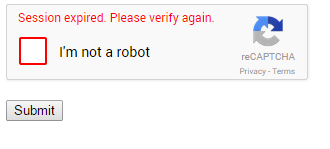
Session Expiration in reCAPTCHA
After checking the reCAPTCHA box, if user stays the same page for 5 minutes, his reCAPTCHA session will be expired.
Then it will ask the user to verify himself by showing the AUDIO or IMAGE Challenge
You can configure which TYPE of challenge you want to show always. Replace the above Login.html file div class="g-recaptcha" code with below one.
Thats it.
Validation is done just by checking the input box, however if google suspects user as spam (by IP and users previously collected details) they will show a image or audio based challenge.
 |
| new reCAPTCHA |
To begin you need SiteKey and SecretKey from reCAPTCHA website. Visit https://www.google.com/recaptcha and create above keys for your site free.
Login.html
<!DOCTYPE html>
<html lang="en">
  <head>
    <meta charset="utf-8">
    <meta http-equiv="X-UA-Compatible" content="IE=edge">
    <meta name="viewport" content="width=device-width, initial-scale=1">
    <meta name="description" content="">
    <meta name="author" content="">

    <title>MyCodde.blogspot.com Login</title>

    <!-- Bootstrap core CSS -->
    <link href="http://getbootstrap.com/dist/css/bootstrap.min.css" rel="stylesheet">

    <!-- Custom styles for this template -->
    <link href="http://getbootstrap.com/examples/signin/signin.css" rel="stylesheet">


    <!-- HTML5 shim and Respond.js for IE8 support of HTML5 elements and media queries -->
    <!--[if lt IE 9]>
      <script src="https://oss.maxcdn.com/html5shiv/3.7.2/html5shiv.min.js"></script>
      <script src="https://oss.maxcdn.com/respond/1.4.2/respond.min.js"></script>
    <![endif]-->
  </head>

  <body>

    <div class="container">

      <form class="form-signin" role="form" action="validateform.php" method="POST">
            <div id="status">
            </div>
        <h2 class="form-signin-heading">Please sign in</h2>
        <label for="inputEmail" class="sr-only">Email address</label>
        <input type="email" id="inputEmail" value="mycodde@test.com" class="form-control" placeholder="Email address" required autofocus>
        <label for="inputPassword" class="sr-only">Password</label>
        <input type="password" id="inputPassword" value="rashid" class="form-control" placeholder="Password" required>
        <div class="g-recaptcha" data-sitekey="6Lc_0f4SAAAAAF9ZA_d7Dxi9qRbPMMNW-tLSvhe6"></div>
        <button class="btn btn-lg btn-primary btn-block" type="submit">Sign in</button>
      </form>

    </div> <!-- /container -->


    <!-- Bootstrap core JavaScript
    ================================================== -->
    <!-- Placed at the end of the document so the pages load faster -->
    <script src="https://ajax.googleapis.com/ajax/libs/jquery/1.11.1/jquery.min.js"></script>
    <script src="http://getbootstrap.com/dist/js/bootstrap.min.js"></script>
    <script src="https://www.google.com/recaptcha/api.js" async defer></script>
  </body>
</html>
validateform.php
<?php
//@author = mycodde.blogspot.com
require_once "recaptchalib.php";
// reCAPTCHA supported 40+ languages listed here: https://developers.google.com/recaptcha/docs/language
$lang = "en";
// The response from reCAPTCHA
$resp = null;
// The error code from reCAPTCHA, if any
$error = null;
$reCaptcha = new ReCaptcha("6Lc_0f4SAAAAAKWjlLCttM0stC4AB7NYU81006RW");
if ($_POST["g-recaptcha-response"]) {
    $resp = $reCaptcha->verifyResponse(
        $_SERVER["REMOTE_ADDR"],
        $_POST["g-recaptcha-response"]
    );
    //print_r($resp); To See the response object uncomment this
} else {
    echo "Recaptcha Not submitted";
}
if ($resp != null && $resp->success) {
    echo "Recaptcha Verification Success";
    //Write other FORM password and Email Validation Procedures
} else {
    echo "Recaptcha Verification Error";
}
?>
Session Expiration in reCAPTCHA
After checking the reCAPTCHA box, if user stays the same page for 5 minutes, his reCAPTCHA session will be expired.
 |
| reCAPTCHA Session Expired |
 |
| New reCAPTCHA showing audio challenge |
You can configure which TYPE of challenge you want to show always. Replace the above Login.html file div class="g-recaptcha" code with below one.
<div class="g-recaptcha"
data-sitekey="6Lc_0f4SAAAAAF9ZA_d7Dxi9qRbPMMNW-tLSvhe6" data-theme="dark" data-theme="dark" data-type="audio"></div>
 |
| reCAPTCHA Image Challenge after session expiration |
Wednesday, February 4, 2015
Nokia Lumia 635 Hard Reset Format Lock Code Blue Screen
Before you proceed flashing / hard resetting your phone / tablet make sure to back up your important files if possible. Because we care about your data.
In this tutorial I will teach you how to hard reset your Nokia Lumia 635. This can also fix the cog wheel of death, blue screen of death. Hard reset combination works in other Windows Phone 8 devices.

OK Lets proceed follow the instruction bollow
1. Turn the power Off.
2. Press and hold the Volume down and connect the charger or the USB cable with PC, for about 8 seconds, you will see an exclamation mark (!) on the screen. Note: If you do not press any of the following keys, then the phone wp8 will starts boot normally.
Then press the keys in this exact order:
1. Volume up
2. Volume down
3. Power
4. Volume down
Then wait until the phone reboot. Just be patient. It takes about 2-3 minutes until it reboot into normal state.
Read more »
We also suggest that your battery should be atleast 50% or better to have it fully charge, lower than the said value may cause unwanted result, such as bricking your phone / tablet rendering it unuseable. This is very important in flashing your phone / tablet. Use original USB cable as possible.
Files that you downloaded should not be corrupted, if ever the file is corrupted you might brick your phone. Or the flashing will start.
Drivers are very important specially in Spreadtrum Chipset, having an Spreadtrum SPD6610 (non android devices) driver will not work in SPD6820 (android devices).
If you are using laptop to flash your phone, make your that it has enough charge. If your laptop shutdown when your flashing your phone/tablet, youll end up bricking your phone. Sometimes you can still recover your phone just flash it again and your phone will boot up again. But that is just a case to case basis, if your phone / tablet is deadboot (totally dead, erased all program in the chip) you cant recover it, you will need to seek professional help (technician).
In this tutorial I will teach you how to hard reset your Nokia Lumia 635. This can also fix the cog wheel of death, blue screen of death. Hard reset combination works in other Windows Phone 8 devices.
OK Lets proceed follow the instruction bollow
1. Turn the power Off.
2. Press and hold the Volume down and connect the charger or the USB cable with PC, for about 8 seconds, you will see an exclamation mark (!) on the screen. Note: If you do not press any of the following keys, then the phone wp8 will starts boot normally.
Then press the keys in this exact order:
1. Volume up
2. Volume down
3. Power
4. Volume down
Then wait until the phone reboot. Just be patient. It takes about 2-3 minutes until it reboot into normal state.
Subscribe to:
Posts (Atom)