Showing posts with label c. Show all posts
Showing posts with label c. Show all posts
Thursday, February 19, 2015
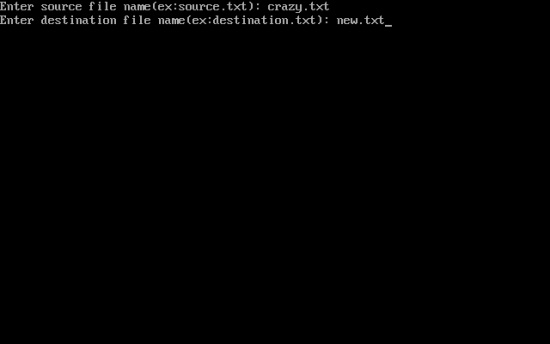
C program to copy the contents of one file into another
#include<stdio.h>
#include<conio.h>
#include<stdlib.h>
void main()
{
FILE *fp1,*fp2;
char ch,*f1,*f2;
clrscr();
printf("Enter source file name(ex:source.txt): ");
scanf("%s",f1);
printf("Enter destination file name(ex:destination.txt): ");
scanf("%s",f2);
fp1=fopen(f1,"r");
fp2=fopen(f2,"w");
if(fp1==NULL||fp2==NULL)
{
printf("File could not open!!");
exit(0);
}
while((ch=getc(fp1))!=EOF)
putc(ch,fp2);
fclose(fp1);
fclose(fp2);
}

Wednesday, February 18, 2015
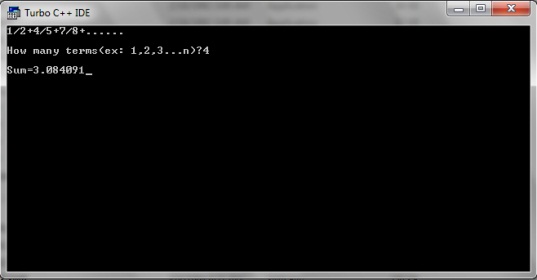
C program to find the sum of series 1 2 4 5 7 8
#include<stdio.h>
#include<conio.h>
void main()
{
int i,n;
clrscr();
float sum=0,x,a=1;
printf("1/2+4/5+7/8+......");
printf("
How many terms(ex: 1,2,3...n)?");
How many terms(ex: 1,2,3...n)?");
scanf("%d",&n);
for(i=0;i<n;++i)
{
x=a/(a+1);
sum+=x;
a+=3;
}
printf("
Sum=%f",sum);
Sum=%f",sum);
getch();
}
Tuesday, February 17, 2015
Explain Basic Structure of C Programs

Documentation Section
This section consists of comment lines which include the name of programmer, the author and other details like time and date of writing the program. Documentation section helps anyone to get an overview of the program.Link Section
The link section consists of the header files of the functions that are used in the program. It provides instructions to the complier to link functions from the system library.Also Read: List of all useful Turbo C++ keyboard shortcuts
Also Read: How to create your own Header Files in C/C++?
Definition Section
All the symbolic constants are written in definition section. Macros are known as symbolic constants.Global Declaration Section
The global variables that can be used anywhere in the program are declared in global declaration section. This section also declares the user defined functions.main() Function Section
It is necessary have one main() function section in every C program. This section contains two parts, declaration and executable part. The declaration part declares all the variables that are used in executable part. These two parts must be written in between the opening and closing braces. Each statement in the declaration and executable part must end with a semicolon (;). The execution of program starts at opening braces and ends at closing braces.Also Read: What are advantages and disadvantages of C language?
Also Read: How to Write and Run C/C++ Programs in Ubuntu (Linux)
Subprogram Section
The subprogram section contains all the user defined functions that are used to perform a specific task. These user defined functions are called in the main() function.Monday, February 16, 2015

C Program to Print following series 1 4 7 10 40
#include<iostream.h>
#include<conio.h>
void main()
{
clrscr();
int i,a=-1,b;
for(i=1;i<=40;i+=3)
{
a*=-1;
b=i;
b*=a;
cout<<b<<" ";
}
getch();
}
C program to reverse a number

#include<iostream.h>
#include<conio.h>
void main()
{
clrscr(); //to clear the screen
long n,rev=0,d;
cout<<"Enter the number:";
cin>>n;
while(n!=0)
{
d=n%10;
rev=(rev*10)+d;
n=n/10;
}
cout<<"The reversed number is "<<rev;
getch(); //to stop the screen
}
switch statement in C Part 2
Read: switch statement in C - Part 1
In the last tutorial I told you about the syntax and working of a program using switch keyword. Well in day to day programming we generally don’t use that syntax in C. This is because if we use the earlier method then it will execute all the subsequent statements after the condition turns true.
Syntax
switch(integer expression)
{
case constant 1: Statement 1;
break;
case constant 2; Statement 2;
break;
. . . . . .
. . . . . .
default: Statement 3;
}
Explanation of the above syntax
Well the whole syntax is almost same. But in the above syntax we have added break keyword after the cases. Remember we generally do not use continue keyword with switch.
Working of break keyword in switch statement
As you can see I have given break keyword after every case. Its working in switch case is almost same as in loops. If the compiler encounters break keyword in switch then it will take the control to the outside of switch block.
The perfect way to understand it is through a program.
Output
Explanation
Points to remember
In the last tutorial I told you about the syntax and working of a program using switch keyword. Well in day to day programming we generally don’t use that syntax in C. This is because if we use the earlier method then it will execute all the subsequent statements after the condition turns true.
switch statement in C
So we need a syntax that will execute only a certain set of statements when the condition turns true. So lets checkout the advance modification of switch statement with break keyword.Syntax
switch(integer expression)
{
case constant 1: Statement 1;
break;
case constant 2; Statement 2;
break;
. . . . . .
. . . . . .
default: Statement 3;
}
Explanation of the above syntax
Well the whole syntax is almost same. But in the above syntax we have added break keyword after the cases. Remember we generally do not use continue keyword with switch.
Working of break keyword in switch statement
As you can see I have given break keyword after every case. Its working in switch case is almost same as in loops. If the compiler encounters break keyword in switch then it will take the control to the outside of switch block.
 |
| Flowchart of switch statement in C - Image Source |
The perfect way to understand it is through a program.
#include<stdio.h>

void main()
{
 int i=10;

 switch(i)
 {
  case 1: printf("Hey its 1");
   break;

  case 10: printf("Hey its 10");
    break;

  case 7: printf("Hey its 7");
   break;

  default: printf("Hey its default");
 }
}
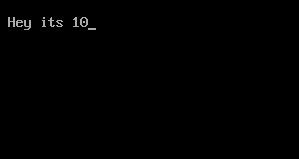
Output
- In the beginning of the program I have declared an integer variable with value 10.
- After that I have written switch keyword with integer expression i. It means the compiler will check the value of i (which is 10) with all the cases.
- In the first case I have written integer constant ‘1’ which turns false. So compiler will skip that case.
- In the second case I have written integer constant ‘10’ which turns true. So compiler will execute the statements under that case.
- Now just after the printf() function I have written a break keyword. So it will take the control of the program outside the switch block.
Points to remember
- You can also write multiple statements under each case to execute them. And you will not need to give separate braces for them, as the switch statement executes all statements once the condition turns true.
- Remember default keyword is optional. Its completely depend on us whether we want it or not in our program.
- The order of cases and default in the switch block do no matter. You can write them in any order but you must take care of proper use of break after each case.
C Program to print table of any number
#include<iostream.h>
#include<conio.h>
void main()
{
clrscr();
int i,n;
cout<<"Enter a ny number:";
cin>>n;
cout<<"
";
for(i=1;i<=10;++i)
cout<<" "<<n<<"*"<<i<<"="<<n*i<<"
";
getch();
}
Sunday, February 15, 2015
Functions in C Programming Part 4
In the last tutorial I told you about the passing values to the functions. I hope you had read that tutorial at least twice till now. So today I will tell you about some typical nuances of using functions in C language. I will also tell you about the scope rule of functions. So lets start with our first objective
1. The variables that are passed by main() function are called actual arguments or parameters and the variables in which the user defined function receives those values is called formal arguments or parameters.
2. We can pass any number of actual arguments. But it should be in the same number and order to the formal arguments.
3. We can also use the same variable name for both formal and actual arguments but the compiler will treat them different.
4. Compiler automatically passes the control to the calling function when it encounters the closing brace of user defined function. There is no need for some return statement for it.
5. However if you want to return some value to the calling function then you should use return statement for it.
6. You can use any number of return statements in your program. There is no restriction for that.
7. Some variations while using return statement
return(b);
return(4);
return(2.67);
return;
Last return statement will return any garbage value to the calling function. And we can drop the parenthesis in that case.
8. We can only return one value at a time. It’s a restriction in C. So below statements will not work.
return(x, y);
return(6,4);
9. IMPORTANT – When we change the value of formal arguments then those values will not change in actual arguments.
E.g. Suppose we pass two variables to some function. And in that function I received the values in that variables in some local variable. So when we change the values of those local variables the it will not affect to the values of actual variables.
The simple reason is that the default scope of variables inside some functions is local to it. It means the variables inside main() function can only be accessed in main() function. We cannot access them in any other function. So that is why we have to pass values to the user defined functions explicitly.
Rules for using functions in C
1. The variables that are passed by main() function are called actual arguments or parameters and the variables in which the user defined function receives those values is called formal arguments or parameters.2. We can pass any number of actual arguments. But it should be in the same number and order to the formal arguments.
3. We can also use the same variable name for both formal and actual arguments but the compiler will treat them different.
4. Compiler automatically passes the control to the calling function when it encounters the closing brace of user defined function. There is no need for some return statement for it.
5. However if you want to return some value to the calling function then you should use return statement for it.
6. You can use any number of return statements in your program. There is no restriction for that.
7. Some variations while using return statement
return(b);
return(4);
return(2.67);
return;
Last return statement will return any garbage value to the calling function. And we can drop the parenthesis in that case.
8. We can only return one value at a time. It’s a restriction in C. So below statements will not work.
return(x, y);
return(6,4);
9. IMPORTANT – When we change the value of formal arguments then those values will not change in actual arguments.
E.g. Suppose we pass two variables to some function. And in that function I received the values in that variables in some local variable. So when we change the values of those local variables the it will not affect to the values of actual variables.
Scope Rule of Functions
In this rule I will tell you about the reason behind point number 9 in above rules. Till now you must be asking that why we should pass the values to some function explicitly?The simple reason is that the default scope of variables inside some functions is local to it. It means the variables inside main() function can only be accessed in main() function. We cannot access them in any other function. So that is why we have to pass values to the user defined functions explicitly.
C Program to Count no of alphabates digits and spaces present in a file STORY TXT

#include<fstream.h>
#include<conio.h>
void main()
{
clrscr();
ifstream fin("STORY.TXT");
char ch;
int i,a=0,s=0,d=0;
while(fin)
{
fin.get(ch);
i=ch;
if(i>63&&i<91||i>96&&i<123)
a++;
else
if(ch== )
s++;
else
if(i>47&&i<58)
d++;
}
cout<<"No. OF Alphabates:"<<a;
cout<<"
No. Of Digits:"<<d;
cout<<"
No. Of Spaces:"<<s;
getch();
}
Saturday, February 14, 2015
C program to count number of words in a string

#include<stdio.h>
#include<conio.h>
void main()
{
int i,words=1;
char str[100];
clrscr();
printf("Enter a string:");
gets(str);
for(i=0;str[i]!=
C Program to Print an Alphabet from A to L of s in Capital Letter

#include<iostream>
using namespace std;
int main()
{
int i,j,k=1;
char ch;
cout<<"Input an Alphabet in capital letters that you want to print:";
cin>>ch;
cout<<"
";
switch(ch)
{
case A:
cout<<" ";
for(i=1;i<=40;++i)
{
for(j=0;j<=22;++j)
{
if(i==1||i==2||i==21||i==20)
cout<<"*";
else
{
if(j==0||j==20)
cout<<"**";
else
cout<<" ";
}
}
cout<<"
";
}
break;
case B:
cout<<" ";
while(k<=2)
{
for(i=1;i<=9;++i)
{
for(j=0;j<=i;++j)
{
if(j==0||j==i)
cout<<"**";
else
cout<<" ";
}
cout<<"
";
}
for(i=1;i<=10;++i)
{
if(i==1||i==10)
cout<<"**";
else
cout<<" ";
}
cout<<"
";
for(i=1;i<=10;++i)
{
if(i==1||i==10)
cout<<"**";
else
cout<<" ";
}
cout<<"
";
for(i=9;i>=1;--i)
{
for(j=0;j<=i;++j)
{
if(j==0||j==i)
cout<<"**";
else
cout<<" ";
}
cout<<"
";
}
++k;
}
break;
caseC:
cout<<" ";
for(i=1;i<=40;++i)
{
for(j=0;j<=22;++j)
{
if(i==1||i==2||i==39||i==40)
cout<<"*";
else
{
if(j==0)
cout<<"**";
else
cout<<" ";
}
}
cout<<"
";
}
break;
caseD:
cout<<" ";
for(i=1;i<=18;++i)
{
for(j=0;j<=i;++j)
{
if(j==0||j==i)
cout<<"**";
else
cout<<" ";
}
cout<<"
";
}
while(k<=4)
{
for(i=1;i<=19;++i)
{
if(i==1||i==19)
cout<<"**";
else
cout<<" ";
}
cout<<"
";
++k;
}
for(i=18;i>=1;--i)
{
for(j=0;j<=i;++j)
{
if(j==0||j==i)
cout<<"**";
else
cout<<" ";
}
cout<<"
";
}
break;
caseE:
cout<<" ";
for(i=1;i<=39;++i)
{
for(j=1;j<=20;++j)
{
if(i==1||i==2||i==20||i==21||i==38||i==39)
cout<<"*";
else
{
if(j==1)
cout<<"**";
else
cout<<" ";
}
}
cout<<"
";
}
break;
caseF:
cout<<" ";
for(i=1;i<=40;++i)
{
for(j=1;j<=20;++j)
{
if(i==1||i==2||i==18||i==19)
cout<<"*";
else
{
if(j==1)
cout<<"**";
else
cout<<" ";
}
}
cout<<"
";
}
break;
caseG:
cout<<" ";
for(i=1;i<=25;++i)
{
for(j=1;j<=20;++j)
{
if(i==1||i==2)
cout<<"*";
else
{
if(j==1)
cout<<"**";
else
cout<<" ";
}
}
cout<<"
";
}
for(i=1;i<=10;++i)
{
for(j=1;j<=20;++j)
{
if(i==1||i==2)
{ if(j==1||j==14||j==15||j==16)
cout<<"**";
else
cout<<" ";
}
else
{
if(i==9||i==10)
cout<<"*";
else
{ if(j==1||j==18)
cout<<"**";
else
cout<<" ";
}
}
}
cout<<"
";
}
break;
caseH:
cout<<" ";
for(i=1;i<=40;++i)
{
for(j=1;j<=21;++j)
{
if(i==20||i==21)
cout<<"*";
else
{
if(j==1||j==19)
cout<<"**";
else
cout<<" ";
}
}
cout<<"
";
}
break;
caseI:
cout<<" ";
for(i=1;i<=40;++i)
{
for(j=1;j<=30;++j)
{
if(i==1||i==2||i==39||i==40)
cout<<"*";
else
{
if(j==15)
cout<<"**";
else
cout<<" ";
}
}
cout<<"
";
}
break;
caseJ:
cout<<" ";
for(i=1;i<=30;++i)
{
for(j=1;j<=28;++j)
{
if(i==1||i==2)
cout<<"*";
else
{
if(j==14)
cout<<"**";
else
cout<<" ";
}
}
cout<<"
";
}
for(i=1;i<=10;++i)
{
for(j=1;j<=15;++j)
{
if(i==10||i==9)
cout<<"*";
else
{
if(j==1||j==13)
cout<<"**";
else
cout<<" ";
}
}
cout<<"
";
}
break;
caseK:
cout<<" ";
for(i=20;i>=1;--i)
{
for(j=0;j<=i;++j)
{
if(j==0||j==i)
cout<<"**";
else
cout<<" ";
}
cout<<"
";
}
for(i=1;i<=20;++i)
{
for(j=0;j<=i;++j)
{
if(j==0||j==i)
cout<<"**";
else
cout<<" ";
}
cout<<"
";
}
break;
caseL:
cout<<" ";
for(i=1;i<=40;++i)
{
for(j=1;j<=25;++j)
{
if(i==39||i==40)
cout<<"*";
else
{
if(j==1)
cout<<"**";
else
cout<<" ";
}
}
cout<<"
";
}
break;
}
return 0;
}
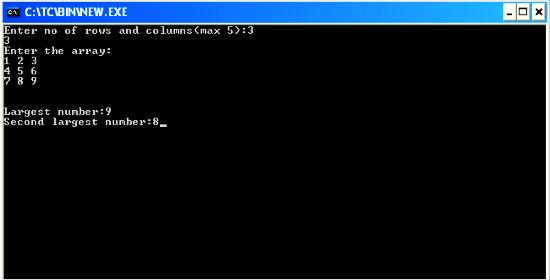
C program to find largest and second largest no from a 2D array
#include<iostream.h>
#include<conio.h>
void main()
{
clrscr();
int a[5][5],big1,big2,n,m,i,j;
cout<<"Enter no of rows and columns(max 5):";
cin>>m>>n;
cout<<"Enter the array:
";
for(i=0;i<m;i++)
for(j=0;j<n;++j)
cin>>a[i][j];
big1=a[0][0];
for(i=0;i<m;++i)
for(j=0;j<n;++j)
{
if(a[i][j]>big1)
big1=a[i][j];
}
big2=a[0][0];
for(i=0;i<m;++i)
for(j=0;j<n;++j)
{
if(a[i][j]>big2&&a[i][j]<big1)
big2=a[i][j];
}
cout<<"
Largest number:"<<big1;
cout<<"
Second largest number:"<<big2;
getch();
}
C Program for Implementation of Circular Queue Using Array
#include<stdio.h>
#define MAX 10
typedef struct Q
{
int R,F;
int data[MAX];
}Q;
void initialise(Q *P);
int empty(Q *P);
int full(Q *P);
void enqueue(Q *P,int x);
int dequeue(Q *P);
void print(Q *P);
void main()
{
Q q;
int op,x;
initialise(&q);
do
{
printf("
1)Insert
2)Delete
3)Print
4)Quit");
printf("
Enter Your Choice:");
scanf("%d",&op);
switch(op)
{
case 1: printf("
Enter a value:");
scanf("%d",&x);
if(!full(&q))
enqueue(&q,x);
else
printf("
Queue is full !!!!");
break;
case 2: if(!empty(&q))
{
x=dequeue(&q);
printf("Deleted Data=%d",x);
}
else
printf("
Queue is empty !!!!");
break;
case 3: print(&q);break;
}
}while(op!=4);
}
void initialise(Q *P)
{
P->R=-1;
P->F=-1;
}
int empty(Q *P)
{
if(P->R==-1)
return(1);
return(0);
}
int full(Q *P)
{
if((P->R+1)%MAX==P->F)
return(1);
return(0);
}
void enqueue(Q *P,int x)
{
if(P->R==-1)
{
P->R=P->F=0;
P->data[P->R]=x;
}
else
{
P->R=(P->R+1)%MAX;
P->data[P->R]=x;
}
}
int dequeue(Q *P)
{
int x;
x=P->data[P->F];
if(P->R==P->F)
{
P->R=-1;
P->F=-1;
}
else
P->F=(P->F+1)%MAX;
return(x);
}
void print(Q *P)
{
int i;
if(!empty(P))
{
printf("
");
for(i=P->F;i!=P->R;i=(i+1)%MAX)
printf("%d ",P->data[i]);
printf("%d ",P->data[i]);
}
}

#define MAX 10
typedef struct Q
{
int R,F;
int data[MAX];
}Q;
void initialise(Q *P);
int empty(Q *P);
int full(Q *P);
void enqueue(Q *P,int x);
int dequeue(Q *P);
void print(Q *P);
void main()
{
Q q;
int op,x;
initialise(&q);
do
{
printf("
1)Insert
2)Delete
3)Print
4)Quit");
printf("
Enter Your Choice:");
scanf("%d",&op);
switch(op)
{
case 1: printf("
Enter a value:");
scanf("%d",&x);
if(!full(&q))
enqueue(&q,x);
else
printf("
Queue is full !!!!");
break;
case 2: if(!empty(&q))
{
x=dequeue(&q);
printf("Deleted Data=%d",x);
}
else
printf("
Queue is empty !!!!");
break;
case 3: print(&q);break;
}
}while(op!=4);
}
void initialise(Q *P)
{
P->R=-1;
P->F=-1;
}
int empty(Q *P)
{
if(P->R==-1)
return(1);
return(0);
}
int full(Q *P)
{
if((P->R+1)%MAX==P->F)
return(1);
return(0);
}
void enqueue(Q *P,int x)
{
if(P->R==-1)
{
P->R=P->F=0;
P->data[P->R]=x;
}
else
{
P->R=(P->R+1)%MAX;
P->data[P->R]=x;
}
}
int dequeue(Q *P)
{
int x;
x=P->data[P->F];
if(P->R==P->F)
{
P->R=-1;
P->F=-1;
}
else
P->F=(P->F+1)%MAX;
return(x);
}
void print(Q *P)
{
int i;
if(!empty(P))
{
printf("
");
for(i=P->F;i!=P->R;i=(i+1)%MAX)
printf("%d ",P->data[i]);
printf("%d ",P->data[i]);
}
}
Friday, February 13, 2015
C Program to find Greatest number among three numbers
#include<iostream.h>
#include<conio.h>
void main()
{
int x,y,z,max;
clrscr();
cout<<"Enter The Three Numbers ";
cin>>x>>y>>z;
max=x;
if (y>max)
max=y;
if (z>max)
max=z;
cout<<"
"<<"The Greatest Number among "<<x<<" "<<y<<" "<<z<<" is "<<max;
getch();
}
#include<conio.h>
void main()
{
int x,y,z,max;
clrscr();
cout<<"Enter The Three Numbers ";
cin>>x>>y>>z;
max=x;
if (y>max)
max=y;
if (z>max)
max=z;
cout<<"
"<<"The Greatest Number among "<<x<<" "<<y<<" "<<z<<" is "<<max;
getch();
}
switch statement in C Part 1
It is quite common that in day to day life we have to choose one option from several choices. Say if you have to choose only one desert out of the menu. Suppose if I give you a task to write a program for one menu. Probably you will use if-else ladder to make that. Well its good for now. But after reading this tutorial, I would suggest you to go with switch statements rather than anything else.
Syntax
switch(integer expression)
{
case constant 1: do this;
case constant 2: do this;
case constant 3: do this;
default: do this;
}
Explanation of this syntax
integer expression: It is used to check if programmer wants to execute the set of statements under switch or not. It works similar to conditions but we can only give integer expressions insider. It means an expression which is a integer or which evolves an integer.
case: It is the keyword to show multiple conditions inside switch statement. We can have any number of cases.
constant 1,2 and 3: As its name suggests these values should be either integer constant or character constant. Each value must be unique.
do this: We can use any legal C programming statement at that place.
default: It is another keyword which is used to execute some default statements if all conditions fails inside switch.
Now lets apply the above knowledge in some program.
Output
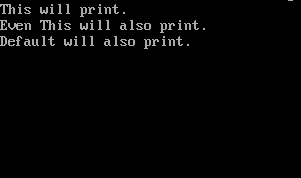
Explanation
Now an obvious question which should hit your mind.
Why is it so?
Well this is not the demerit of this program. In fact it’s the speciality of switch statements. It means if one condition turns true then all the subsequent conditions will also get executed inside switch statement. This is because it does not check any condition after getting a true value with one condition.
Switch statements are used very frequently in C programming. So I would recommend you to go through this tutorial at least once and make some programs by using switch keyword. In the next tutorial I will tell you about the method by which we can stop executing all the statements inside switch.
switch statement in C
This is the decision control instruction which allows the programmer to build a menu type program, so that the user can choose one options from multiple choices. It is also called switch-case-default instructions too because these are three keywords involved in making this instruction. Now lets head on to the syntax of switch statement.Syntax
switch(integer expression)
{
case constant 1: do this;
case constant 2: do this;
case constant 3: do this;
default: do this;
}
Explanation of this syntax
integer expression: It is used to check if programmer wants to execute the set of statements under switch or not. It works similar to conditions but we can only give integer expressions insider. It means an expression which is a integer or which evolves an integer.
case: It is the keyword to show multiple conditions inside switch statement. We can have any number of cases.
constant 1,2 and 3: As its name suggests these values should be either integer constant or character constant. Each value must be unique.
do this: We can use any legal C programming statement at that place.
default: It is another keyword which is used to execute some default statements if all conditions fails inside switch.
Now lets apply the above knowledge in some program.
#include<stdio.h>

void main ()
{
 int i=2;

 switch(i)
 {
  case 0: printf("No Message");
  case 1: printf("No Message");
  case 2: printf("This will print.
");
  case 3: printf("Even This will also print.
");
  default: printf("Default will also print.");
 }
}
Output
- The program starts with integer variable i with value 2 in it.
- After that I have written a switch keyword with one integer expression. i.e. switch(i). It means full switch statements will get executed if i=2 turns true.
- I think you should have an idea that case 2 will get executed.
- Now the turning point is after case 2, every statement get executed.
- Even the last expression under default is also get executed.
Now an obvious question which should hit your mind.
Why is it so?
Well this is not the demerit of this program. In fact it’s the speciality of switch statements. It means if one condition turns true then all the subsequent conditions will also get executed inside switch statement. This is because it does not check any condition after getting a true value with one condition.
Switch statements are used very frequently in C programming. So I would recommend you to go through this tutorial at least once and make some programs by using switch keyword. In the next tutorial I will tell you about the method by which we can stop executing all the statements inside switch.
Operators Rivisited Hierarchy of Operators NOT and Conditional Operator in C
Today we will re-visit the operators once again. In the tutorial of logical operators deliberately missed the NOT operator.
Why? Ah… it’s a bit confusing and I don’t want to ruin the next important topics due to that operator.
If ( !(y>6) )
In the above statement I am writing a condition that y should be lesser than or equal to 6. I can also write the same condition as
If (y<=6)
Both the statements will give the same results. You can use anyone of them.

General form of Conditional/Ternary operator
(Expression 1 ? expression 2 : expression 3)
It is generally used to avoid small if-else statement. Remember it is not the alternative of if-else clauses. It can used at some places.
Lets try to understand it with some simple example.
if (x==10)
Y=3;
else
Y=9;
In the above we are basically checking if x is equal to 10. If condition turns true then it will assign y as 3. Otherwise it will assign y as 9. The same task can be completed using ternary operator.
Y=(x==10 ? 3 : 9);
I hope everyone will agree with the fact that above example is very much compact than the earlier version.
Another example to use ternary operators is given below.
( x > 4 ? printf ( "Value is greater than 4" ) : printf ( "Value is less than 4" ) ) ;
A small example of nested ternary operator is given below
Small = ( x < y ? ( x > z ? 9: 10 ) : ( y > z ? 14: 16 ) ) ;
In the above example small is the variable and it will store
9 if x<y and x>z
10 if x<y and x<z
14 if x>y and y>z
16 if x>y and y<z
Sounds confusing? Well that’s why they are used rarely. But like our example, it can sometimes make the program compact.
So that’s all for decision control instructions. I recommend you to make programs and practice for at least 2 days before proceeding further. In the next tutorial I will cover an overview to loops in C programming.
Why? Ah… it’s a bit confusing and I don’t want to ruin the next important topics due to that operator.
NOT Operator (!)
The NOT operator (!) is used to reverse the results. This operator is mainly used as a key in big complex programs. By using this operator we can reverse the condition easily. Lets try to understand it with an example.If ( !(y>6) )
In the above statement I am writing a condition that y should be lesser than or equal to 6. I can also write the same condition as
If (y<=6)
Both the statements will give the same results. You can use anyone of them.
Hierarchy of Operators
I have given the hierarchy of operators after arithmetic operators. Now we have learnt about the logical operators (AND OR NOT) too. So the new hierarchy of operators is given below.Conditional Operators
They are also called ternary operators. As we have to use three arguments to use this operator.General form of Conditional/Ternary operator
(Expression 1 ? expression 2 : expression 3)
It is generally used to avoid small if-else statement. Remember it is not the alternative of if-else clauses. It can used at some places.
Lets try to understand it with some simple example.
if (x==10)
Y=3;
else
Y=9;
In the above we are basically checking if x is equal to 10. If condition turns true then it will assign y as 3. Otherwise it will assign y as 9. The same task can be completed using ternary operator.
Y=(x==10 ? 3 : 9);
I hope everyone will agree with the fact that above example is very much compact than the earlier version.
Another example to use ternary operators is given below.
( x > 4 ? printf ( "Value is greater than 4" ) : printf ( "Value is less than 4" ) ) ;
Nested Conditional Operator
Well nested conditional operators are used very rarely but they are good to make the program compact.A small example of nested ternary operator is given below
Small = ( x < y ? ( x > z ? 9: 10 ) : ( y > z ? 14: 16 ) ) ;
In the above example small is the variable and it will store
9 if x<y and x>z
10 if x<y and x<z
14 if x>y and y>z
16 if x>y and y<z
Sounds confusing? Well that’s why they are used rarely. But like our example, it can sometimes make the program compact.
So that’s all for decision control instructions. I recommend you to make programs and practice for at least 2 days before proceeding further. In the next tutorial I will cover an overview to loops in C programming.
C program which reads your name from the keyboard and outputs a list of ASCII codes which represent your name

#include<stdio.h>
#include<conio.h>
void main()
{
int i;
char name[50];
clrscr();
printf("Enter your name: ");
gets(name);
printf("
Character ASCII Code");
for(i=0;name[i]!=
C program to read a matrix of size mxn from the keyboard and display the same on the screen
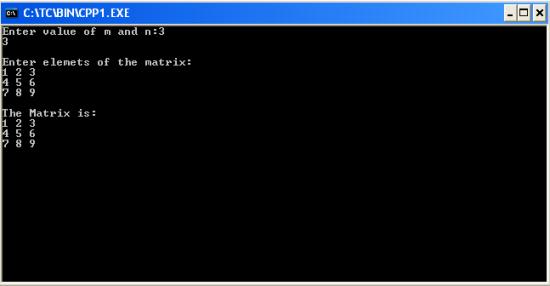
#include<iostream.h>
#include<conio.h>
void main()
{
clrscr(); //to clear the screen
int a[5][5],n,m,i,j;
cout<<"Enter value of m and n:";
cin>>m>>n;
cout<<"
Enter elemets of the matrix:
";
for(i=0;i<m;++i)
for(j=0;j<n;++j)
cin>>a[i][j];
cout<<"
The Matrix is:
";
for(i=0;i<m;++i)
{
for(j=0;j<n;++j)
cout<<a[i][j]<<" ";
cout<<"
";
}
getch(); //to stop the screen
}
Thursday, February 12, 2015
C Program to multiply two matrices

#include<stdio.h>
#include<conio.h>
void main()
{
int a[5][5],b[5][5],c[5][5],m,n,p,q,i,j,k;
clrscr();
printf("Enter rows and columns of first matrix:");
scanf("%d%d",&m,&n);
printf("Enter rows and columns of second matrix:");
scanf("%d%d",&p,&q);
if(n==p)
{
printf("
Enter first matrix:
");
for(i=0;i<m;++i)
for(j=0;j<n;++j)
scanf("%d",&a[i][j]);
printf("
Enter second matrix:
");
for(i=0;i<p;++i)
for(j=0;j<q;++j)
scanf("%d",&b[i][j]);
printf("
The new matrix is:
");
for(i=0;i<m;++i)
{
for(j=0;j<q;++j)
{
c[i][j]=0;
for(k=0;k<n;++k)
c[i][j]=c[i][j]+(a[i][k]*b[k][j]);
printf("%d ",c[i][j]);
}
printf("
");
}
}
else
printf("
Sorry!!!! Matrix multiplication cant be done");
getch();
}
Subscribe to:
Posts (Atom)