Showing posts with label activeperl. Show all posts
Showing posts with label activeperl. Show all posts
Friday, February 13, 2015
HowTo Play sounds in ActivePerl using Win32 Sounds
Playing of sounds using Win32::Sound requires that you play the sound while the perl script is still running.
If the perl script terminates, the playing of sound also terminates.
The sound plays in this example because we are inside the Gtk2 main loop, the script does not terminate instantly because we are waiting for user inputs.
Please take note of the difference between the 2 buttons, SND_ASYNC allows the Gtk2 to loop without waiting for the sound to finish playing.
On the other hand, the one without the SND_ASYNC does not allow the Gtk2 loop to proceed until the sound has finished playing.
#!/usr/bin/perl -w
If the perl script terminates, the playing of sound also terminates.
The sound plays in this example because we are inside the Gtk2 main loop, the script does not terminate instantly because we are waiting for user inputs.
Please take note of the difference between the 2 buttons, SND_ASYNC allows the Gtk2 to loop without waiting for the sound to finish playing.
On the other hand, the one without the SND_ASYNC does not allow the Gtk2 loop to proceed until the sound has finished playing.
#!/usr/bin/perl -w
use strict;
use Gtk2 -init;
use Win32::Sound;
my $window = Gtk2::Window->new();
$window->signal_connect(destroy=>sub{ Gtk2->main_quit();});
my $vbox = Gtk2::VBox->new();
$window->add($vbox);
my $b1 = Gtk2::Button->new("NON BLOCKING");
$b1->signal_connect(clicked=>sub{
Win32::Sound::Play(SystemExclamation,SND_ASYNC);
# Win32::Sound::Play(c:\foobaring.wav,SND_ASYNC);
# you can also use the code above to play your own wav files
});
$vbox->pack_start($b1,0,0,0);
my $b2 = Gtk2::Button->new("BLOCKING");
$b2->signal_connect(clicked=>sub{
Win32::Sound::Play(SystemExclamation);
# Win32::Sound::Play(c:\foobaring.wav);
# you can also use the code above to play your own wav files
});
$vbox->pack_start($b2,0,0,0);
$window->show_all();
Gtk2->main();

Tuesday, February 10, 2015
HowTo Install Gtk2 in ActivePerl in Windows 7
This was tested in the ActivePerl 5.14.2 and 5.16.2
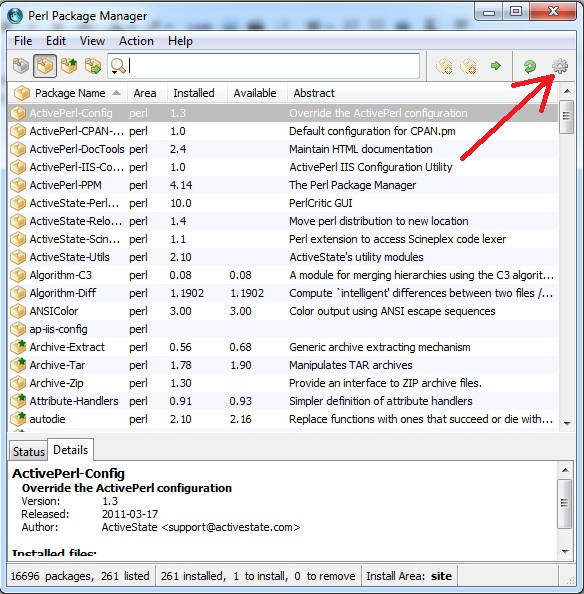
Step1: open Perl Package Manager
Step2: click on preferences (the gear thingy) on the upper right corner
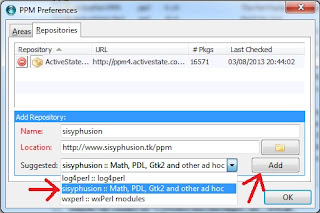
Step3: select the sisyphusion :: Math, PDL, Gtk2 and other ad hoc and press Add button then press OK
Name: sosyphusion
Location: http://www.sisyphusion.tk/ppm
Step4: follow the arrows from 1 to 5 in the diagram below
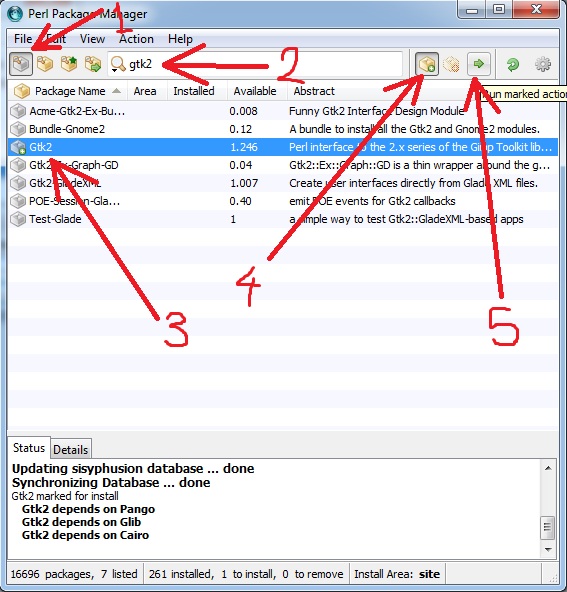
Step5: Gtk2 is now installed!!
Thanks to one of our Commentor, (AnonymousJuly 3, 2013 at 5:53 AM) suggested you do the following if your installation fails with this message "The package Gtk2 has already installed a file that package Pango wants to install."
Anyway, in order to successfully install it under (at least) ActiveState Perl 5.16.3 you need to :
Step 1 .. Step 3 : same as shown above
Step 4 : exit PPM GUI
Step 5 : on command line (cmd.exe) enter :
ppm install Gtk2 --force
Step 6 : enjoy !
Read more »
Step1: open Perl Package Manager
Step2: click on preferences (the gear thingy) on the upper right corner
Name: sosyphusion
Location: http://www.sisyphusion.tk/ppm
Step4: follow the arrows from 1 to 5 in the diagram below
Step5: Gtk2 is now installed!!
Thanks to one of our Commentor, (AnonymousJuly 3, 2013 at 5:53 AM) suggested you do the following if your installation fails with this message "The package Gtk2 has already installed a file that package Pango wants to install."
Anyway, in order to successfully install it under (at least) ActiveState Perl 5.16.3 you need to :
Step 1 .. Step 3 : same as shown above
Step 4 : exit PPM GUI
Step 5 : on command line (cmd.exe) enter :
ppm install Gtk2 --force
Step 6 : enjoy !
** I tried this and it works like a charm ** thanks anonymous
Subscribe to:
Posts (Atom)