Showing posts with label website. Show all posts
Showing posts with label website. Show all posts
Tuesday, February 17, 2015
Free Website PSD Template
-.jpg "Free Website PSD Template")
Free Download Website Template PSD. The Photoshop file is fully layered. Enjoy!
Type : PSD
Category : Web Templates
License : Free
Author : Dribbble
Download

Sunday, February 15, 2015
Best Way to Easily Find and Remove Broken Links from your Website or Blog

What are Broken Links?
Broken links are the links which leads to a page that actually does not exist. When you publish any article on your blog than search engines like Google indexe it and add your article information to its database. After some days or months if you delete your previously published article than it is removed from your blog database but not from Google database. If anyone search for a keyword related to your article on Google than your article link come up in the search results. And if he/she clicks on the link then it leads to a 404 error page.Also Read: The Top 10 Websites to create free Logo for your Blog
404 error pages and broken links have a negative effect on SEO and which decreases your search engine ranking. Let’s take an example to explain it more clearly. Suppose if you search for a keyword on Google, than so many search results come up. When you click one of them you may come across a 404 error page. Now tell me that, what you will do in this situation? You will immediately leave that site and go for another one. Google consider this as bad practice and which gradually leads to decrease in your search engine ranking.
In this post I am going to tell you the best way to easily find and remove broken links from your blog. This can be done by using an online tool Google Webmaster Tool. This is one of the tool that I occasionally use to detect and remove broken links from my blog. If you have a blogger blog then there is no need to register but if you have a wordpress blog then you have to first register your blog. Let’s see how to remove these useless links from Google database.
Also Read: Tips on How to Have Better SEO Results with Link Building
How to Find and Remove Broken Links?
1. First of all login to Google Webmaster Tool by going to the link given below:
http://www.google.com/webmasters/
2. Now go to Dashboard and select the blog that you want (if you have more than one) from the drop down menu situated at right top.
3. Go to Health>Crawl Errors and than click on Not found option as shown below.

(click on the image to enlarge)
4. After that you will see a list of all the broke links in your blog. Than click on any link from the list, now a new pop-up window will open, copy the link from there.
5. Now go to Optimization>Remove URLs and than click on Create a new removal request, paste the link that you have copied earlier in the box as shown below and than click on Continue button.

(click on the image to enlarge)
6. A new window will open,there click on Submit Request as shown below.

(click on the image to enlarge)
8. You have done…..! Do you have any query? You are free to ask, just comment below.
Note: Google webmaster Tool will take some time to remove these URLs from Google database.
Friday, February 13, 2015
Freebie PSD Website Design

Type : PSD
Category : Web Templates
License : Free
Author : Dribbble
Download
Thursday, February 12, 2015
Free Coorp PSD Template Website

Free Download PSD Template Website. Heres a free homepage PSD designed to fit Wordpress. Use it for corporate or magazine content, it fits all kind of needs. Enjoy!
Type : PSD
Category : Web Templates
License : Free
Author : Dribbble
Download
Wednesday, February 11, 2015
W3Schools Offline Version Download Full Website
W3Schools is an educational website that provides web development tutorials. It covers topics like HTML, CSS, JavaScript, PHP, ASP.Net, SQL and many more. W3Schools is getting more than 35 million visits per month and it is the most popular web development website on the internet. The tutorials are very helpful for beginners to learn web development. It also provides thousands of examples and facility to edit and execute them online.
Also Read: A Guide to Several Programming Languages Available for Web Development
The biggest drawback of W3Schools is that you can’t access these awesome tutorials without internet. Fortunately I have found a great solution for this problem. So in this article I am sharing the link to download W3Schools offline version for absolutely free.
1. First of all download the compressed file from the link http://sh.st/syf0a
2. After 5 seconds click on the SKIP THIS AD button located at top right corner. Now you will be redirected to download page. There click on download button to download the file.
3. The file is about 2 MB in size and will become 100 MB after extracting. Use any compression tool like Winrar to extract it.
4. Now go to folder W3schools Offline Version > www.w3schools.com and then open the default file.
5. This will open the W3Schools offline version website. Make sure you have any browser installed in your computer.
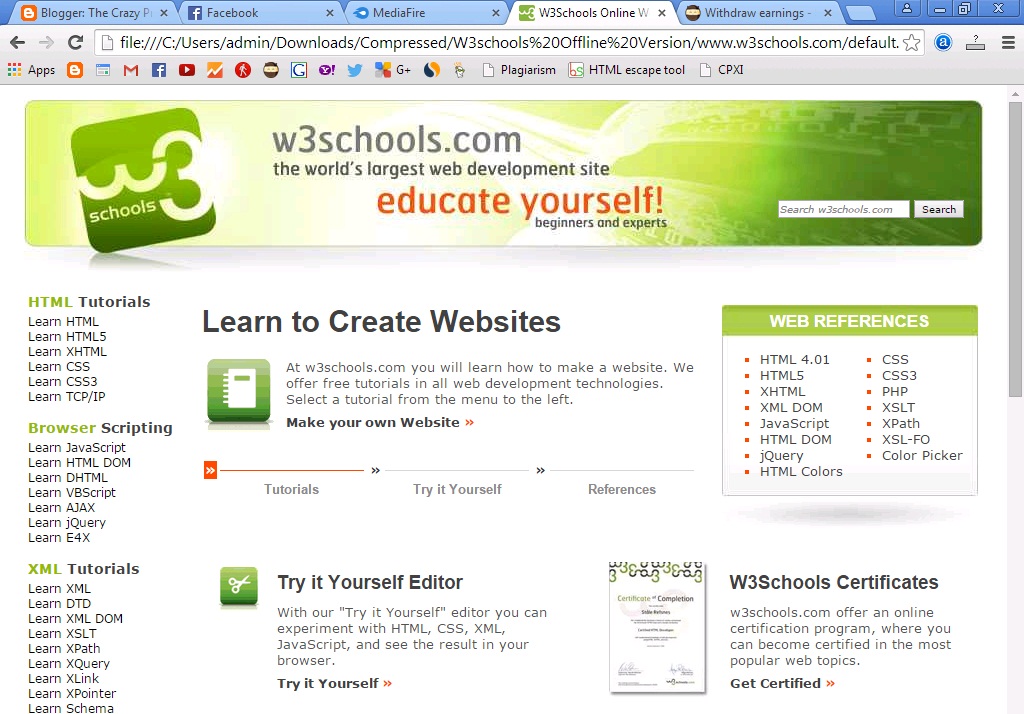
You will not get all the features in W3Schools offline version but still you will get many. Comment below if you are facing any problem in downloading and using it.
Also Read: A Guide to Several Programming Languages Available for Web Development
The biggest drawback of W3Schools is that you can’t access these awesome tutorials without internet. Fortunately I have found a great solution for this problem. So in this article I am sharing the link to download W3Schools offline version for absolutely free.
Steps for W3Schools Offline Version Download
1. First of all download the compressed file from the link http://sh.st/syf0a
2. After 5 seconds click on the SKIP THIS AD button located at top right corner. Now you will be redirected to download page. There click on download button to download the file.
3. The file is about 2 MB in size and will become 100 MB after extracting. Use any compression tool like Winrar to extract it.
4. Now go to folder W3schools Offline Version > www.w3schools.com and then open the default file.
5. This will open the W3Schools offline version website. Make sure you have any browser installed in your computer.
You will not get all the features in W3Schools offline version but still you will get many. Comment below if you are facing any problem in downloading and using it.
Subscribe to:
Posts (Atom)