Wednesday, February 18, 2015
Kettle Pass parameters from job to transformation in PDI Retrieve data from table by passing table name as parameter
This post will talk about basic understanding of parameters concept in PDI.
Software Setup :
PDI 5.1.0 CE
PostgreSQL
Concept : Retrieve data from table by passing table name as parameter.
You will learn below things
1) Table input step & database connections
2) Creating parameter(s) in Transformation(s) & Job(s)
3) Passing parameter(s) from job to transformation.
Lets say in foodmart database you have below tables 1) region 2) product 3) customer and etc.
Every time when you pass different table name as parameter you should able to fetch the data coming from the passed table.
1) Table input step & database connections
2) Creating parameter(s) in Transformation(s) & Job(s)
1) Create a new transformation & drag and drop "Table Input" step from Design Pane.

2) Double Click on "Table input" step & Click on New tab to give database connections as shown in below image

3) Define the parameter in transformation ( in this example the table name should go as parameter).
Image A : Right Click on the empty space to get the transformation settings.
Image B : Database Connection Details
Parameter Name is : tableName


4) Come back to the properties of "Table input" & write select statement to retrieve the data.
Eg : SELECT * FROM product LIMIT 100
In above example "product" is the table name that you have to replace with the parameter.
i.e., SELECT * FROM ${tableName} LIMIT 100
Once you write the query, come down check "Replace variables in script"

5) Take a "Dummy" step and connect it to "Table input step" . Save the transformation & run it on "Dummy Step"( Right click dummy step and click on "Preview".
OUTPUT : Test 1 : With "region" table

OUTPUT : Result 1

OUTPUT : Test 2 : With "product" table
* Right click Dummy step then click on Preview
* Click on Configure & then in parameters tab give "product" for tableName value parameter.
OUTPUT : Result 2

3) Passing parameter(s) from job to transformation
* Crtl+Alt to create a new job
* From the "General" node of Design tab ( Appears left side) drag and drop "Transoformation step".
* Drag and drop "START" step and connect these two as shown in below image.

* Double click on "Transformation" step to set the properties & parameter information.
* Browse for the transformation file and then move to parameters tab
* Click on "Get Parameters" then you can find parameter get apper under Parameter tab.
* Right click on empty canvas of job to get its settings & move to Parameters tab and give parameter name as "tableName" and provide default value.
Save the job and run it.
IMP NOTE :
1) Parameter names in job & transformation should match.
2) You can create n number of parameters in job but can pass as many you wish.
3) In job design you should take "START" step to tell the job to start execution from there.
If you ignore you will get below error ( which took me awhile to solve it for the very first time).
Start of job execution
:A serious error occurred during job execution:
Couldnt find starting point in this job.
org.pentaho.di.core.exception.KettleJobException:
Couldnt find starting point in this job.
at org.pentaho.di.job.Job.execute(Job.java:516)
at org.pentaho.di.job.Job.run(Job.java:422)
Spoon - Job has ended.
References :
1) http://wiki.pentaho.com/display/EAI/Named+Parameters
2) http://diethardsteiner.blogspot.in/2013/07/pentaho-kettle-parameters-and-variables.html
3) http://wiki.pentaho.com/display/EAI/Substituting+variable+references+in+Job+Parameter+values
Hope this helps some one like me for the first time who is looking for parameters(named) concept :-)
Cheers :-)
:-) Happy New Year - Welcome - 2015 :-)
Software Setup :
PDI 5.1.0 CE
PostgreSQL
Concept : Retrieve data from table by passing table name as parameter.
You will learn below things
1) Table input step & database connections
2) Creating parameter(s) in Transformation(s) & Job(s)
3) Passing parameter(s) from job to transformation.
Lets say in foodmart database you have below tables 1) region 2) product 3) customer and etc.
Every time when you pass different table name as parameter you should able to fetch the data coming from the passed table.
1) Table input step & database connections
2) Creating parameter(s) in Transformation(s) & Job(s)
1) Create a new transformation & drag and drop "Table Input" step from Design Pane.
2) Double Click on "Table input" step & Click on New tab to give database connections as shown in below image
3) Define the parameter in transformation ( in this example the table name should go as parameter).
Image A : Right Click on the empty space to get the transformation settings.
Image B : Database Connection Details
Parameter Name is : tableName
4) Come back to the properties of "Table input" & write select statement to retrieve the data.
Eg : SELECT * FROM product LIMIT 100
In above example "product" is the table name that you have to replace with the parameter.
i.e., SELECT * FROM ${tableName} LIMIT 100
Once you write the query, come down check "Replace variables in script"
5) Take a "Dummy" step and connect it to "Table input step" . Save the transformation & run it on "Dummy Step"( Right click dummy step and click on "Preview".
OUTPUT : Test 1 : With "region" table
OUTPUT : Result 1
OUTPUT : Test 2 : With "product" table
* Right click Dummy step then click on Preview
* Click on Configure & then in parameters tab give "product" for tableName value parameter.
OUTPUT : Result 2
3) Passing parameter(s) from job to transformation
* Crtl+Alt to create a new job
* From the "General" node of Design tab ( Appears left side) drag and drop "Transoformation step".
* Drag and drop "START" step and connect these two as shown in below image.
* Double click on "Transformation" step to set the properties & parameter information.
* Browse for the transformation file and then move to parameters tab
* Click on "Get Parameters" then you can find parameter get apper under Parameter tab.
* Right click on empty canvas of job to get its settings & move to Parameters tab and give parameter name as "tableName" and provide default value.
Save the job and run it.
IMP NOTE :
1) Parameter names in job & transformation should match.
2) You can create n number of parameters in job but can pass as many you wish.
3) In job design you should take "START" step to tell the job to start execution from there.
If you ignore you will get below error ( which took me awhile to solve it for the very first time).
Start of job execution
:A serious error occurred during job execution:
Couldnt find starting point in this job.
org.pentaho.di.core.exception.KettleJobException:
Couldnt find starting point in this job.
at org.pentaho.di.job.Job.execute(Job.java:516)
at org.pentaho.di.job.Job.run(Job.java:422)
Spoon - Job has ended.
References :
1) http://wiki.pentaho.com/display/EAI/Named+Parameters
2) http://diethardsteiner.blogspot.in/2013/07/pentaho-kettle-parameters-and-variables.html
3) http://wiki.pentaho.com/display/EAI/Substituting+variable+references+in+Job+Parameter+values
Hope this helps some one like me for the first time who is looking for parameters(named) concept :-)
Cheers :-)
:-) Happy New Year - Welcome - 2015 :-)

Enter the Matrix PC game Full version

God loves, hype kills. Marketing departments everywhere are doing such a thorough job that it seems every other day, a new entertainment property emerges that is heralded as the be-all, end-all experience ever to grace a movieplex, television screen or concert stage. Usually, the "new best thing" cannot stand up under the weight of expectation.
If the universal hype machine had never been fired up, perhaps folks would just sit back and enjoy their movies, games and music. But as it stands, everyone is expecting the most mind-blowing, orgasmic experience of their lives every time they sit in a theater or pop a game in their console or PC. The second Matrix film, The Matrix Reloaded has been playing to mixed reviews, partially due to the rampant hype that has been unleashed by the creators, media and fans. As the tagline states, no matter where you are "The Matrix Has You."
Enter Enter the Matrix. Developed by Shiny and published by Atari, its the first game ever to exploit the uber-lucrative Matrix license. Its impossible to know what kind of game would have to be shipped in order to avoid disappointment, but its easy to see that Enter the Matrix is not that game.
Hype aside, what it is, is an above-average action game that incorporates cool elements of the film with a decent engine to provide an experience that is similar to Dead to Rights and Max Payne. Whats more, the movies creators went the extra mile to ensure that the game isnt a rehash of what played out onscreen in The Matrix Reloaded. Instead, the movie follows the side-story of Niobe and Ghost, and their missions within the Matrix to help the A Team (Neo, Morpheus and Trinity) succeed. There is tons of exclusive content that was shot at the same time as the film that is inter-cut with the story. That alone is probably worth at least a rental from hardcore Matrix fans, and there are a lot of them in the world. Read more
System requirements:
Windows 98/ME/2000/XP
MINIMUM
Pentium II or AMD Duron 800MHz Processor
128MB RAM
4.3GB Hard Disk Space
nVidia GeForce 256 or ATI Radeon 8500 Video Card
Windows Compatible Sound Card
4X CD-ROM Drive
DirectX 9.0
RECOMMENDED
Pentium III or AMD Athlon 1.2GHz Processor
256MB RAM
7200RPM Hard Disk Speed
Sound Blaster Audigy 2 Sound Card
Screen Shots: Click on the image to view large screen
 |  |  |
I hope you like it......!
Free IPhone 5 Mockup PSD Template
.jpg "Free IPhone 5 Mockup PSD Template")
Free Download IPhone 5 Mockup Template PSD. Case of UI/UX design mockup is always a helpful element’s to demonstrate work to client. Enjoy!
Type : PSD
Category : Mockups
License : Free
Author : Cssauthor
Download
AutoCAD 2002 Full version Free Download

In the eighties, if my memory serves me right, there was an expression that came about from a commercial and it went something like this; "Wheres the Beef?"
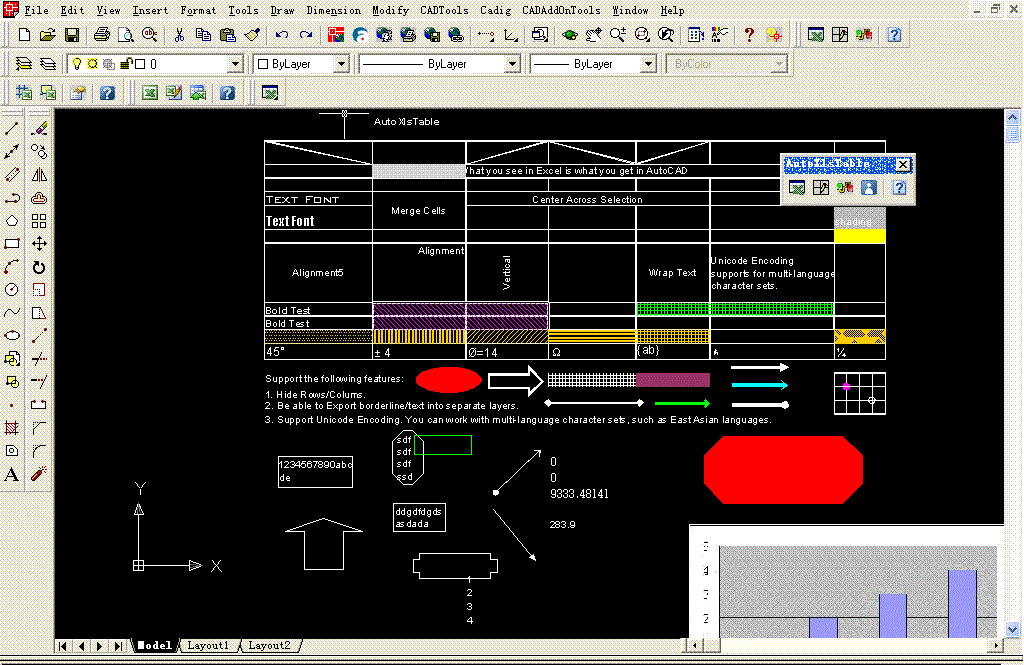
In the illustration to the right, I show the Whats New in AutoCAD® 2002 Window and the list of New Features and Enhanced Features. I think the list speaks for itself. Whats actually surprising to me is that this is being called a "Release". After having looked it over, I seems more appropriate to called it something like AutoCAD 2000i2 or AutoCAD 2000.5. This "Release" is very much like like the previous "Release", AutoCAD® 2000i; where we found numerous integrated features from the Express Tools, VIP program and other Beta Products from Autodesks Beta Site. And, of course, the Internet Tools that put the "i" in AutoCAD 2000i.
In this "Release" we find more integration of features available through other means, like the VIP program; features like the Layer Translator and CAD Standards. With the other new features, like "True Associative Dimensioning" and Text Scale, this AutoCAD comes across as a Productivity Module.
Surface Appearance
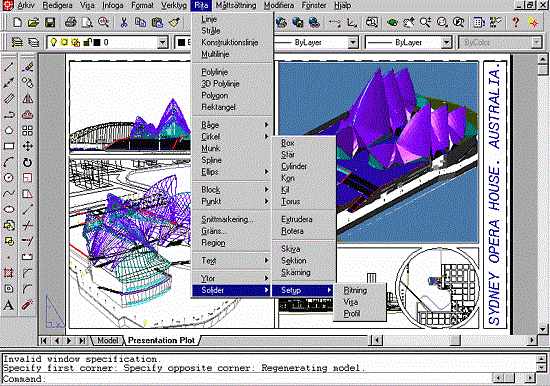
Aside from a few different colors on familiar icons, AutoCAD 2002 looks almost exactly like AutoCAD 2000i.
Illustrated to the right is AutoCAD 2002 beta with some toolbars that have new features: Modify I, Dimension, Text and CAD Standards.
Also illustrated to the right is an example of more AutoCAD 2002 changes that are not listed in the "Whats New in AutoCAD 2002" list: The AutoCAD 2002 Today Window. As it turns out, there are actually a lot of changes but most of them are quite subtle.
Though I turn this thing off on every station I work on, the new changes to the AutoCAD 2002 Today Window include Maximize and Minimize buttons for the My Drawings and Bulletin Board panes so you can open up a message from the bulletin board in full wide-screen format. Also include with this Window is a sample HTML page with Java Scripts that can be used to design Web pages that compress automatically for the Today Window. We will probably come back and take a look at that in a future publication.
If you dig into this release you will find other interesting new features that hint at things to come; things like making XML drawing files with the Wblock command. And speaking of Wblock, when is this command going to return to the menu structure? Read more
System Requirements:
Autodesk ended support for AutoCAD 2002 in January of 2006
Microsoft Windows XP, Windows 2000 Professional, Windows NT 4.0, or Windows 98
Microsoft Internet Explorer 6.0
Pentium III or later or compatible
64 MB RAM
300 MB free disk space
1024 x 768 VGA with True Color
Mouse, trackball, or compatible pointing device
Screen Shots: Click on the image to view large screen
 |  |  |
I hope you like it......!
Skip List Data Structure
A skip list is a data structure that is used for storing a sorted list of items with a help of hierarchy of linked lists that connect increasingly sparse subsequences of the items. A skip list allows the process of item look up in efficient manner. The skip list data structure skips over many of the items of the full list in one step, that’s why it is known as skip list.
 |
| Skip List |
Complexity
| | Average Case | Worst Case |
| Space | O(n) | O(nlogn) |
| Search | O(logn) | O(n) |
| Insert | O(logn) | O(n) |
| Delete | O(logn) | O(n) |
Structure of Skip List
A skip list is built up of layers. The lowest layer (i.e. bottom layer) is an ordinary ordered linked list. The higher layers are like ‘express lane’ where the nodes are skipped (observe the figure).
Searching Process
When an element is tried to search, the search begins at the head element of the top list. It proceeds horizontally until the current element is greater than or equal to the target. If current element and target are matched, it means they are equal and search gets finished.
If the current element is greater than target, the search goes on and reaches to the end of the linked list, the procedure is repeated after returning to the previous element and the search reaches to the next lower list (vertically).
Implementation Details
1. The elements used for a skip list can contain more than one pointers since they are allowed to participated in more than one list.
2. Insertion and deletion operations are very similar to corresponding linked list operations.
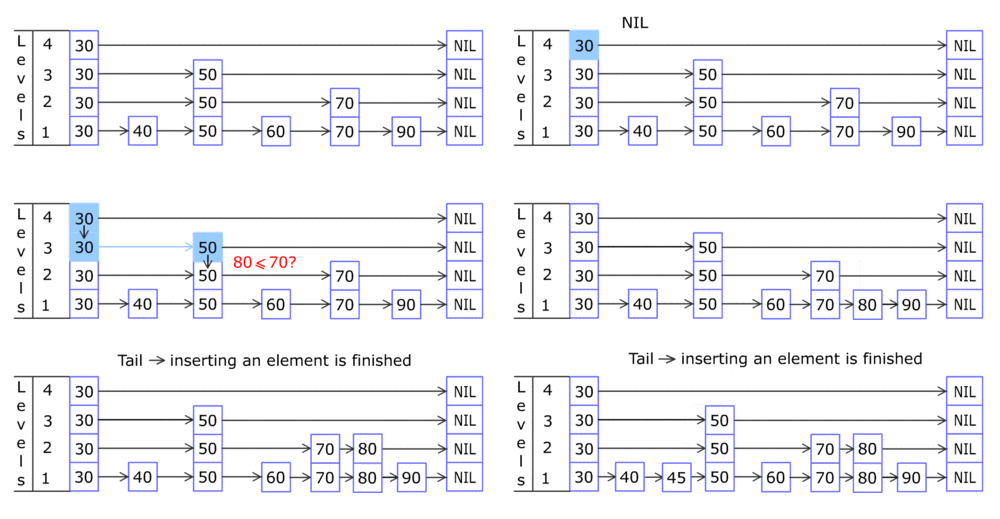 |
| Insertion in Skip List |
Applications of Skip List
1. Skip list are used in distributed applications. In distributed systems, the nodes of skip list represents the computer systems and pointers represent network connection.
2. Skip list are used for implementing highly scalable concurrent priority queues with less lock contention (struggle for having a lock on a data item).
Subscribe to:
Posts (Atom)