Showing posts with label 5. Show all posts
Showing posts with label 5. Show all posts
Thursday, February 19, 2015
Installation of Pentaho 5 0 1 CE in windows 7 changes made from previous version
Being crazy of Pentaho and its associated tools Id like to share some thing about Pentaho CE 5.0.1 BA latest release..
First of all, Id like to thank you to the web details team for the efforts they kept in bringing up the powerful analytical engine(BA server).
The home page itself make you to stick with BA server where you can enter into the server with "admin" and "password" as the default credentials.. Yes, "joe" user is no more but he left with the same password to log into BA server.
There will be NO more admin console ... Now it is very easy and developer friendly to navigate in one console(User Console) to give data base connections and new roles for new users..
A lot of stuff included in the home page itself, giving the blogs links, books on different tools of pentaho family. In a single word I can say , All the stuff related to Pentaho at a single place. A BI developer like me can reduce the time for developing reports, dashboards , jobs.
Market place for installing C-Tools and the installed plug-ins list drop down is one of the good ideas of the team.
As quick as Pentaho released its CE 5.0.1 , I just downloaded and trying to explore the new look and navigating from all the menus, reports, connection places and etc.
Its very easy to install the pentaho CE BA now in windows...
Installation procedure :
1) Down load the software as a .zip file using this link .
2) Unzip it in your fav folder
3) Click on start-pantaho.bat file
Home page :
NOTE: path and class path for java must be set before the installation.
First of all, Id like to thank you to the web details team for the efforts they kept in bringing up the powerful analytical engine(BA server).
The home page itself make you to stick with BA server where you can enter into the server with "admin" and "password" as the default credentials.. Yes, "joe" user is no more but he left with the same password to log into BA server.
There will be NO more admin console ... Now it is very easy and developer friendly to navigate in one console(User Console) to give data base connections and new roles for new users..
A lot of stuff included in the home page itself, giving the blogs links, books on different tools of pentaho family. In a single word I can say , All the stuff related to Pentaho at a single place. A BI developer like me can reduce the time for developing reports, dashboards , jobs.
Market place for installing C-Tools and the installed plug-ins list drop down is one of the good ideas of the team.
As quick as Pentaho released its CE 5.0.1 , I just downloaded and trying to explore the new look and navigating from all the menus, reports, connection places and etc.
Its very easy to install the pentaho CE BA now in windows...
Installation procedure :
1) Down load the software as a .zip file using this link .
2) Unzip it in your fav folder
3) Click on start-pantaho.bat file
Home page :
NOTE: path and class path for java must be set before the installation.

Wednesday, February 18, 2015
Pentaho Opensource 5 0 1 stable Vs Jasper Professional 5 5 BA Server Tool selection decision making points on 3 categories
Hello Guys,
Here is a small document prepared on differentiating Pentaho Open source Vs Jasper Professional.
Based on the below information one can take decision on tool selection for BI needs.
I would like to present a clear picture with insight & readers of this document are encouraged to add your points in the comment box..
IMP NOTE: Remember , I am comparing the Pentaho Open source(Community) 5.0.1 stable with Jasper Professional(licensed) 5.5
Dashboards :
| Key feaute | Pentaho Open source Dashboard | Jasper Professional dashboard |
| Tool | Community Tools(C-Tools) – Server plug ins CDE(Community Dashboard Editor) CDF(Community Dashboard Framework) CDA(Community Data Access) | iReport/Jasper Studio Desktop stand alone tools |
| Development of Reports done at | Fly on the server itself | Depends on stand alone designing tools & need to publish to the server and again need to design the dashboard |
| Responsiveness /Mobile support | Responsiveness is achievable using bootstrap css framework | Lack of responsiveness even though there is Proprtional property of the dashboard designer |
| Dashboards output end view-able devices | Compatible with Mobile/iPad/laptop/Desktop/TV like big screens | Compatible with laptop/desktop |
| Charts | Protovis charts implemented, extend able to D3 charts.. can integrate fusion and HTML charts also. | Embedded charts engines – Jfree, Fusion & HTML5 charts. Can integrate protovis/D3 charts using html component of iReport/Jasper Studio |
| Loading of charts on the dashboard | Will take lesser time using Pentahos powerful caching mechanism | Will take longer time to load the charts on the dashboard |
| Embedding BI | Achievable using iframe tags | Achievable using iframe tags |
| Community support | Active | Active as it is a professional .. general community is not so active |
| Interactivity/Drill down/ Inter charts(frames) communication | Achievable | Achievable |
| Multi-tenancy | Need to check (will update on this) | Achievable |
| Customization | Developer friendly | Not developer friendly |
| Download here | Pentaho Maket Place or install using ctools-installer.sh http://community.pentaho.com/ | Purchase license https://www.jaspersoft.com/jaspersoft-business-intelligence-software-trial |
Analysis : OLAP Cubes
| Key feature | Pentaho Open source Analysis | Jasper Opensource/Pro Analysis | |
| Desktop Stand alone Development Tool | Pentaho Schema workbench | Schema Workbench | |
| Front End tool to view the output | Pviot4J Analytics (or) Saiku Analytics (or) JPivot View (or) BTable (or) Ivy Schema Editor | JPivot View | |
| Ad-hoc Reporting on Cube ouptut | Yes, using Saiku Analytics | Ad-hoc Editor (For jasper pro & enterprise it is an add-on feature. http://www.jaspersoft.com/editions | |
| Query Language | MDX ( Multi Dimensional Expression) | MDX (Mullti Dimensional Expression) | |
| Caching | Enabled – Very fast access of data | Enabled – some what less speed when compared with pentaho server | |
| Community Support | Very Active – Quick Responses | Not so active as it is not a owned product of jasper/tibco | |
| Documentation | Online documentation available with examples | Online pdf documentation is available with Examples |
Ad-hoc Reporting
| Key feature | Pentaho Open source Ad-hoc | Pentaho Enterprise Ad-hoc | Jasper Pro Ad-hoc |
| Source for ad-hoc reporting | Meta data layer creation | Meta data layer creation | Create topics OR Create Domains |
| Tool | Pentaho Meta Data Editor(PME) (Stand alone desktop tool) (OR ) Create JOINS on the fly on the server and use it for ad-hoc reporting | PME | No desktop tool.. directly in the server create Domains OR topics |
| Output Server tools | WAQR – Web Ad-hoc Query and Reporting (OR) Saiku Reporting compatible with 4.8 server as of now | Interactive Reporting - Advanced of WAQR But WAQR is not supported by any more Interactive reporting is an extension of WAQR in Enterprise Version of pentaho | Jasper Ad-hoc Editor |
| Support | Deprecated – No longer supported by penatho | On demand support | On demand – Need to be jasper customer |
| Visualization of Data in the form of charts | No | No | Yes .. using Ad-hoc report output visualization of data in the form of selected charts . |
Readers of this post is encouraged to add your points/suggestions in comment box..
Thank you.
Sadakar
BI developer
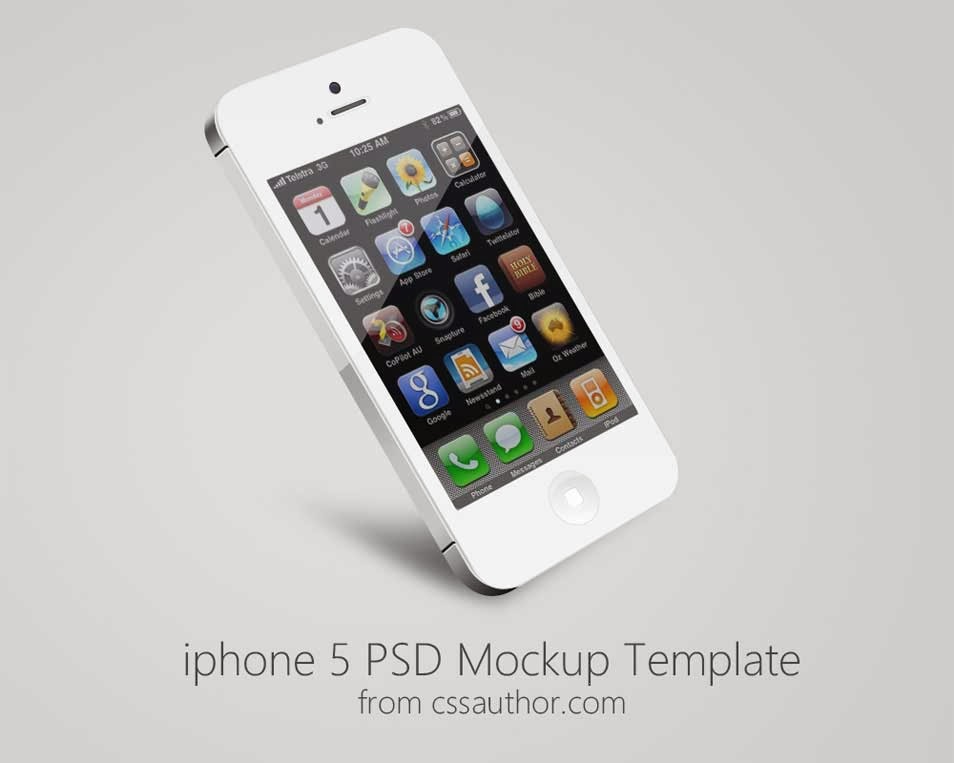
Free IPhone 5 Mockup PSD Template
.jpg "Free IPhone 5 Mockup PSD Template")
Free Download IPhone 5 Mockup Template PSD. Case of UI/UX design mockup is always a helpful element’s to demonstrate work to client. Enjoy!
Type : PSD
Category : Mockups
License : Free
Author : Cssauthor
Download
C program to find the sum of series 1 2 4 5 7 8
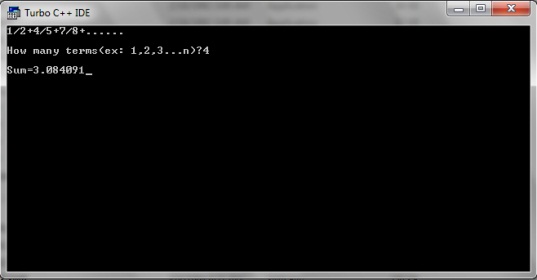
#include<stdio.h>
#include<conio.h>
void main()
{
int i,n;
clrscr();
float sum=0,x,a=1;
printf("1/2+4/5+7/8+......");
printf("
How many terms(ex: 1,2,3...n)?");
How many terms(ex: 1,2,3...n)?");
scanf("%d",&n);
for(i=0;i<n;++i)
{
x=a/(a+1);
sum+=x;
a+=3;
}
printf("
Sum=%f",sum);
Sum=%f",sum);
getch();
}
iPhone 5 Mockup Template PSD
.jpg "iPhone 5 Mockup Template PSD")
Free Download iPhone 5 Mockup PSD Template. freebie is another iPhone5 in hand mockup for showcasing apps or websites. Enjoy!
Type : PSD
Category : Mockups
License : Free
Author : Dribbble
Download
Monday, February 16, 2015

Saturday, February 14, 2015
Online Compilers The Top 5 Websites to Write Compile and Run Programs Online
Have you ever thought about writing and compiling c or c++ programs online. Are you getting bored of using c, c++, java or any other compilers in your computer? If yes then here I come with a solution. In this article I am going to share some websites that provide facility to compile and run programs of different languages like c, c++, java, python, etc. directly on internet. I have done a research on internet and find the top 5 websites given below that provides this facility. So just visit them, use them and let me know about your experience.

Also Read: GCC Compiler: Download Code::Blocks 12.11 a Free C/C++ IDE
Also Read: How to Write and Run C/C++ Programs in Ubuntu (Linux)


Also Read: How to create your own Header Files in C/C++?
Also Read: C4droid: Download Free C/C++ Compiler for Android Platform


Also Read: GCC Compiler: Download Code::Blocks 12.11 a Free C/C++ IDE
Also Read: How to Write and Run C/C++ Programs in Ubuntu (Linux)
The Top 5 Best Online Compilers
codepad.org
Codepad.org is an online compiler/interpreter, and a simple collaboration tool. Its a pastebin that executes code for you.ideone.com
Ideone is something more than a pastebin. Its an online compiler and debugging tool which allows to compile and run code online in more than 40 programming languages.compilr.com
Compilr is an online editor & sandbox that lets you write your code all from the comfort of your browser.Also Read: How to create your own Header Files in C/C++?
Also Read: C4droid: Download Free C/C++ Compiler for Android Platform
compileonline.com
It is another good online compiler which allows writing and running programs in more than 50 programming languages.onlinecompiler.net
It is not good and famous as above compilers. This allow you to write and run programs only in 6 languages i.e. c, c++, fortran, java, pascal and basic.Friday, February 13, 2015
iPhone 5 Landscape Mockup PSD
.jpg "iPhone 5 Landscape Mockup PSD")
Free Download iPhone 5 Landscape PSD Mockup. It comes in black and white and uses smart layers to showcase your design on a landscape psd iPhone 5. Enjoy!
Type : PSD
Category : Mockups
License : Free
Author : Pixeden
Download
Thursday, February 12, 2015
KMSpico v9 0 5 20131110 RC Offline Activator for Windows and Office

KMSpico - is the ideal tool to activate the final version of Windows 7/8 and Office 2010/2013. Activator does not require user intervention, the entire activation process takes place in the background, just run the activator and a couple of minutes to check the activation status of Windows and/or Office.
Features:
Universal (Activates Windows Vista/7/8 Pro/(8.1 Preview)/Enterprise/N/VL and Office 2010/2013 Retail/VL.)
• Does not require user intervention (enough to run the activator).
• Simultaneous activation immediately and Windows, and Office.
KMSpico Can do:
1. Acivate Windows 8.1 ( Review )
2. Acivate Windows 8 ( any edition)
3. Acivate Widows 7 ( Any Edition )
4. Acivate Windows Vista ( Any Edition )
PC Requirements:
Requirements: .NET 4.0 or Windows 8.
Activates Windows Vista/7/8 and Office 2010/2013.
Windows Server 2008/2008R2/2012
How to use:
1. Install KMSpico v8.9 in Windows.
2. Run automatically KMSELDI and AutoPico.
2.1 Make Tokens Backup.
2.2 Detect VL or Retail and depending of the License Status activate or convert to VL.
2.3 Activate for 180 days all VL products found.
3. Install a windows service that reactive every windows start.
4. Create a task schedule for AutoPico to run every 24 hours.
Change Log:
- Fixed know bugs.
- Improve retail key finder in W8.1
For Windows 8.1 RTM It contains :
- Retail key finder over internet only windows keys.
- Check for valid keys for the local installation.
- Install the first key and show the Installation ID for later phone activation.
- Create a validKeys.txt file with the valid keys found in internet.
Download
KMSpico v9.0.5.20131110 RC: Link 1 ; Link 2
How to Download

O hope you like it.........!
iPhone 5 Mock ups PSD
.jpg "iPhone 5 Mock ups PSD")
Free Download iPhone 5 Mock ups PSD. It gives me great pleasure to finally present you with my latest freebie. Enjoy!
Type : PSD
Category : Mockups
License : Free
Author : Dribbble
Download
Best Java Books Top 5 Best Java Programming Books
What are the best java books? This is the first question that comes in our mind when we start learning java programming. So in this article I have made a list of top 5 best java programming books on the basis of their popularity. These books are written for easy learning and are highly recommended for beginners.
List of Top 5 Best Java Books
Java: A Beginners Guide

- Get this Book -
Table of Contents
Java Fundamentals
Introducing Data Types and Operators
Program Control Statements
Introducing Classes, Objects, and Methods
More Data Types and Operators
A Closer Look at Methods and Classes
Inheritance
Packages and Interfaces
Exception Handling
Using I/O
Multithreaded Programming
Enumerations, Autoboxing, Static Import, and Annotations
Generics
Applets, Events, and Miscellaneous Topics
Introducing Swing
Answers to Self Tests
Using Javas Documentation Comment
Index
Head First Java

- Get this Book -
Table Of Contents
Introduction
Breaking the Surface: a quick dip
A Trip to Objectville: yes there will be Object
Know Your Variables: primitives and references
How Objects Behave: object state affects method &Junior
Extra-Strength Methods: flow control operations, and more
Using the Java Library: so you dont have to write it all yourself
Better Living in Objectville: planning for the future
Serious Polymorphism: exploiting abstract Classes and interfaces
Life and Death of an Object: constructors and memory management
Numbers Matter: math, formatting, wrappers; and statics
Risky Behavior: exception handing
A Very Graphic Story: intro to GUI, event handling, and inner classes
Work on Your Swing: layout managers to subcomponents
Saving Object: serialization and I/0
Make a Connection: networking sockets and multi-threading
Data Structures: collections and genetics
Release Your Code: packaging and deployment
Distributed Computing: RMI with a dash of serialize, EJE, and Jini
Appendix A: Fatal code kitchen
Appendix B: To 7th Mugs that &diet make it into the rest of the book
Index
Effective Java

- Get this Book -
Table of Contents
Foreword
Preface
Acknowledgments
Introduction
Creating and Destroying Objects
Methods Common to All Objects
Classes and Interfaces
Generics
Enums and Annotations
Methods
General Programming
Exceptions
Concurrency
Serialization
Appendix: Items Corresponding to First Edition
References
Index
Java - The Complete Reference

- Get this Book -
Table of Contents
Part I: The Java Language
The History and Evolution of Java
An Overview of Java
Data Types, Variables and Arrays
Operators
Control Statements
Introducing Classes
A Closer Look at Methods and Classes
Inheritance
Packages and Interfaces
Exception Handling
Multithreaded Programming
Enumerations, Auto-boxing and Annotations (Meta-data)
I / O, Applets and Other Topics
Generics
Lambda Expressions
Part II: The Java Library
String Handling
Exploring java.lang
Java.util Part 1 - The Collections Framework
Java.util Part 2 - More Utility Classes
Input / Output - Exploring Java.io
Exploring NIO
Networking
The Applet Class
Event Handling
Introducing the AWT - Working with Windows, Graphics and Text
Using AWT Controls, Layout Managers and Menus
Images
The Co-currency Utilities
The Stream API
Regular Expressions and Other Packages
Part III: Introducing GUI Programming with Swing
Introducing Swing
Exploring Swing
Introducing Swing Menus
Part IV: Introducing GUI Programming with JavaFX
Introducing JavaFX GUI Programming
Exploring JavaFX Controls
Introducing JavaFX Menus
Part V: Applying Java
Java Beans
Introducing Servlets
Appendix: Using Java’s Documentation Comments
Index
Programming With Java

- Get this Book -
Table of Contents
Chapter 1: Fundamentals of Object-Oriented Programming
Chapter 2: Java Evolution
Chapter 3: Overview of Java Language
Chapter 4: Constants, Variable and Data types
Chapter 5: Operators and Expressions
Chapter 6: Decision Making and Branching
Chapter 7: Decision Making and Looping
Chapter 8: Classes, Objects and Methods
Chapter 9: Arrays, Strings and Vectors
Chapter 10: Interfaces: Multiple Inheritance
Chapter 11: Packages: Putting Classes Together
Chapter 12: Multithreading Programming
Chapter 13: Managing Error and Exceptions
Chapter 14: Applet Programming
Chapter 15: Graphics Programming
Chapter 16: Managing Inputs/Output Files in Java
Chapter 17: Java Collections
Appendices
Appendix A: Java Language Reference
Appendix B: Java Keywords
Appendix C: Difference between Java C/C++
Appendix D: Bit-level Programming
Appendix E: Java API Packages
Appendix F: Java Classes and their Packages
Appendix G: Assertion and Design by Contract
Appendix H: Java Version History
Appendix I: Deprecated Classes and Methods
Appendix J: Statistics of Java Packages
Appendix K: SCJP Exam Model Questions
Appendix L: Points to Remember
Appendix M: Common Coding Errors
Appendix N: Glossary of Java Terms
Appendix O: Projects
Bibliography
Index
5 Remarkably Useful WordPress Features You Might Have Missed out on
The herd of CMSes out there is either impressive or interestingly mediocre, but it surely is quite a big and an ever expanding herd that keeps getting crowded by the hour. And Wordpress has remain unscathed till know by purely riding on the consistent self-reinventions and an approach that is unswervingly innovation-driven.
If Wordpress continues on its present trajectory, it is going to be nearly impossible to displace it from its Numero Uno place in the realm of content management systems.

Now, as someone who has been using Wordpress for his/her website from quite a while now, you are probably aware of a truckload of in-built features and the whole ensemble of plugins that Wordpress tosses at you for your consideration. But be it as it may, there is still no dearth of features which still go relatively unnoticed and unheard. And we arent talking about the puny plugins and functionalities that hardly serve a purpose, but certain set of capabilities that Wordpress can vest you up with when you wish to make it seriously count as a web publisher. Here is a bunch of them:
Also Read: How to Find the Websites or Blogs that are Copying your Content?
1. Private Social Circle (To Let the Like-Minded Individuals Within Your Audience Come Under One Roof)
You might pin it on the digitalization of the world, but we, as social animals, manage to make more interpersonal connections over the web than we do in the real, physical world. Its easier to met like-minded people over the Internet and thats what the Private Social Circle feature of Wordpress is aimed to make use of fir boosting the user engagement on your website.
Wordpress offers us the P2 theme that gives your visitors some control over how they engage with your portal. It embeds a feature that facilitates creating user-generated networks wherein every user can stay connected to a bunch of people that share the same interests and tastes.
Lets say, you are running a blog on leisure, entertainment, humor and poetry. Now, you have a huge audience for people who relish the poetry on your site. Imagine how awesome it would be when instead of just commenting (a practise they wont follow repeatedly), your website offers them a platform over which they interact with each other.
Now, they may not be reciting homilies only about your poems and instead they are sharing their own works. What eventually matters is the fact that they are doing so while they are on your website. Every activity happening in that social circle is happening on your domain and this is boosting some metrics like “Total number of visits”, and “Avg. time spent per visit”. Apparently, there are the two stats which matter the most to any webmaster and when P2 makes achieving so effortlessly, there is no reason why you should not grab it right away.
2. SupportDynamo by Plugin Dynamo
This one is the ideal plugin for businesses that are looking to create a Help Desk on their Wordpress websites. Support Dynamo is a high performance plugin that works in perfect unison with most Wordpress themes. It facilitates email piping (a feature much in demand off-late), helps you create a knowledge base on the site for your audience to refer, integrates the method of signing up for membership, helps save comments and replies, simplifies the process of creating user ticket notes, etc.
Also Read: Pros and Cons of Interviewing Bloggers on your Blog
3. Wordpress Wiki
User generated content has always been a trump card for smart publishers. For bloggers who scramble to update the content on their blog frequently, the Wordpress Wiki is a gift. Facilitating an interface that is user-friendly and lets your visitors update the posts on your website (aka Wikipedia) and also submit their own, Wordpress Wiki makes sure you are never short of content and that your visitors have one more reason to stay around: they have a better interface than an unnoticeable comment box below the posts to voice their opinions about a certain post. Of course, the challenge for you is to audit the content comprehensively and with a lot of care to ensure that no inappropriate language or controversial phrases make their way to the live posts.
4. Comment Redirect
When increasing the average time spent per visit and boosting the overall engagement is on your agenda, Comment Redirect is among the very best things you can get your hands on. When a visitor on your website is commenting on a post, most likely, they have found that piece of content engaging enough (even if they dont particularly like it), so it wont be a bad idea to engage them a little more. Comment Redirect lets you redirect your sites visitors on a page of your choice as soon as they hit the Submit button under the comments section. Now that page may just just be another post or it can be the page suggesting the comment to sign up as a subscriber to your site or any of the zillion other things you want them to do.
5. WP Mingle Plugin
Close on the heels of the Private Social Circle, but one with the scope of creating more unexclusive circles. The WP Mingle plugin transforms your website into a social media portal that gives your visitors the wherewithal to facilitate social media activities like tagging friends to the posts, uploading personalized avatars, private messaging within the websites circle, posting their own content and much more. This plugin thus gives your websites traffic a major push in the terms of quantity and the quality visits.
The adaptability of Wordpress to the rapidly changing digital environment is what serves as its differentiator, and also the fact that it has not just remained glued to trends, but has also been the sole proprieter of certain trends that have altered the whole landscape of Internet.
Author Bio
Maria is an expert in web technologies and loves to dole out sermon around the same. She works for Wordprax, a HTML to Wordpress Service company. If you plan to hire services for Convert Magento to Wordpress , you can count on Wordprax.
Wednesday, February 11, 2015
Tip Remove Disable Edit Option Mode For wcdf CDE Files in Pentaho 5 x Production Community Server
Hi Guys,
Below tip is used for disable Edit Mode of CDE dashboards ..
When this is useful ?
CASE 1 :
If you are not going for Embedding BI to integrate the CDE dashboards.
CASE 2:
If you dont want your end user to open the CDE file to view the CODE.. If you are using the Server itself in your end client location he/she also may not need all these except logging into the server and see the dashboards...
For doing this.. i.e., to disable the Edit mode of CDE dashboards, you just need to comment below code in plugin.xml file of pentaho-cdf-dd folder.
File location : /home/sadakar/softwares installed/Pentaho/biserver-ce/pentaho-solutions/system/pentaho-cdf-dd
<!--
<operation>
<id>EDIT</id>
<perspective>wcdf.edit</perspective>
</operation>
-->
Sample Image:

NOTE: As it is a configuration file, you need to restart the server once the changes done to it.
Another Imp NOTE:
As C-Tools(CDE,CDF,CDA) are uneatable from Marketplace, and if you go for any upgrade of them then you might lost this configuration.. what itll do internally when you upgrade to new versions of C-Tools, internally itll uninstall the plug-ins and then download the new.. hence as you will get a fresh copy you there might be a chance of losing your settings.. This is not tested..
Thank you :-)
Sadakar
BI developer
Pentaho/Jasper/Talend ETL
Below tip is used for disable Edit Mode of CDE dashboards ..
When this is useful ?
CASE 1 :
If you are not going for Embedding BI to integrate the CDE dashboards.
CASE 2:
If you dont want your end user to open the CDE file to view the CODE.. If you are using the Server itself in your end client location he/she also may not need all these except logging into the server and see the dashboards...
For doing this.. i.e., to disable the Edit mode of CDE dashboards, you just need to comment below code in plugin.xml file of pentaho-cdf-dd folder.
File location : /home/sadakar/softwares installed/Pentaho/biserver-ce/pentaho-solutions/system/pentaho-cdf-dd
<!--
<operation>
<id>EDIT</id>
<perspective>wcdf.edit</perspective>
</operation>
-->
Sample Image:
NOTE: As it is a configuration file, you need to restart the server once the changes done to it.
Another Imp NOTE:
As C-Tools(CDE,CDF,CDA) are uneatable from Marketplace, and if you go for any upgrade of them then you might lost this configuration.. what itll do internally when you upgrade to new versions of C-Tools, internally itll uninstall the plug-ins and then download the new.. hence as you will get a fresh copy you there might be a chance of losing your settings.. This is not tested..
Thank you :-)
Sadakar
BI developer
Pentaho/Jasper/Talend ETL
Remove WaterMark from Visual lightBox 5 x and latest version

Hi Users today im telling you how to remove watermark from Visual Lightbox and you can also remove watermark from your publish project. It is very easy to remove but just follow these steps:
1. Download and install your Visual Lightbox from here: Download
2. After installing Visual Lightbox create your project and publish to your destination folder
3. After publishing the project go to your publish project and find "visuallightbox.js" which is locate at "your publish proct folder/index_files folder/vlb_engine folder" and open "visuallightbox.js" with Word pad and press Ctrl+f and search "visuallightbox.com" and change it to your own website url or remove it like:
For example:
Original image:

Change it to like this:

Or you can add your own url

4. after doing that press Ctrl+S and save it.
5. After doing that copy your original image and paste it into "your publish project folder/vlb_images1 folder/" and replace the images.
For example:

your original image convert the old image and it will remove the watermark from image automatically

6. Congratulation you did it.
7. Any complain, Just comment and i will give your ans in 2 to 3 hour....!
8. Thnx users for reading i hope you will like it......!
Tuesday, February 10, 2015
Winzip pro 17 5 Full version with Serial key

Info:
Unzip all major formats - With just a click, open all major compression file types, including Zip, Zipx, RAR, 7Z, TAR, GZIP and more.
Protect your files - Easily encrypt files as you zip to keep information and data secure. Add watermarks to deter unauthorized copying.
Do more with your files - Convert Microsoft Office files to PDF and easily resize photos to more convenient sharing sizes as you zip.
Share anywhere - Connect to your cloud services, and share via social media and email while keeping your files secure.
FEATURES
Zip and manage content
Compressing large files and folders makes them easier to transfer and saves storage space. Choose files from your PC using simple, drag-and-drop functionality or get files you’ve stored on Box, SkyDrive, Dropbox or Google Drive to zip instantly. Zip files are perfect for sharing because they let you organize multiple files into one convenient package.
Unzip anything
Extract content from the industrys widest selection of compressed file types, including Zip, Zipx, RAR, 7Zip, BZ2, LHA/LZH and many more. When extracting encrypted files, WinZip auto-wipes all temporarily extracted copies to prevent misuse.
NEW! Share with the cloud
WinZip connects directly to Box, SkyDrive, Dropbox and Google Drive so you can organize all your cloud files at once. Use WinZip to zip and save large files to the cloud or retrieve files or links to share via email. Secure your files and save precious online storage space by zipping and encrypting them first.
NEW! Zip and share to social media
Use ZipShare to share any type of file to Facebook, Twitter and LinkedIn. Keep everyone in the loop by posting content to all three social networks at once. Simply select the files you want to share, compose your message, and pick the social networks where you want your files to go.
Email large files with ease
Use the integrated ZipSend file delivery service to send oversized files or entire folders using your own email. ZipSend automatically zips and uploads your files to the cloud, then adds a link to the files in your email message. Send up to 50MB per message for free or try ZipSend Pro to send up to 2GB.
NEW! Convert files to PDF
Share content the right way by converting to PDF. WinZip makes it easy to convert Microsoft Office files to PDF as you zip, making them ready to share with anyone. For extra protection, consider creating a read-only PDF.
NEW! Create share-ready images
Convert high-resolution images to more convenient sharing sizes instantly when adding them to your Zip. This lets you share entire albums with ease while keeping full-quality originals on file.
Preview files and folders
WinZips convenient previewing functionality lets you browse the contents of a Zip before deciding if you need to unzip it. The advanced Unzip and Try feature lets you temporarily review related components within a Zip (such as an HTML page and its associated graphics) without having to extract the Zip first.
Secure confidential information
Protect your files from unauthorized access by applying banking-level security with 128- or 256-bit AES encryption. For extra security, set your own password policy by defining complexity requirements that WinZip will enforce for you.
NEW! Add watermarks
Deter unauthorized copying, add traceability and protect your intellectual property by adding custom watermarks to images and PDFs. You control how and where the watermark appears.
Back up your files, automatically
Back up your documents, email, desktop, favorites, pictures, libraries and more with just a click by setting up custom jobs to automatically zip and archive your important files. Simplify the process and free yourself from repetitive zipping and archiving tasks by using predefined jobs.
Get more from portable media
Prevent data loss by zipping and backing up your important data and burning it directly to Blu-ray Disc, CD or DVD. You choose if you want to back up your whole computer or just specific files. If necessary, WinZip Pro will automatically split your backups over multiple disks.
System Requirements:
- Microsoft Windows 8
- Windows 7
- Windows Vista
- Windows XP
Screen Shots: Click on the image to view large screen
 |  |  |
I hope you like it......!
Top 5 Tools to Create Interesting Infographic

Infographics are big image files that disseminate information of some sort. That is the modern definition of an Infographic, even though technically a modern online infographic is just a mere “type” of Infographic. Still, the image file Infographics you see online are popular because they have an SEO (Search Engine Optimization) value and they are attractive for readers to look at. There is no science to creating a modern Infographic, nor are there any sorts of rules. Here are five tools you can use to create your very own Infographics.
Also Read: Whats New With Windows 8.1? Release Date and Features
Also Read: Download WhatsApp for any Java Phone for free [100% Working]
1. InFoto
This is a free tool that you can use to create Infographics that are centered on how you take your photographs. A lot of people enjoy taking photos on their mobile devices, and some people have files full of images that nobody is ever going to see again. This tool helps those people to make use of their old photos, and it helps professional Infographic creators to create more original Infographics.
The Infographics tool will mine data from your photograph and then help you create an Infographic based upon that information. It is very easy to use as it does most of the work for you. It is free but you do have to suffer through adverts. You should give it a try if you are running out of ideas for your new batch of Infographics.
2. Vizualize
This is a tool that has lots of functions for people who want to make an Infographic about themselves. It has lots of functions that would be ideal for creating an Infographic CV, but they can be used for different purposes such as explaining how long you have had a certain client, or the achievements of your website or company.
The nice thing about this tool is that you can look at how other people have used the tool to create their Infographics, and then use the tool to copy what they did. You can then alter and customize your Infographic so that it does not look as if you have taken inspiration from another person. It is a good tool to use in conjunction with other tools.
3. Google Developers
This is a tool that allows you to connect with Google and collect data in real time so that you can add it to your Infographics. It gives you a wide choice of charts that you can use, and they all contain information that it available on Google. You can change and configure the charts so that they are more in keeping with the style of your Infographics or even of your website.
Also Read: The Top 4 Websites to Create Android Apps Online for Free
Also Read: The Top 8 Best Alternatives to Google Play Store to Download Android Apps for Free
Lots of people use this tool for their website to make their website appear a little less like the work of a bumpkin, and make it look a little more professional. You can apply the same rules to your Infographics and make them look more professional with the charts you gain from the Google developers’ tool.
4. Piktochart
This is the software that you see on most lists of this nature. It allows you to create charts with their tools and you can customize them so that they do not look like the charts everybody else has created with this tool. You can add in a lot of alterative graphics you can use with the tool, you can customize the font and change the color scheme to match your Infographics.
The tool is free to use, but you can upgrade your version to a more advanced one if you are planning on making multiple different Infographics. The templates you use are lined, so you can set things out on your Infographic page without worrying about them being wonky or misaligned. You can also resize things and keep them in proportion as you do it.
5. Easel.ly
This tool has lots of different Infographics templates that you can use to create your Infographics. It is sometimes difficult to try and come up with a brand new Infographic out of thin air. Sometimes you need a little something to get your started, and that is where this tool may help you. The templates are fairly simple and are all customizable so you do not have to create Infographics that look like everybody else’s.
It also has different tools and editorial functions that you can use, such as connector lines and shapes. You can also adjust your text styles and sizes. You can adjust your Infographics colors and upload your own graphics whilst adjusting your Infographic fonts.
Author’s bio:
My name is Sonia Jackson. I write for www.cool-essays.comthat provides well-written and quality essays and research papers for college and university students.
Subscribe to:
Posts (Atom)