Showing posts with label video. Show all posts
Showing posts with label video. Show all posts
Sunday, February 15, 2015
How to do Unlimited Video and Voice Calls on Mobile for Free

Is your increasing phone and sms bill is giving you tension, than don’t be scared. There are so many communication services available on internet which allows you to do unlimited call on mobile for free. In this post I am telling you about some of these services which will help you to get rid of your increasing phone bill. For this you will only need 3G or Wi-Fi data.
Also Read: Top 5 Cheapest Android Tablets below Rs. 5000 in India in 2013
For video calling
FaceTime
http://www.apple.com/in/mac/facetime/
This is a free video calling app of Apple, which works on Wi-Fi. This works very well with second and third generation iPad, iPhone and mac. It is very easy to use.
Tinychat
tinychat.com
It is a browser based chat service. In this you can create a room for chat, for this you have to just do signup. In this room you can invite your friends as a guest. Your friends can chat with you without doing signup process.
For video and voice calling
Nimbuzz
nimbuzz.com
This application works very nicely on smartphones as well as on feature loaded phones. It contains desktop client for windows and mac. To do free chat you have to do free signup in nimbuzz account, after this you can add people to your contacts. You can do free voice calls with the help of 3G or Wi-Fi. It also allows you to do chat with your friends on google talk, yahoo chat, msn and facebook account.
Oovoo
oovoo.com
It provides you video calling services in twelve different ways on your computer or mobile. Its main feature is that it allows you to send files and record your calls.
Also Read: The 12 Best Tools To Protect Your Password
Also Read: The 12 Best Tools To Protect Your Password
Rocketalk
rocketalk.com
You can’t do video chat with the help of this ,but it allows you to send photos, videos and text messages. It is freely available on the internet for all android and java feature loaded phones.
Skype
skype.com
It work on android, IOS, windows and symbian phones. If you have 3G or Wi-Fi than with the help of skype you can do free call to any skype mobile user.
Fring
fring.com
With fring you can do free voice calls, video calls and instant messaging on 3G or Wi-Fi. It provides free four ways group video chat service. It is available for IOS, android and symbian phones.
Viber
viber.com
It is available for android, IOS, windows and blackberry phones. You can do free unlimited call and send messages to a person who have viber installed handset. This works on 3G and Wi-Fi, for this you have to only pay for data.

Thursday, February 12, 2015
Leawo PowerPoint to Video Pro 2 2 0 55 Full Version with serial key and patch
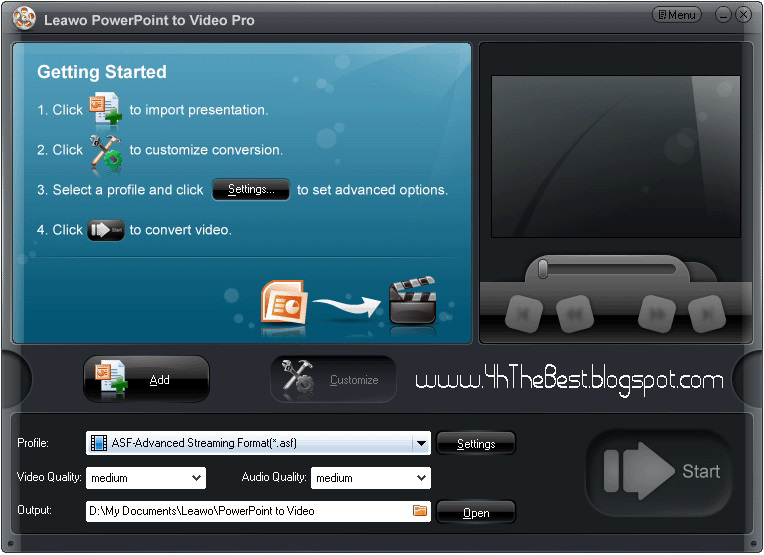
Convert PowerPoint to video in most formats. Leawo PowerPoint to Video Pro is a wonderful PowerPoint to video conversion program that assists in converting your PowerPoint presentations and slideshows to quality videos for uploading to video-sharing websites like YouTube and playing on portable devices like iPad, iPod and iPhone, while retaining all the animations, slide transitions, sounds and video clips in the source PowerPoint. #
The PPT to Video conversion tool offers an innovative way for you to deliver anything made in PowerPoint, from Math homework to Makeup ads, from courseware to church sermons, fast and faithfully to the recipients via a video-welcome site.
Convert PowerPoint to video of 23 formats
Transfer your PowerPoint to the video format you prefer. Create a variety of video slideshows, regular ones including ASF, AVI, FLV, MPEG, MP4, TS, MOV, WMV, VOB, 3GP, and rare ones like RM, RA, MKV, MKA, Wii AVI, Wii MOV, NDS DPG, NDS DPG2, NDS DPG3 and NDS DPG4. Extract a sound from PowerPoint and turn it to a different audio format, e.g. *.aac, *.ac3, *.mp3.
Support multiple PowerPoint versions as input
Convert PowerPoint 2010, 2007, 2003, 2002, 2000 files to almost all kinds of video formats. With the support for free PowerPoint Viewer 2010 and 2007, you are able to convert PowerPoint to video without Microsoft Office Suite installed on your computer. Good for Microsoft Office PowerPoint fans who want more video copies of their PowerPoint presentations.
Batch Conversion for PowerPoint files
Process multiple PPT files per conversion. The input file formats supported by this PowerPoint to video converter include PPT, PPS, POT, PPTX, PPSX, POTX, etc. Create a separate video for each input PPT file.
Convert PPT to video for multiple web services
Export a PowerPoint presentation to popular web video like Audio Video Interleaved, Flash Video, Windows Media video, Apple QuickTime Movie and more, making it accessible on YouTube, Google Video, your blogs and many other video-sharing sites.
Output video for diverse end-devices
Apart from specific video file format, this PowerPoint to video conversion tool also offers non-tech savvy users a comfort to choose a proper video output - to choose by terminal device of their PowerPoint video, which features Apple TV, Blackberry, iPod, iPad, iPhone, PSP, PS3 (HD support), Pocket PC, Zen, Zune, XBOX, and etc.
Multi-lingual User Interface for easier conversion
Leawo PowerPoint to Video Pro is set with a neat GUI in 7 most-spoken languages, i.e. French, German, Italian, Simplified and Traditional Chinese, to give you quick access to your video slideshow.
Keep everything from original PowerPoint to output video
Retain all original elements, particularly dynamic effects like music, flash, movie clips from a selected PowerPoint file to final video. You can modify the video settings in the Profile of the PPT to video converter and make your own.
Insert background music & record real-time narration
The Music feature of this cool PowerPoint to video converter allows you to add background music or your recorded narration for the video slideshow. You can insert as many soundtracks as you like. You can also add watermark or logos to credit your work. Adjust the video layout with photo frame you can create a perfect video out of ordinary PowerPoint.
Process fast and precisely with a timeline
Convert your all-ready PowerPoint presentations to videos in no minute. Display the exact process of each PPT file with precise conversion time. Preview the output video during the conversion process.

I hope you like it......!
Wednesday, February 4, 2015
Adobe Flash CS5 and ActionScript 3 Video Tutorials in French
Course: Tutorom Adobe Flash CS5 Nouveautés et ActionScript 3.0
Author: Rachel Thiebaud
Training Site: VTC Online University.
Below, you will find free sample videos to an Adobe Flash CS5 and ActionScript 3 training course in French. This course is provided by the VTC Online University. If you wish to view the entire course, learn more about the VTC Online University and sign-up for a membership.
Nouveautés dAdobe Flash CS5
Travail collaboratif : format de fichier .xfl
Formater du texte
Créer des colonnes
Relier des blocs de texte entre les images
Nouveau : dessiner des images animées
Créer un squelette avec loutil Segment
Créer un effet de ressort avec loutil Segment
Fenêtre Actions : panneaux et assistant de script
Fenêtre Actions : barre doutils de code
Objets : classe et propriété
Objets : méthode et fonction
Variables
Expressions - Types de données
Syntaxe de code
Externaliser le code A.S
Créer un lien vers une animation
Contrôler lanimation avec des boutons Stop et Play
Déclencher une animation - Événements de souris (clic - survol…)
Déplacer un objet avec les flèches du clavier
Ajouter une action de glisser-déposer sur une image
Cliquer pour positionner un objet
Placer lobjet au premier plan
Faire disparaître une image en fondu
Cliquer pour masquer lobjet
Afficher un objet
Cliquer pour afficher un champ de texte
Personnaliser le curseur de la souris
Générer un numéro aléatoire
Afficher le temps - Compte à rebours
Animation fluide
Rotation
Copier un code danimation
Ajouter - Supprimer instances de la bibliothèque
Charger du texte externe
Charger des images externes
Créer un menu déroulant animé
Créer des boutons de menu
Fermer un menu déroulant
Paramétrer le lecteur FLVPlayback
Extraire une image de la vidéo comme image de prévisualisation
Charger limage de prévisualisation
Lancer la vidéo après la prévisualisation
Nouveau : insérer des points de repères directement dans Flash
Insérer des sous-titres
Lire plusieurs vidéos avec des boutons
Lire plusieurs vidéos avec une Playlist
Créer le code pour la Playlist
Présentation de lauteur
Read more »
Author: Rachel Thiebaud
Training Site: VTC Online University.
Below, you will find free sample videos to an Adobe Flash CS5 and ActionScript 3 training course in French. This course is provided by the VTC Online University. If you wish to view the entire course, learn more about the VTC Online University and sign-up for a membership.
Introduction
Présentation du tutoromNouveautés dAdobe Flash CS5
Travail collaboratif : format de fichier .xfl
Créer du texte avec le nouvel outil TLF
Créer des paragraphesFormater du texte
Créer des colonnes
Relier des blocs de texte entre les images
Dessiner et animer des décors avec loutil Déco
Dessiner avec de nouveaux remplissagesNouveau : dessiner des images animées
Animer avec un squelette
Utiliser les modèles danimation FlashCréer un squelette avec loutil Segment
Créer un effet de ressort avec loutil Segment
Les bases dActionScript 3.0
Introduction et nouveautésFenêtre Actions : panneaux et assistant de script
Fenêtre Actions : barre doutils de code
Objets : classe et propriété
Objets : méthode et fonction
Variables
Expressions - Types de données
Syntaxe de code
Externaliser le code A.S
Coder avec les fragments de code AS 3.0
Créer un lien vers une page webCréer un lien vers une animation
Contrôler lanimation avec des boutons Stop et Play
Déclencher une animation - Événements de souris (clic - survol…)
Déplacer un objet avec les flèches du clavier
Ajouter une action de glisser-déposer sur une image
Cliquer pour positionner un objet
Placer lobjet au premier plan
Faire disparaître une image en fondu
Cliquer pour masquer lobjet
Afficher un objet
Cliquer pour afficher un champ de texte
Personnaliser le curseur de la souris
Générer un numéro aléatoire
Afficher le temps - Compte à rebours
Animer avec les fragments de code AS 3.0
Animation de pixels en pixelsAnimation fluide
Rotation
Copier un code danimation
Les fragments de code AS 3.0 pour texte et images
Cliquer pour charger des images de la bibliothèqueAjouter - Supprimer instances de la bibliothèque
Charger du texte externe
Créer un diaporama avec des boutons
Créer des boutons reliés à des images externesCharger des images externes
Créer un menu déroulant
Créer un menu principal et des sous-menusCréer un menu déroulant animé
Créer des boutons de menu
Fermer un menu déroulant
Utiliser les fragments de code AS 3.0 pour la vidéo
Introduction et nouveautésParamétrer le lecteur FLVPlayback
Extraire une image de la vidéo comme image de prévisualisation
Charger limage de prévisualisation
Lancer la vidéo après la prévisualisation
Nouveau : insérer des points de repères directement dans Flash
Insérer des sous-titres
Lire plusieurs vidéos avec des boutons
Lire plusieurs vidéos avec une Playlist
Créer le code pour la Playlist
Conclusion
Résumé et aidePrésentation de lauteur
Subscribe to:
Posts (Atom)