Showing posts with label how. Show all posts
Showing posts with label how. Show all posts
Tuesday, February 17, 2015
How To Remote Computer Using IP address
 |
| How To Remote Computer Using IP address |
Literally, hacking is accessing something or somebody in internet without their permission or interest. While, speaking in summary, hacking is very easy job, it is like instead of using front door, finding the hidden door of a house and hijacking the precious things. Among all the hacking, hacking via IP address is one of the most common yet powerful beginning.
Mesothelioma Lawyers San Diego
You may want to hack the website and put your advertisement there or grab some database information In this type of hacking, you are playing with the web server’s computer instead of the administrator’s computer. Because, www.website.com is hosted in separate web server rather than personal computer.
Another can be accessing your friend’s computer from your home. Again this is IP based and this is possible only when your friend’s computer is online. If it is off or not connected to internet then remote IP hacking is totally impossible.
Well, both of the hacking has the same process. Let’s summarize what we must do.
Secured Loan Calculator
Confirm the website or a computer you want to hack.
Find or trace their IP address.
Make sure that IP address is online
Scan for open ports
Check for venerable ports
access through the port
Brute-force username and password
Now let me describe in brief in merely basic steps that a child can understand it.
First, getting the IP address of victim.
To get the IP address of the victim website, ping for it in command prompt.
For example,
ping www.google.com
will fetch the IP address of Google.com
a How to hack remote computer using IP Address
This is how we can get the IP address of the victims website.
How about your friend’s PC? You can’t do www.yourfirend’sname.com, can you? Finding your friend’s IP address is little tough job, and tougher it is if he has dynamic IP address that keeps changing.
One of the widely used method to detect IP address of your friend is by chatting with him.
You might find this article helpful
How to get the IP address using MSN/Yahoo/Pidgin messenger
Now you got the IP address right? Is it online?
To know the online status just ping the IP address, if it is online it will reply.
If the IP address is online, scan for the open ports. Open ports are like closed door without locks, you can go inside and outside easily.
Use Advanced Port Scanner to scan all open and venerable ports.
b How to hack remote computer using IP Address
Now you’ve IP address and open port address of the victim, you can now use telnet to try to access them. Make sure that you’ve telnet enabled in your computer or install it from Control panel > Add remove programs > add windows components.
Now open command prompt and use telnet command to access to the IP address. Use following syntax for connection.
telnet [IP address] [Port]
c How to hack remote computer using IP Address
You’ll be asked to input login information.
d How to hack remote computer using IP Address
If you can guess the informations easily then it’s OK. Or you can use some brute-forcing tools like this one.
In this way you’ll able to hack remove computer using only IP address
Purchase Structured Settlements

Monday, February 16, 2015
Using a VPN Service – How to Hide Yourself Online

Many Internet surfers want to remain hidden or just left alone. Their reasoning might be founded on something more than just doing something illicit, or illegal. Their reasoning might be based on not wanting to be a part of the ongoing online marketing strategies that scrub personal habits away from everything we do on the Internet. Many companies are eager to get their hands on any Internet surfer’s searching habits, buying and selling preferences, and even their economic status. Most of these companies use this technology to build profiles from the information they garner to know exactly what the online surfer is interested in purchasing before they ever start looking.
Creating Anonymity
The easiest way to hide personal buying habits and other individualized data is to create an anonymous connection online, through a VPN (virtual private network). Using a VPN, the online surfer’s browser will not be recognized by intrusive eyes attempting to pry into personal information and habits. A VPN service creates anonymity by reassigning the computer’s true IP address in an exchange for an anonymous one. This will instantly create a barrier that hides the Internet surfer’s actual data including their region, name and physical address, along with the ISP (Internet service provider) that is being used.
Also Read: Tips on How to Have Better SEO Results with Link Building
A VPN service works as an intermediary between the user and the remote location or website. All requests generated from the user, or the visited website, must go through the virtual private network server. This avoids any man-in-the-middle attackers or cyber-thieves attempting to invade the Internet surfer’s privacy.
Open Access
Using a reputable VPN service provides the Internet surfer open access to any website online. They can gain instant access to social media networks, blogging sites, and streaming websites. These include Netflix, Hulu, Pandora and others that are often restricted due to high activity bandwidth. Additionally, they can visit gambling sites that have heavy restrictions between countries, and allow them to have full access.
Gaining the ability to surf online, without having any online connection session monitored or blocked, is the simplest way to hide online. A reputable VPN service can provide a continuous secured environment that is anonymous to anyone attempting to intercept personal information and data, from any location around the globe. In some countries, government rules and regulations allow law enforcement to request logs and information anytime they suspect an illegal activity from the anonymous surfer.
Veronica Clyde reviews the best VPN providers at VPNServices.net. She loves to share Online Security, VPN technology and Blogging tips. If interested you can check out a Hide my ass.com review.
Sunday, February 15, 2015
How to do Unlimited Video and Voice Calls on Mobile for Free

Is your increasing phone and sms bill is giving you tension, than don’t be scared. There are so many communication services available on internet which allows you to do unlimited call on mobile for free. In this post I am telling you about some of these services which will help you to get rid of your increasing phone bill. For this you will only need 3G or Wi-Fi data.
Also Read: Top 5 Cheapest Android Tablets below Rs. 5000 in India in 2013
For video calling
FaceTime
http://www.apple.com/in/mac/facetime/
This is a free video calling app of Apple, which works on Wi-Fi. This works very well with second and third generation iPad, iPhone and mac. It is very easy to use.
Tinychat
tinychat.com
It is a browser based chat service. In this you can create a room for chat, for this you have to just do signup. In this room you can invite your friends as a guest. Your friends can chat with you without doing signup process.
For video and voice calling
Nimbuzz
nimbuzz.com
This application works very nicely on smartphones as well as on feature loaded phones. It contains desktop client for windows and mac. To do free chat you have to do free signup in nimbuzz account, after this you can add people to your contacts. You can do free voice calls with the help of 3G or Wi-Fi. It also allows you to do chat with your friends on google talk, yahoo chat, msn and facebook account.
Oovoo
oovoo.com
It provides you video calling services in twelve different ways on your computer or mobile. Its main feature is that it allows you to send files and record your calls.
Also Read: The 12 Best Tools To Protect Your Password
Also Read: The 12 Best Tools To Protect Your Password
Rocketalk
rocketalk.com
You can’t do video chat with the help of this ,but it allows you to send photos, videos and text messages. It is freely available on the internet for all android and java feature loaded phones.
Skype
skype.com
It work on android, IOS, windows and symbian phones. If you have 3G or Wi-Fi than with the help of skype you can do free call to any skype mobile user.
Fring
fring.com
With fring you can do free voice calls, video calls and instant messaging on 3G or Wi-Fi. It provides free four ways group video chat service. It is available for IOS, android and symbian phones.
Viber
viber.com
It is available for android, IOS, windows and blackberry phones. You can do free unlimited call and send messages to a person who have viber installed handset. This works on 3G and Wi-Fi, for this you have to only pay for data.
How to Make a Notepad in VB Net
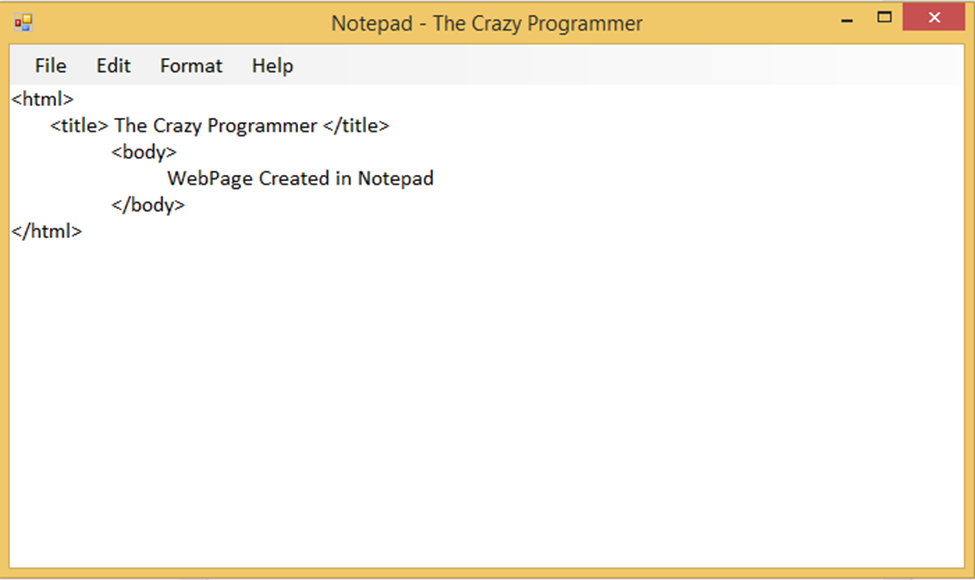
In today’s article I am going to provide you a simple notepad source code developed in visual basic.net. So the notepad uses very simple controls like RichTextBox1 and MenuStrips that is used to design the graphical interface. The code is very simple and self explanatory. This notepad has options like File, Edit, Format and Help.
Also Read: How to Create a Web Browser in Visual Basic
Also Read: How to Create a Web Browser in Visual Basic
How to Use?
- Unzip the rar file we have provided to your favorite folder
- Open Visual Studio, go to File > Open > Project/Solution
- Navigate to the folder where you have extracted the rar file
- Open Notepad.sln file
- Now you can make changes in the program
Download the notepad source code from below link.
- Download Notepad Source Code -
How To Hack Into Someone Facebook Account
 |
| Hacking Facebook |
There are 3 main methods used when it comes to Hacking Facebook accounts. Briefly,They are :
1.Keyloggers : Making the victim open up his account on a system with a keylogger attached/ Sending a remote keylogger to the victim.
2.Phishing : Making a fake login page and having the entered details sent to you.(This has been explained in the "Starting Off" section).
3.Social Engineering : This is just a fancy term for making the victim give up vital information in a supposedly casual conversation. The information may be the users recovery questions answer, which can then be used to take over the account via : "Forgot your password? Click Here!" Button.
Some time ago, Facebook developers patched in a new security feature. In a nutshell, if facebook detects that your IP address is different from the usual(previously used) IP addresses, it may stop you from logging in without further identity verification which may be, for example: an SMS code. Now this can potentially effect every type of hack, but if it is infact possible there is only one way to know- By doing it. Hope for the best, Prepare for the worst.
1.Keyloggers:
A Keylogger is type of software that usually runs in the background, without the knowledge of an innocent victim and secretly records their actions. A wide variety of functionality is offered by various products : Almost all record every keystroke on the keyboard in a simple text file format, some record mouse clicks and pointer locations, some record folders and files opened and some even take screenshots at regular intervals.
Most of the keyloggers provide an option whether to store the text file locally send it to an FTP server or your email id. They can be installed and set up relatively easily like any other program. Once setup, they usually go into hiding as a background process leaving no trace on the surface and starting up automatically when the operating system starts.
For some reason people seem to avoid or look over keyloggers, I can give you my word this is the best and easiest method for hacking any type of account there is, so definitely check this out. In our case, we want the victim to login to their facebook account on a compromised system, one that has a stealthy keylogger installed. There are two ways to go about this :Installing a keylogger on your system and having them use it to login to their FB account, or if you have temporary access to their system- Installing it on their computer and having the log files sent to you by email or FTP.
Whichever way you prefer, the method is the same. Download a keylogger, follow the smooth setup instructions as you would when installing anything, customize settings according to your preference and Let it rip !
I have personally tried and tested the following keyloggers, you can choose any of these randomly since they all seem to do the job :
(i)Actual key-logger - Download from http://www.actualkeylogger.com/download-free-key-logger.html
(ii)Home key-logger - Download from http://www.kmint21.com/download.html
(iii) REFOG Free key-logger - Download from https://www.refog.com/download.html
(P.S- Certain full versions of very good keyloggers are available as torrents from websites like isohunt.com , kickass.to but these torrents are illegal and we shouldnt use them)
2.Phishing : This method has been described in great detail in the "Starting Off" section. Follow the instructions carefully while using facebook.com instead of gmail.com.
3.Social Engineering : Facebook uses security questions as a recovery method, almost everyone sets it up to a personal question like :
"Where were you born? "
"What was your first pets name? "
Social engineering is a term that describes a non-technical kind of intrusion that relies heavily on human interaction and often involves tricking other people to break normal security procedures.
A social engineer runs what used to be called a "con game." For example, a person using social engineering to break into a computer network might try to gain the confidence of an authorized user and get them to reveal information that compromises the networks security. Social engineers often rely on the natural helpfulness of people as well as on their weaknesses. They might, for example, call the authorized employee with some kind of urgent problem that requires immediate network access.
Appeal to vanity, appeal to authority, appeal to greed, and old-fashioned eavesdropping are other typical social engineering techniques.
For this method to work, you need to know the person whos account you want to hack. In fact, you need to know them well enough, such that it doesnt seem suspicious when you carefully try to work up their recovery questions into your conversation and get them to answer it casually.
After that,using the "Forgot your password? Click Here!" Button one can simply turn over an accounts user. But even after this, your work is not done yet. Nowadays facebook has implemented a 24 hour delay before recovering the account and logging in, So if the victim happens to log in during that period they can reverse the process in seconds. Not only do you need careful planning, but also careful timing.
Facebook uses a verification method during recovery -if the victims email and phone number are no longer functional it asks to put in another phone number. If you can somehow get a hold of their cell phones or email accounts their account is yours, otherwise the process may be slow and fruitless.
How to create MySQL Database and User name

What is MySQL:
MySQL is an open source database management software that helps users store, organize, and later retrieve data. It has a variety of options to grant specific users nuanced permissions within the tables and databases, May this tutorial gives you some kind of thinking about MySQL........!So now we lets start
How to Create MySQL Database and User:
Step 1: Login to your Web hosting account and open your control panel ( Cpanel ).
Step 2: Find Databases portion look like this: for example
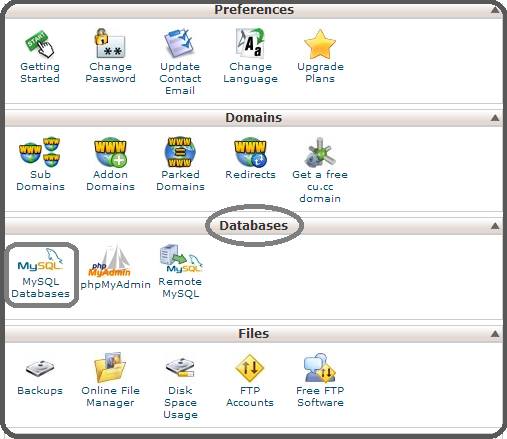
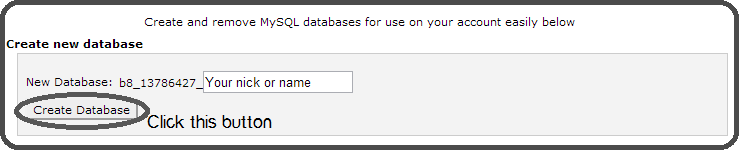
Step 3: Now click on MySQL Database and this screen will appeared look like given below image: Write your name or nick name as you want in New Database black box and click on Create Database.
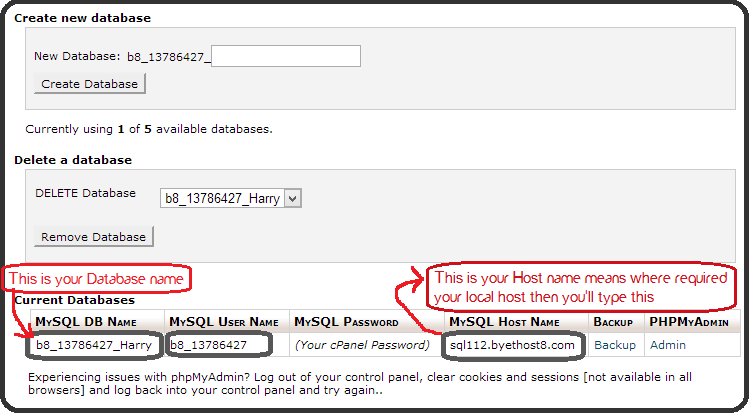
After click on Create Database button then you will see the given below screen. In the MySQL DB name means Your Database name and in the MySQL Host name means where you are required to enter your local host then you will type this ( your MySQL Host Name).
Congratulation you have done it.For more detail How to Install WordPress
Saturday, February 14, 2015
Whatsapp for Java Phones How to Download and Install
Whatsapp for java phones is like a dream for java mobile users. I found a solution for this and in this article I am going to tell you how to download and install whatsapp for java phones.
WhatsApp is an app used to send free sms to your friend who is also using the app via internet. WhatsApp is available for various platforms like android, windows, symbian and some s40 phones. One who have a smartphone can esily use Whatsapp.
WhatsApp is an app used to send free sms to your friend who is also using the app via internet. WhatsApp is available for various platforms like android, windows, symbian and some s40 phones. One who have a smartphone can esily use Whatsapp.

Also Read: How to Install WhatsApp on PC
In this article I am going to tell you how to download and install whatsapp for java phones. Below, I am sharing a link to download WhatsApp for Java Phones which will run in almost all java mobile phones with big screen (having at least 240x320 screen size, can’t say anything about other screens). It is 100% working and tested by me on some nokia phones like Asha 200, C2-03, etc. So without wasting time just click on below link to download WhatsApp for java phone and comment below to let me know if it is working in your phone or not.
Steps to Download and Install Whatsapp for Java Phones
1. Download both the files (WhatsApp_Messenger.jar and WhatsApp_Messenger.jad) from the link given below in your PC (not in mobile)WhatsApp_Messenger.jar
WhatsApp_Messenger.jad
3. You have done! Now try to run whatsapp from your mobile and enjoy using it.
Note: Downloading must be done in computer. If you download files from mobile then the file format does not support.
Search Terms:
whatsapp for java phonewhatsapp para java
download whatsapp for java jar
download whatsapp for samsung java
whatsapp java download
whatsapp for java mobile phone
whatsapp java download
whatsapp for java mobile phone
Wednesday, February 11, 2015
How to Execute Your Java Program Without main Method
Have you ever thought about executing your java programwithout main() method? If you write a program without main() and compile it then it will compile successfully. But as you execute the program it will show an error that Main method not found in the class. JVM verify the code before its execution. JVM checks for main() method and if not found it will show error.
+Method.jpg "How to Execute Your Java Program Without main() Method?")
There is a way to execute your java program without using main(). This can be done using static block. JVM has four phases as I have discussed in one of my article about Java Virtual Machine Architecture and Structure.
- Load Code
- Verify Code
- Execute Code
- Provide Runtime Environment
Static block executed at the loading of code. In below example we get output and then error is shown because the code is executed at loading of code and after that JVM verifies the code and show error.
class demo
{
static
{
System.out.println("Static Block");
}
}
Note: This method will work till Java 6. Java 7 and newer versions doesn’t allow this because JVM checks presence of main method before initializing the class.
If you have any other such trick then you can share it by commenting below.
Thursday, February 5, 2015
How To Change Your Mouse Cursor Into Pakistan Flag

Asalam-o-Alaikum Friends!!! To day I am Gonna Tell You That How To Change Your Cursor Into Pakistan Flag !!
Its Very Easy Follow These Steps Respectively
Fist Download Pakistan Cursor Click Here To Download(Its Not Too Large Its Just 21Kbs)
- Save Attached File in your PC
- Go to Start menu + Settings + Control Panel
- Double click on Mouse Icon
- Go in Pointer
- Click on Browse menu and select saved File (PAKISTAN.ani)
- Click Apply and Ok.
We Have Finished Now.. Chek Your Cursor Now It has changed into Pakistan Flag !!
♥♥ Pakistan Zindabad ♥♥
" Prewiew Is Given Below !! "

How to share presentations on LinkedIn
 Image via CrunchBase
There are two ways to share your presentations on Linkedin; 1) Using SlideShare 2) Google Presentations. In order to share presentations either via SlideShare or Google presentations you need to install SlideShare or Google presentations application. To add a presentation to your Linkedin profile, follow the steps below:
 1. First sign in to your Linkedin account
2. Either go to Edit My Profile and add an application from there or click Add an
Application box on the right.
3. In the Applications section, click Add an
Application and select Google or Slideshare
Presentation.
You need to have a SlideShare or Google account to use respective applications. Login to your SlideShare/Google account to link your SlideShare/Google account with your Linkedin profile.These Linkedin applications not only let you share your presentations with your connections but also let you see what people in your network are sharing, viewing and commenting.
Google presentations Linkedin App
Though you can upload and share a new presentation from your desktop or share an existing presentation in your Google account yet you still have to go to Google docs to create a new presentations.
SlideShare Linkedin App
Slideshare app lets you share all presentations from your Linkedin account or upload and share new presentations from within Linkedin. SlideShare has recently released Linkedin share button as well which means now you can share any SlideShare presentation on LinkedIn with a press of button.
2. Either go to Edit My Profile and add an application from there or click Add an
Application box on the right.
3. In the Applications section, click Add an
Application and select Google or Slideshare
Presentation.
You need to have a SlideShare or Google account to use respective applications. Login to your SlideShare/Google account to link your SlideShare/Google account with your Linkedin profile.These Linkedin applications not only let you share your presentations with your connections but also let you see what people in your network are sharing, viewing and commenting.
Google presentations Linkedin App
Though you can upload and share a new presentation from your desktop or share an existing presentation in your Google account yet you still have to go to Google docs to create a new presentations.
SlideShare Linkedin App
Slideshare app lets you share all presentations from your Linkedin account or upload and share new presentations from within Linkedin. SlideShare has recently released Linkedin share button as well which means now you can share any SlideShare presentation on LinkedIn with a press of button.

Wednesday, February 4, 2015
How to find the Greatest common divisor of an integer array in java
In this post Im going to illustrate very simple algorithm to find the Greatest Common Divisor (GCD) of set of integers (an array) using java.
See the following implementation of the algorithm.
Here is the output for 15, 18, 42 and 108

Here is the output for 3,7 and 12

Read more »
- In this algorithm we first find the smallest integer in the int array.
- Then we get the modulus for each element in the numbers of the array by dividing smallest integer and add all those modulus together.
- After processing each element in the array we check if the total of modulus is equals to 0. If it is equal to 0 then the GCD is current smallest value if that total is not equals 0 we deduct 1 from the previous smallest value and do the same computation.
- The algorithm will continue with the same operations until total of modulus becomes 0 or until smallest integer is 2.
- If there is any GCD, algorithm will return it or otherwise it will return -1.
See the following implementation of the algorithm.
public class GCD {

    public static int findGcd(int... numbers) {

        //Find the smallest integer in the number list

        int smallest = numbers[0];

        for (int i = 1; i < numbers.length; i++) {
            if (numbers[i] < smallest) {
                smallest = numbers[i];
            }
        }

        //Find the GCD
        while (smallest > 1) {

            int counter = 0;
            int modTot = 0;

            while (counter < numbers.length) {

                modTot += numbers[counter] % smallest;
                counter++;

            }

            if (modTot == 0) {
                //Return the gcd if any
                return smallest;
            }

            //System.out.print(" "+ smallest);
            smallest--;

        }
        //return -1 if there is no gcd
        return -1;
    }

    public static void main(String[] x) {
        System.out.println("The GCD of 15 18 42 108 : "+GCD.findGcd(new int[]{15, 18, 42,108}));
    }
}
Here is the output for 15, 18, 42 and 108
Here is the output for 3,7 and 12
Subscribe to:
Posts (Atom)