Showing posts with label part. Show all posts
Showing posts with label part. Show all posts
Monday, February 16, 2015
switch statement in C Part 2
Read: switch statement in C - Part 1
In the last tutorial I told you about the syntax and working of a program using switch keyword. Well in day to day programming we generally don’t use that syntax in C. This is because if we use the earlier method then it will execute all the subsequent statements after the condition turns true.
Syntax
switch(integer expression)
{
case constant 1: Statement 1;
break;
case constant 2; Statement 2;
break;
. . . . . .
. . . . . .
default: Statement 3;
}
Explanation of the above syntax
Well the whole syntax is almost same. But in the above syntax we have added break keyword after the cases. Remember we generally do not use continue keyword with switch.
Working of break keyword in switch statement
As you can see I have given break keyword after every case. Its working in switch case is almost same as in loops. If the compiler encounters break keyword in switch then it will take the control to the outside of switch block.
The perfect way to understand it is through a program.
Output
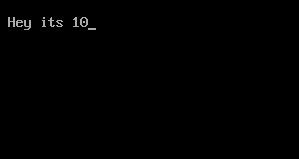
Explanation
Points to remember
In the last tutorial I told you about the syntax and working of a program using switch keyword. Well in day to day programming we generally don’t use that syntax in C. This is because if we use the earlier method then it will execute all the subsequent statements after the condition turns true.
switch statement in C
So we need a syntax that will execute only a certain set of statements when the condition turns true. So lets checkout the advance modification of switch statement with break keyword.Syntax
switch(integer expression)
{
case constant 1: Statement 1;
break;
case constant 2; Statement 2;
break;
. . . . . .
. . . . . .
default: Statement 3;
}
Explanation of the above syntax
Well the whole syntax is almost same. But in the above syntax we have added break keyword after the cases. Remember we generally do not use continue keyword with switch.
Working of break keyword in switch statement
As you can see I have given break keyword after every case. Its working in switch case is almost same as in loops. If the compiler encounters break keyword in switch then it will take the control to the outside of switch block.
 |
| Flowchart of switch statement in C - Image Source |
The perfect way to understand it is through a program.
#include<stdio.h>

void main()
{
 int i=10;

 switch(i)
 {
  case 1: printf("Hey its 1");
   break;

  case 10: printf("Hey its 10");
    break;

  case 7: printf("Hey its 7");
   break;

  default: printf("Hey its default");
 }
}
Output
- In the beginning of the program I have declared an integer variable with value 10.
- After that I have written switch keyword with integer expression i. It means the compiler will check the value of i (which is 10) with all the cases.
- In the first case I have written integer constant ‘1’ which turns false. So compiler will skip that case.
- In the second case I have written integer constant ‘10’ which turns true. So compiler will execute the statements under that case.
- Now just after the printf() function I have written a break keyword. So it will take the control of the program outside the switch block.
Points to remember
- You can also write multiple statements under each case to execute them. And you will not need to give separate braces for them, as the switch statement executes all statements once the condition turns true.
- Remember default keyword is optional. Its completely depend on us whether we want it or not in our program.
- The order of cases and default in the switch block do no matter. You can write them in any order but you must take care of proper use of break after each case.

Sunday, February 15, 2015
Functions in C Programming Part 4
In the last tutorial I told you about the passing values to the functions. I hope you had read that tutorial at least twice till now. So today I will tell you about some typical nuances of using functions in C language. I will also tell you about the scope rule of functions. So lets start with our first objective
1. The variables that are passed by main() function are called actual arguments or parameters and the variables in which the user defined function receives those values is called formal arguments or parameters.
2. We can pass any number of actual arguments. But it should be in the same number and order to the formal arguments.
3. We can also use the same variable name for both formal and actual arguments but the compiler will treat them different.
4. Compiler automatically passes the control to the calling function when it encounters the closing brace of user defined function. There is no need for some return statement for it.
5. However if you want to return some value to the calling function then you should use return statement for it.
6. You can use any number of return statements in your program. There is no restriction for that.
7. Some variations while using return statement
return(b);
return(4);
return(2.67);
return;
Last return statement will return any garbage value to the calling function. And we can drop the parenthesis in that case.
8. We can only return one value at a time. It’s a restriction in C. So below statements will not work.
return(x, y);
return(6,4);
9. IMPORTANT – When we change the value of formal arguments then those values will not change in actual arguments.
E.g. Suppose we pass two variables to some function. And in that function I received the values in that variables in some local variable. So when we change the values of those local variables the it will not affect to the values of actual variables.
The simple reason is that the default scope of variables inside some functions is local to it. It means the variables inside main() function can only be accessed in main() function. We cannot access them in any other function. So that is why we have to pass values to the user defined functions explicitly.
Rules for using functions in C
1. The variables that are passed by main() function are called actual arguments or parameters and the variables in which the user defined function receives those values is called formal arguments or parameters.2. We can pass any number of actual arguments. But it should be in the same number and order to the formal arguments.
3. We can also use the same variable name for both formal and actual arguments but the compiler will treat them different.
4. Compiler automatically passes the control to the calling function when it encounters the closing brace of user defined function. There is no need for some return statement for it.
5. However if you want to return some value to the calling function then you should use return statement for it.
6. You can use any number of return statements in your program. There is no restriction for that.
7. Some variations while using return statement
return(b);
return(4);
return(2.67);
return;
Last return statement will return any garbage value to the calling function. And we can drop the parenthesis in that case.
8. We can only return one value at a time. It’s a restriction in C. So below statements will not work.
return(x, y);
return(6,4);
9. IMPORTANT – When we change the value of formal arguments then those values will not change in actual arguments.
E.g. Suppose we pass two variables to some function. And in that function I received the values in that variables in some local variable. So when we change the values of those local variables the it will not affect to the values of actual variables.
Scope Rule of Functions
In this rule I will tell you about the reason behind point number 9 in above rules. Till now you must be asking that why we should pass the values to some function explicitly?The simple reason is that the default scope of variables inside some functions is local to it. It means the variables inside main() function can only be accessed in main() function. We cannot access them in any other function. So that is why we have to pass values to the user defined functions explicitly.
Friday, February 13, 2015
switch statement in C Part 1
It is quite common that in day to day life we have to choose one option from several choices. Say if you have to choose only one desert out of the menu. Suppose if I give you a task to write a program for one menu. Probably you will use if-else ladder to make that. Well its good for now. But after reading this tutorial, I would suggest you to go with switch statements rather than anything else.
Syntax
switch(integer expression)
{
case constant 1: do this;
case constant 2: do this;
case constant 3: do this;
default: do this;
}
Explanation of this syntax
integer expression: It is used to check if programmer wants to execute the set of statements under switch or not. It works similar to conditions but we can only give integer expressions insider. It means an expression which is a integer or which evolves an integer.
case: It is the keyword to show multiple conditions inside switch statement. We can have any number of cases.
constant 1,2 and 3: As its name suggests these values should be either integer constant or character constant. Each value must be unique.
do this: We can use any legal C programming statement at that place.
default: It is another keyword which is used to execute some default statements if all conditions fails inside switch.
Now lets apply the above knowledge in some program.
Output
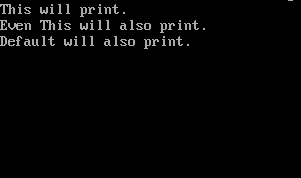
Explanation
Now an obvious question which should hit your mind.
Why is it so?
Well this is not the demerit of this program. In fact it’s the speciality of switch statements. It means if one condition turns true then all the subsequent conditions will also get executed inside switch statement. This is because it does not check any condition after getting a true value with one condition.
Switch statements are used very frequently in C programming. So I would recommend you to go through this tutorial at least once and make some programs by using switch keyword. In the next tutorial I will tell you about the method by which we can stop executing all the statements inside switch.
switch statement in C
This is the decision control instruction which allows the programmer to build a menu type program, so that the user can choose one options from multiple choices. It is also called switch-case-default instructions too because these are three keywords involved in making this instruction. Now lets head on to the syntax of switch statement.Syntax
switch(integer expression)
{
case constant 1: do this;
case constant 2: do this;
case constant 3: do this;
default: do this;
}
Explanation of this syntax
integer expression: It is used to check if programmer wants to execute the set of statements under switch or not. It works similar to conditions but we can only give integer expressions insider. It means an expression which is a integer or which evolves an integer.
case: It is the keyword to show multiple conditions inside switch statement. We can have any number of cases.
constant 1,2 and 3: As its name suggests these values should be either integer constant or character constant. Each value must be unique.
do this: We can use any legal C programming statement at that place.
default: It is another keyword which is used to execute some default statements if all conditions fails inside switch.
Now lets apply the above knowledge in some program.
#include<stdio.h>

void main ()
{
 int i=2;

 switch(i)
 {
  case 0: printf("No Message");
  case 1: printf("No Message");
  case 2: printf("This will print.
");
  case 3: printf("Even This will also print.
");
  default: printf("Default will also print.");
 }
}
Output
- The program starts with integer variable i with value 2 in it.
- After that I have written a switch keyword with one integer expression. i.e. switch(i). It means full switch statements will get executed if i=2 turns true.
- I think you should have an idea that case 2 will get executed.
- Now the turning point is after case 2, every statement get executed.
- Even the last expression under default is also get executed.
Now an obvious question which should hit your mind.
Why is it so?
Well this is not the demerit of this program. In fact it’s the speciality of switch statements. It means if one condition turns true then all the subsequent conditions will also get executed inside switch statement. This is because it does not check any condition after getting a true value with one condition.
Switch statements are used very frequently in C programming. So I would recommend you to go through this tutorial at least once and make some programs by using switch keyword. In the next tutorial I will tell you about the method by which we can stop executing all the statements inside switch.
Thursday, February 5, 2015
Creating EasyTooltip class Part 21
In this tutorial well work on removing listeners and tooltips.
First of all, go to TooltipListener class and update the kill() function. Right now it only removes the 2 mouse event listeners. It should also stop the timer, remove its listener, set it to null and set the tooltip to null.
Full TooltipListener class:
Now go to EasyTooltip class and add a function called removeListener(). Give it a parameter "listener", which is the DisplayObject instance that has a tooltip listener. In the function, we loop through the listeners and compare each "list" property of the listener in the array to the listener in the parameter. If they match, remove that listener using kill() method of the TooltipListener instance, set it to null, and remove the item from the array.
Add a new function called kill(), which loops through the listeners and kills each one. Then remove the TooltipCursor, the ENTER_FRAME listener and set the cursor to null.
Full EasyTooltip code:
Thats all for today.
Thanks for reading!
Read more »
First of all, go to TooltipListener class and update the kill() function. Right now it only removes the 2 mouse event listeners. It should also stop the timer, remove its listener, set it to null and set the tooltip to null.
public function kill():void {
list.removeEventListener(MouseEvent.ROLL_OVER, onOver);
list.removeEventListener(MouseEvent.ROLL_OUT, onOut);
timer.removeEventListener(TimerEvent.TIMER_COMPLETE, onTimer);
timer.stop();
timer = null;
tip = null;
}
Full TooltipListener class:
package com.kircode.EasyTooltip
{
import flash.display.DisplayObject;
import flash.events.MouseEvent;
import flash.events.TimerEvent;
import flash.utils.Timer;

/**
 * Manages a single visible object that displays a tooltip when rolled over.
 * @author Kirill Poletaev
 */
public class TooltipListener
{

public var tip:Tooltip;
public var list:DisplayObject;
private var timer:Timer;

public function TooltipListener(listener:DisplayObject, tooltip:Tooltip, delay:int)
{
list = listener;
tip = tooltip;
timer = new Timer(delay, 1);
timer.addEventListener(TimerEvent.TIMER_COMPLETE, onTimer);
listener.addEventListener(MouseEvent.ROLL_OVER, onOver);
listener.addEventListener(MouseEvent.ROLL_OUT, onOut);
}

public function kill():void {
list.removeEventListener(MouseEvent.ROLL_OVER, onOver);
list.removeEventListener(MouseEvent.ROLL_OUT, onOut);
timer.removeEventListener(TimerEvent.TIMER_COMPLETE, onTimer);
timer.stop();
timer = null;
tip = null;
}

private function onOver(evt:MouseEvent):void {
timer.reset();
timer.start();
}

private function onOut(evt:MouseEvent):void {
tip.display = false;
timer.stop();
}

private function onTimer(evt:TimerEvent):void {
tip.display = true;
}

}

}
Now go to EasyTooltip class and add a function called removeListener(). Give it a parameter "listener", which is the DisplayObject instance that has a tooltip listener. In the function, we loop through the listeners and compare each "list" property of the listener in the array to the listener in the parameter. If they match, remove that listener using kill() method of the TooltipListener instance, set it to null, and remove the item from the array.
/**
 * Removes a Tooltip listener.
 * @paramlistener The object that invokes tooltip on roll over.
 */

public function removeListener(listener:DisplayObject):void {
for (var i:int = listeners.length-1; i >= 0; i--) {
if (listener == listeners[i].list) {
listeners[i].kill();
listeners[i] = null;
listeners.splice(i, 1);
}
}
}
Add a new function called kill(), which loops through the listeners and kills each one. Then remove the TooltipCursor, the ENTER_FRAME listener and set the cursor to null.
/**
 * Completely removes the EasyTooltip manager, all the listeners and tooltip cursor.
 */

public function kill():void {
for (var i:int = listeners.length-1; i >= 0; i--) {
listeners[i].kill();
listeners[i] = null;
listeners.splice(i, 1);
}
(par as DisplayObjectContainer).removeChild(cursor);
cursor.removeEventListener(Event.ENTER_FRAME, onFrame);
cursor = null;
}
Full EasyTooltip code:
package com.kircode.EasyTooltip
{
import flash.display.DisplayObjectContainer;
import flash.display.DisplayObject;
import flash.events.Event;
/**
 * Utility for creation of tooltips.
 * @author Kirill Poletaev
 */
public class EasyTooltip
{

private var par:DisplayObject;
public var listeners:Array;
private var cursor:TooltipCursor;
private var parW:int;
private var parH:int;
private var delay:int;
private var smooth:Number;

/**
 * Create a Tooltip manager. Needed for creating and managing tooltips.
 * @paramparent Reference to the parent of tooltips - the container, which will contain the objects that will be rolled over.
 * @paramparentWidth Width of the parent.
 * @paramparentHeight Height of the parent.
 * @paramsmoothMovement The movement smoothener - the bigger the value, the smoother the movement. 1 = no smoothment.
 * @paramspawnDelay Delay in milliseconds of how long the user has to hold their mouse over the object to invoke a tooltip.
 */

public function EasyTooltip(parent:DisplayObjectContainer, parentWidth:int, parentHeight:int, smoothMovement:Number = 3, spawnDelay:int = 0)
{
smooth = smoothMovement;
delay = spawnDelay;
par = parent;
listeners = [];
parW = parentWidth;
parH = parentHeight;
cursor = new TooltipCursor(parentWidth, parentHeight, smoothMovement);
cursor.mouseChildren = false;
cursor.mouseEnabled = false;
parent.addChild(cursor);
cursor.addEventListener(Event.ENTER_FRAME, onFrame);
setStyle(new TooltipStyle());
trace("Tooltip manager created!");
}

/**
 * Set a new style for the tooltips.
 * @paramstyle TooltipStyle object that defines the style.
 */

public function setStyle(style:TooltipStyle):void {
cursor.setStyle(style);
}

/**
 * Add a Tooltip listener.
 * @paramlistener Object, which invokes the tooltip on roll over.
 * @paramtooltip Message to be displayed.
 * @returnNewly created Tooltip object. Can be used to dynamically change its properties in real-time.
 */

public function addListener(listener:DisplayObject, tooltip:String):Tooltip {
var tip:Tooltip = new Tooltip(tooltip);
var list:TooltipListener = new TooltipListener(listener, tip, delay);
listeners.push(list);
return tip;
}

/**
 * Removes a Tooltip listener.
 * @paramlistener The object that invokes tooltip on roll over.
 */

public function removeListener(listener:DisplayObject):void {
for (var i:int = listeners.length-1; i >= 0; i--) {
if (listener == listeners[i].list) {
listeners[i].kill();
listeners[i] = null;
listeners.splice(i, 1);
}
}
}

/**
 * Completely removes the EasyTooltip manager, all the listeners and tooltip cursor.
 */

public function kill():void {
for (var i:int = listeners.length-1; i >= 0; i--) {
listeners[i].kill();
listeners[i] = null;
listeners.splice(i, 1);
}
(par as DisplayObjectContainer).removeChild(cursor);
cursor.removeEventListener(Event.ENTER_FRAME, onFrame);
cursor = null;
}

private function onFrame(evt:Event):void {
cursor.x += (par.mouseX - cursor.x)/smooth;
cursor.y += (par.mouseY - cursor.y)/smooth;
var displayInd:int = -1;
for (var i:int = 0; i < listeners.length; i++) {
if (listeners[i].tip.display) {
displayInd = i;
break;
}
}
if (displayInd == -1) {
cursor.alpha = 0;
}else {
cursor.alpha = 1;
cursor.setText(listeners[displayInd].tip.msg);
}
}

}

}
Thats all for today.
Thanks for reading!
Android beginner tutorial Part 63 BroadcastReceiver
Today well learn about Broadcast Receivers.
A Broadcast Receiver is a component used for catching external events and reacting to them. Events can be dispatched by other applications, servies, as well as the system. In the previous tutorials, weve already covered handling events using Intents. The components that we used as examples can also react to anonymous messages between applications using sendBroadcast() method.
Using Broadcast Receivers, it is possible to listen to Intents of other applications, change your applications behaviour based on the data, react to changes in the system and events of other applications.
Just like all activities extend Activity class and all services extend Service class, all broadcast receivers extend BroadcastReceiver class.
The class has a single callback method - onReceive().
When a message arrives to the receiver, Android calls onReceive() method and passes the Intent message to it. The Broadcast Receiver component is only active during the execution of this method. The process thats currently executing the code in onReceive() is considered top priority and will be saved, unless theres a critical lack in memory in the system.
When the program returns from onReceive(), the Broadcast Receiver object becomes inactive and the system basically thinks "this BroadcastReceivers job is done" and will get rid of it if the memory taken by this object is needed for higher priority processes.
This sounds fair and all but it can actually cause a problem. For example, imagine if your onReceive() function creates a separate thread with a long process in it. While the process is still running, the onReceive() function will already be considered inactive by the system. If onReceive() is actually expecting a response from the thread, that response may never come since the BroadcastReceiver could get deleted by then.
But if theres a problem theres always a solution. Of course, everything depends on the situation, sometimes one solution might be more optimal than the other one.
One way to solve this would be to create a Service in the onReceive() function and let the Service do the work to keep the content of the process active during the whole operation process.
Thats all for today. Next time we will do something practical.
Thanks for reading!
Read more »
A Broadcast Receiver is a component used for catching external events and reacting to them. Events can be dispatched by other applications, servies, as well as the system. In the previous tutorials, weve already covered handling events using Intents. The components that we used as examples can also react to anonymous messages between applications using sendBroadcast() method.
Using Broadcast Receivers, it is possible to listen to Intents of other applications, change your applications behaviour based on the data, react to changes in the system and events of other applications.
Just like all activities extend Activity class and all services extend Service class, all broadcast receivers extend BroadcastReceiver class.
The class has a single callback method - onReceive().
When a message arrives to the receiver, Android calls onReceive() method and passes the Intent message to it. The Broadcast Receiver component is only active during the execution of this method. The process thats currently executing the code in onReceive() is considered top priority and will be saved, unless theres a critical lack in memory in the system.
When the program returns from onReceive(), the Broadcast Receiver object becomes inactive and the system basically thinks "this BroadcastReceivers job is done" and will get rid of it if the memory taken by this object is needed for higher priority processes.
This sounds fair and all but it can actually cause a problem. For example, imagine if your onReceive() function creates a separate thread with a long process in it. While the process is still running, the onReceive() function will already be considered inactive by the system. If onReceive() is actually expecting a response from the thread, that response may never come since the BroadcastReceiver could get deleted by then.
But if theres a problem theres always a solution. Of course, everything depends on the situation, sometimes one solution might be more optimal than the other one.
One way to solve this would be to create a Service in the onReceive() function and let the Service do the work to keep the content of the process active during the whole operation process.
Thats all for today. Next time we will do something practical.
Thanks for reading!
Creating a Pentomino game using AS3 Part 17
Today well add the ability to draw holes and cells on the grid.
First of all well declare 3 new variables, 2 of which are booleans set to false by default, and third is a Point variable with default coordinates -1;-1.
In the constructor, add 3 new event listeners for MOUSE_DOWN, MOUSE_UP and ENTER_FRAME events:
The canDraw value will be off when the canvas size window is open, and on when the window is closed. Thats why we can set canDraw to false in the beginning of newLevel() and to true in the end of its editContinue() function:
The mouseDown value is set to true in onMouseDown() and to false in onMouseUp(). Moreover, we set currentCell to -1;-1 point in onMouseUp():
Were using the currentCell variable because our drawing tool will be similar to a brush, but it also has to toggle cells (from a hole to a cell, and from a cell to a hole). If the user once clicked on a cell, it toggles its value. But since we are going to have our drawing code written in an ENTER_FRAME event handler, we need to make sure the same cell doesnt get toggled more than once.
In the onEnterFrame() function, we check if we are allowed to draw and if the mouse is held down. Then we check if the users mouse is rolled over a cell. If it is, we check if that cell does not have the coordinates of currentCell. And if so, we toggle the value, set currentCells coordinates to currently selected cells coordinates and call drawGrid():
Full code so far:
Thanks for reading!
The results:
Read more »
First of all well declare 3 new variables, 2 of which are booleans set to false by default, and third is a Point variable with default coordinates -1;-1.
private var canDraw:Boolean = false;
private var mouseDown:Boolean = false;
private var currentCell:Point = new Point(-1, -1);
In the constructor, add 3 new event listeners for MOUSE_DOWN, MOUSE_UP and ENTER_FRAME events:
addEventListener(MouseEvent.MOUSE_DOWN, onMouseDown);
addEventListener(MouseEvent.MOUSE_UP, onMouseUp);
addEventListener(Event.ENTER_FRAME, onEnterFrame);
The canDraw value will be off when the canvas size window is open, and on when the window is closed. Thats why we can set canDraw to false in the beginning of newLevel() and to true in the end of its editContinue() function:
private function newLevel():void {
canDraw = false;

var newScreen:MovieClip = new new_edit_screen();
addChild(newScreen);
newScreen.tWidth.restrict = "0-9";
newScreen.tHeight.restrict = "0-9";
newScreen.tWidth.text = 10;
newScreen.tHeight.text = 6;
newScreen.incorrect.alpha = 0;
newScreen.btn_continue.addEventListener(MouseEvent.CLICK, editContinue);

function editContinue(evt:MouseEvent):void {
if (newScreen.tWidth.text == "" || newScreen.tHeight.text == "" || newScreen.tWidth.text == "0" || newScreen.tHeight.text == "0") {
newScreen.incorrect.alpha = 1;
return;
}
newScreen.parent.removeChild(newScreen);
mapGrid = [];
var width:int = newScreen.tWidth.text;
var height:int = newScreen.tHeight.text;
for (var i:int = 0; i < height; i++) {
mapGrid[i] = [];
for (var u:int = 0; u < width; u++) {
mapGrid[i][u] = 1;
}
}
// grid settings
calculateGrid();
gridShape.x = gridStartX;
gridShape.y = gridStartY;

// draw tiles
drawGrid();

// canPutShape settings
canPutShape.graphics.clear();
canPutShape.graphics.lineStyle(2, 0xff0000);
canPutShape.graphics.drawRect(0, 0, gridCellWidth, gridCellWidth);
canPutShape.alpha = 0;

canDraw = true;
}
}
The mouseDown value is set to true in onMouseDown() and to false in onMouseUp(). Moreover, we set currentCell to -1;-1 point in onMouseUp():
private function onMouseDown(evt:MouseEvent):void {
mouseDown = true;
}

private function onMouseUp(evt:MouseEvent):void {
mouseDown = false;
currentCell = new Point(-1, -1)
}
Were using the currentCell variable because our drawing tool will be similar to a brush, but it also has to toggle cells (from a hole to a cell, and from a cell to a hole). If the user once clicked on a cell, it toggles its value. But since we are going to have our drawing code written in an ENTER_FRAME event handler, we need to make sure the same cell doesnt get toggled more than once.
In the onEnterFrame() function, we check if we are allowed to draw and if the mouse is held down. Then we check if the users mouse is rolled over a cell. If it is, we check if that cell does not have the coordinates of currentCell. And if so, we toggle the value, set currentCells coordinates to currently selected cells coordinates and call drawGrid():
private function onEnterFrame(evt:Event):void {
// if drawing is allowed and mouse is down
if (canDraw && mouseDown) {
var mousePos:Point = new Point(Math.floor((mouseX - gridStartX) / gridCellWidth), Math.floor((mouseY - gridStartY) / gridCellWidth));
// if valid coordinates
if (mousePos.x < mapGrid[0].length && mousePos.y < mapGrid.length && mousePos.x >= 0 && mousePos.y >= 0) {
// if the cell is not "current cell"
if (mousePos.x != currentCell.x || mousePos.y != currentCell.y) {
currentCell.x = mousePos.x;
currentCell.y = mousePos.y;
if (mapGrid[mousePos.y][mousePos.x] == 1) {
mapGrid[mousePos.y][mousePos.x] = 0;
}else {
mapGrid[mousePos.y][mousePos.x] = 1;
}
drawGrid();
}
}
}
}
Full code so far:
package
{
import flash.display.MovieClip;
import flash.display.Sprite;
import flash.events.Event;
import flash.events.KeyboardEvent;
import flash.events.MouseEvent;
import flash.geom.Point;
import flash.sampler.NewObjectSample;
import flash.utils.ByteArray;

/**
 * Open-source pentomino game engine
 * @author Kirill Poletaev
 */

public class pentomino_editor extends MovieClip
{
private var mapGrid:Array = [];
private var shapeButtons:Array = [];

private var gridShape:Sprite = new Sprite();
private var canPutShape:Sprite = new Sprite();
private var gridStartX:int;
private var gridStartY:int;
private var gridCellWidth:int;
private var canDraw:Boolean = false;
private var mouseDown:Boolean = false;
private var currentCell:Point = new Point(-1, -1);

public function pentomino_editor()
{
addEventListener(MouseEvent.MOUSE_MOVE, onMouseMove);
addEventListener(MouseEvent.MOUSE_DOWN, onMouseDown);
addEventListener(MouseEvent.MOUSE_UP, onMouseUp);
addEventListener(Event.ENTER_FRAME, onEnterFrame);

// add shape buttons
for (var i:int = 0; i < 4; i++) {
for (var u:int = 0; u < 3; u++) {
var shapeButton:MovieClip = new edit_shape();
shapeButton.x = 528 + u * 62;
shapeButton.y = 15 + i * 84;
addChild(shapeButton);
shapeButton.bg.alpha = 0.3;
shapeButton.shape.gotoAndStop(3 * i + u + 1);
shapeButtons.push(shapeButton);
shapeButton.addEventListener(MouseEvent.ROLL_OVER, buttonOver);
shapeButton.addEventListener(MouseEvent.ROLL_OUT, buttonOut);
}
}

// buttons
btn_mainmenu.addEventListener(MouseEvent.CLICK, doMainmenu);
btn_reset.addEventListener(MouseEvent.CLICK, function():void{newLevel()});

// new level
newLevel();

addChild(gridShape);
addChild(canPutShape);
}

private function onMouseMove(evt:MouseEvent):void {
if(mapGrid.length>0){
var mousePos:Point = new Point(Math.floor((mouseX - gridStartX) / gridCellWidth), Math.floor((mouseY - gridStartY) / gridCellWidth));
canPutShape.x = mousePos.x * gridCellWidth + gridStartX;
canPutShape.y = mousePos.y * gridCellWidth + gridStartY;
if (mousePos.x < mapGrid[0].length && mousePos.y < mapGrid.length && mousePos.x >= 0 && mousePos.y >= 0) {
canPutShape.alpha = 1;
}else {
canPutShape.alpha = 0;
}
}
}

private function newLevel():void {
canDraw = false;

var newScreen:MovieClip = new new_edit_screen();
addChild(newScreen);
newScreen.tWidth.restrict = "0-9";
newScreen.tHeight.restrict = "0-9";
newScreen.tWidth.text = 10;
newScreen.tHeight.text = 6;
newScreen.incorrect.alpha = 0;
newScreen.btn_continue.addEventListener(MouseEvent.CLICK, editContinue);

function editContinue(evt:MouseEvent):void {
if (newScreen.tWidth.text == "" || newScreen.tHeight.text == "" || newScreen.tWidth.text == "0" || newScreen.tHeight.text == "0") {
newScreen.incorrect.alpha = 1;
return;
}
newScreen.parent.removeChild(newScreen);
mapGrid = [];
var width:int = newScreen.tWidth.text;
var height:int = newScreen.tHeight.text;
for (var i:int = 0; i < height; i++) {
mapGrid[i] = [];
for (var u:int = 0; u < width; u++) {
mapGrid[i][u] = 1;
}
}
// grid settings
calculateGrid();
gridShape.x = gridStartX;
gridShape.y = gridStartY;

// draw tiles
drawGrid();

// canPutShape settings
canPutShape.graphics.clear();
canPutShape.graphics.lineStyle(2, 0xff0000);
canPutShape.graphics.drawRect(0, 0, gridCellWidth, gridCellWidth);
canPutShape.alpha = 0;

canDraw = true;
}
}

private function calculateGrid():void {
var columns:int = mapGrid[0].length;
var rows:int = mapGrid.length;

// free size: 520x460
// fit in: 510x450

// calculate width of a cell:
gridCellWidth = Math.round(510 / columns);

var width:int = columns * gridCellWidth;
var height:int = rows * gridCellWidth;

// calculate side margin
gridStartX = (520 - width) / 2;

if (height < 450) {
gridStartY = (450 - height) / 2;
}
if (height >= 450) {
gridCellWidth = Math.round(450 / rows);
height = rows * gridCellWidth;
width = columns * gridCellWidth;
gridStartY = (460 - height) / 2;
gridStartX = (520 - width) / 2;
}
}

private function drawGrid():void {
gridShape.graphics.clear();
var width:int = mapGrid[0].length;
var height:int = mapGrid.length;

var i:int;
var u:int;

// draw background
for (i = 0; i < height; i++) {
for (u = 0; u < width; u++) {
if (mapGrid[i][u] == 1) drawCell(u, i, 0xffffff, 1, 0x999999);
}
}
}

private function drawCell(width:int, height:int, fill:uint, thick:Number, line:uint):void {
gridShape.graphics.beginFill(fill);
gridShape.graphics.lineStyle(thick, line);
gridShape.graphics.drawRect(width * gridCellWidth, height * gridCellWidth, gridCellWidth, gridCellWidth);
}

private function buttonOver(evt:MouseEvent):void {
evt.currentTarget.bg.alpha = 1;
}

private function buttonOut(evt:MouseEvent):void {
evt.currentTarget.bg.alpha = 0.3;
}

private function doMainmenu(evt:MouseEvent):void {
(root as MovieClip).gotoAndStop(1);
}

private function onMouseDown(evt:MouseEvent):void {
mouseDown = true;
}

private function onMouseUp(evt:MouseEvent):void {
mouseDown = false;
currentCell = new Point(-1, -1)
}

private function onEnterFrame(evt:Event):void {
// if drawing is allowed and mouse is down
if (canDraw && mouseDown) {
var mousePos:Point = new Point(Math.floor((mouseX - gridStartX) / gridCellWidth), Math.floor((mouseY - gridStartY) / gridCellWidth));
// if valid coordinates
if (mousePos.x < mapGrid[0].length && mousePos.y < mapGrid.length && mousePos.x >= 0 && mousePos.y >= 0) {
// if the cell is not "current cell"
if (mousePos.x != currentCell.x || mousePos.y != currentCell.y) {
currentCell.x = mousePos.x;
currentCell.y = mousePos.y;
if (mapGrid[mousePos.y][mousePos.x] == 1) {
mapGrid[mousePos.y][mousePos.x] = 0;
}else {
mapGrid[mousePos.y][mousePos.x] = 1;
}
drawGrid();
}
}
}
}

}

}
Thanks for reading!
The results:
KirSQLite Flex AIR Database Manager Part 43
In this tutorial well change the way Views are displayed.
Go to the tableSelect() function. Well add multiple changes here, some related to Views - some not. Firstly, set the columns of the tableGrid object to an array of a single column in the beginning of the function. This will make sure that the table will only be filled with data if a table has been selected.
Now go to the "view" if statement in this function. When we set text value to the queryText input, we should also display the data in the View table itself. So, call a function called displayView() twice in the code - both times below the lines that set text property of queryText to viewschema.views[0].sql.
The full function looks like this:
Create the displayView() function. Inside of it, we will create an SQLStatement object that uses a SELECT command to select everything from our View object.
When thats selected, we parse it into the resultData ArrayCollection and apply the necessary column data to queryResultGrid object. This procedure is similar to the one that is executed once the user writes his own query in the Query tab and executes it.
Now our application can add, delete and display Views properly.
Thats all for todays tutorial.
Full code so far:
Thanks for reading!
Read more »
Go to the tableSelect() function. Well add multiple changes here, some related to Views - some not. Firstly, set the columns of the tableGrid object to an array of a single column in the beginning of the function. This will make sure that the table will only be filled with data if a table has been selected.
tableGrid.columns = [new AdvancedDataGridColumn("Data")];
Now go to the "view" if statement in this function. When we set text value to the queryText input, we should also display the data in the View table itself. So, call a function called displayView() twice in the code - both times below the lines that set text property of queryText to viewschema.views[0].sql.
// view
if (tableTree.selectedItem.@isBranch == false && tableTree.selectedItem.@type == "view") {
isViewSelected = true;
connection.loadSchema(SQLViewSchema, tableTree.selectedItem.@label, tableTree.selectedItem.@databaseName);
var viewschema:SQLSchemaResult = connection.getSchemaResult();
if(tabNavigator.selectedIndex!=2){
tabNavigator.addEventListener(IndexChangedEvent.CHANGE, tabChangeView);
tabNavigator.selectedIndex = 2;
}else {
queryText.text = viewschema.views[0].sql;
displayView();
}
function tabChangeView(evt:IndexChangedEvent):void {
queryText.text = viewschema.views[0].sql;
displayView();
tabNavigator.removeEventListener(IndexChangedEvent.CHANGE, tabChangeView);
}
}
The full function looks like this:
private function tableSelect():void {
isTableSelected = false;
isIndexSelected = false;
isViewSelected = false;
saveTableButton.emphasized = false;
fullSelectedTable = "";
columnData = new ArrayCollection([]);
tableGrid.columns = [new AdvancedDataGridColumn("Data")];
if(col_name!=null){
col_name.text = "";
col_data.selectedIndex = 0;
col_key.selected = false;
col_auto.selected = false;
col_unique.selected = false;
col_null.selected = false;
col_default.text = "";
col_conflict.selectedIndex = 0;
}
// database
if (tableTree.selectedItem.@isBranch) {
var dataname:String;
if (tableTree.selectedItem.@numid == 1) dataname = "main";
if (tableTree.selectedItem.@numid > 1) dataname = "db" + tableTree.selectedItem.@numid;
selectedDatabase = dataname;
}
// table
if (tableTree.selectedItem.@isBranch == false && tableTree.selectedItem.@type == "table") {
isTableSelected = true;
selectedDatabase = tableTree.selectedItem.@databaseName;
fullSelectedTable = "Selected table: " + selectedDatabase + "." + tableTree.selectedItem.@label;
tableData = new ArrayCollection([]);
var newColumns:Array = [checkboxColumn];
connection.loadSchema(SQLTableSchema, tableTree.selectedItem.@label, tableTree.selectedItem.@databaseName);
var schema:SQLSchemaResult = connection.getSchemaResult();
for (var i:int = 0; i < schema.tables[0].columns.length; i++) {
columnData.addItem({name:schema.tables[0].columns[i].name});
var aColumn:AdvancedDataGridColumn = new AdvancedDataGridColumn();
aColumn.headerText = schema.tables[0].columns[i].name;
aColumn.dataField = "db_" + schema.tables[0].columns[i].name;
if (schema.tables[0].columns[i].autoIncrement) aColumn.editable = false;
if (schema.tables[0].columns[i].primaryKey) tableTree.selectedItem.@primaryKeyColumn = schema.tables[0].columns[i].name;
newColumns.push(aColumn);
}
tableGrid.columns = newColumns;
var stat:SQLStatement = new SQLStatement();
stat.sqlConnection = connection;
stat.text = "SELECT * FROM " + tableTree.selectedItem.@databaseName + "." + tableTree.selectedItem.@label;
stat.execute(-1, new Responder(tableSuccess, tableError));
}
// view
if (tableTree.selectedItem.@isBranch == false && tableTree.selectedItem.@type == "view") {
isViewSelected = true;
connection.loadSchema(SQLViewSchema, tableTree.selectedItem.@label, tableTree.selectedItem.@databaseName);
var viewschema:SQLSchemaResult = connection.getSchemaResult();
if(tabNavigator.selectedIndex!=2){
tabNavigator.addEventListener(IndexChangedEvent.CHANGE, tabChangeView);
tabNavigator.selectedIndex = 2;
}else {
queryText.text = viewschema.views[0].sql;
displayView();
}
function tabChangeView(evt:IndexChangedEvent):void {
queryText.text = viewschema.views[0].sql;
displayView();
tabNavigator.removeEventListener(IndexChangedEvent.CHANGE, tabChangeView);
}
}
// index
if (tableTree.selectedItem.@isBranch == false && tableTree.selectedItem.@type == "index") {
isIndexSelected = true;
connection.loadSchema(SQLIndexSchema, tableTree.selectedItem.@label, tableTree.selectedItem.@databaseName);
var indschema:SQLSchemaResult = connection.getSchemaResult();
if(tabNavigator.selectedIndex!=2){
tabNavigator.addEventListener(IndexChangedEvent.CHANGE, tabChange);
tabNavigator.selectedIndex = 2;
}else {
queryText.text = indschema.indices[0].sql;
}
function tabChange(evt:IndexChangedEvent):void {
queryText.text = indschema.indices[0].sql;
tabNavigator.removeEventListener(IndexChangedEvent.CHANGE, tabChange);
}
}
function tableSuccess(evt:SQLResult):void {
if (evt.data != null) {
for (var item:Object in evt.data) {
var obj:Object = new Object();
for (var value:Object in evt.data[item]) {
obj["db_"+value] = evt.data[item][value];
}
tableData.addItem(obj);
}
}
}
function tableError(evt:SQLError):void {
Alert.show("Unable to read table data.", "Error");
}
}
Create the displayView() function. Inside of it, we will create an SQLStatement object that uses a SELECT command to select everything from our View object.
When thats selected, we parse it into the resultData ArrayCollection and apply the necessary column data to queryResultGrid object. This procedure is similar to the one that is executed once the user writes his own query in the Query tab and executes it.
private function displayView():void {
var stat:SQLStatement = new SQLStatement();
stat.sqlConnection = connection;
stat.text = "SELECT * FROM " + tableTree.selectedItem.@label;
stat.execute( -1, new Responder(querySuccess, queryError));
function querySuccess(evt:SQLResult):void {
var resultColumns:Array = [];
resultData = new ArrayCollection([]);
if (evt.data != null) {
// get the columns
for (var col:Object in evt.data[0]) {
var advCol:AdvancedDataGridColumn = new AdvancedDataGridColumn(String(col));
resultColumns.push(advCol);
}
// get the data
for (var i:int = 0; i < evt.data.length; i++) {
resultData.addItem(evt.data[i]);
}
}
queryResultGrid.columns = resultColumns;
lastStatement(queryText.text);
}
function queryError(evt:SQLError):void {
Alert.show("ERROR: " + evt.details, "Error");
}
}
Now our application can add, delete and display Views properly.
Thats all for todays tutorial.
Full code so far:
<?xml version="1.0" encoding="utf-8"?>
<s:WindowedApplication xmlns:fx="http://ns.adobe.com/mxml/2009"
                       xmlns:s="library://ns.adobe.com/flex/spark"
                       xmlns:mx="library://ns.adobe.com/flex/mx" showStatusBar="false"
                       xmlns:custom="*">

<s:menu>
<mx:FlexNativeMenu dataProvider="{windowMenu}" showRoot="false" labelField="@label" keyEquivalentField="@key" itemClick="menuSelect(event);" />
</s:menu>

<fx:Declarations>
<fx:XML id="windowMenu">
<root>
<menuitem label="Database" enabled="{enableEverything}">
<menuitem id="newdb" label="New" key="n" controlKey="true"/>
<menuitem id="opendb" label="Open" key="o" controlKey="true"/>
<menuitem id="savedb" label="Save a copy" key="s" controlKey="true" enabled="{tableTree.selectedItems.length>0}"/>
</menuitem>
<menuitem label="Table" enabled="{enableEverything}">
<menuitem id="newtable" label="Add table" key="t" controlKey="true" enabled="{tableTree.selectedItems.length>0}"/>
<menuitem id="droptable" label="Drop table" controlKey="true" enabled="{isTableSelected}"/>
<menuitem id="renametable" label="Rename table" controlKey="true" enabled="{isTableSelected}"/>
<menuitem id="copytable" label="Copy table" controlKey="true" enabled="{isTableSelected}"/>
<menuitem id="jointable" label="Join table" controlKey="true" enabled="{isTableSelected}"/>
</menuitem>
</root>
</fx:XML>
<fx:XMLList id="dbData">
</fx:XMLList>
<mx:ArrayCollection id="tableData">
</mx:ArrayCollection>
<mx:ArrayCollection id="columnData">
</mx:ArrayCollection>
<mx:ArrayCollection id="resultData">
</mx:ArrayCollection>
<mx:ArrayCollection id="databaseData">
</mx:ArrayCollection>
<mx:ArrayCollection id="allTables">
</mx:ArrayCollection>
<mx:ArrayCollection id="joinColumns">
</mx:ArrayCollection>
<mx:ArrayCollection id="indexTableColumns">
</mx:ArrayCollection>
<mx:ArrayCollection id="conflictTypes">
<fx:String>---</fx:String>
<fx:String>ABORT</fx:String>
<fx:String>FAIL</fx:String>
<fx:String>IGNORE</fx:String>
<fx:String>ROLLBACK</fx:String>
<fx:String>REPLACE</fx:String>
</mx:ArrayCollection>
<mx:ArrayCollection id="dataTypes">
<fx:String>NONE</fx:String>
<fx:String>INTEGER</fx:String>
<fx:String>TEXT</fx:String>
<fx:String>REAL</fx:String>
<fx:String>NUMERIC</fx:String>
</mx:ArrayCollection>
<mx:AdvancedDataGridColumn id="checkboxColumn" headerText=" " width="30" sortable="false" draggable="false" resizable="false" editable="false">
<mx:itemRenderer>
<fx:Component>
<mx:Box width="30" horizontalAlign="center">
<mx:CheckBox selected="@{data.sel}" />
</mx:Box>
</fx:Component>
</mx:itemRenderer>
</mx:AdvancedDataGridColumn>
<mx:TitleWindow id="newTableWindow" title="Create new table" close="closeNewTableWindow();" showCloseButton="true">
<s:VGroup>
<s:HGroup width="100%" verticalAlign="middle">
<s:Label>Table name: </s:Label>
<s:TextInput id="newTableName" />
</s:HGroup>
<s:HGroup width="100%" verticalAlign="middle">
<s:Label>Key column: </s:Label>
<s:TextInput id="keyName" />
</s:HGroup>
<s:Button click="createNewTable();" label="Create" width="100%" />
</s:VGroup>
</mx:TitleWindow>
<mx:TitleWindow id="newRecordWindow" title="Add new record" close="closeNewRecordWindow();" showCloseButton="true">
<s:VGroup width="100%" height="100%">
<mx:AdvancedDataGrid id="recordDataGrid" width="100%" height="50" editable="true"/>
<s:Button click="addNewRecord();" label="Add record" width="100%"/>
</s:VGroup>
</mx:TitleWindow>
<mx:TitleWindow id="historyWindow" title="SQL History" close="closeHistoryWindow();" showCloseButton="true">
<mx:Box width="100%" height="100%" paddingLeft="10" paddingRight="10" paddingTop="10" paddingBottom="10">
<s:TextArea id="historyText" width="100%" height="100%" editable="false" />
</mx:Box>
</mx:TitleWindow>
<mx:TitleWindow id="renameTableWindow" title="Rename table" close="closeRenameTableWindow();" showCloseButton="true">
<s:VGroup>
<s:HGroup width="100%" verticalAlign="middle">
<s:Label>Table name: </s:Label>
<s:TextInput id="renameTableName" />
</s:HGroup>
<s:Button click="doRenameTable();" label="Rename" width="100%" />
</s:VGroup>
</mx:TitleWindow>
<mx:TitleWindow id="copyTableWindow" title="Copy table" close="closeCopyTableWindow();" showCloseButton="true">
<s:VGroup paddingTop="8">
<s:Label id="selectedCopyTable" />
<s:HGroup width="100%" verticalAlign="middle">
<s:Label>Destination database: </s:Label>
<mx:ComboBox editable="false" id="copyDestinationDatabase" dataProvider="{databaseData}" labelField="name" />
</s:HGroup>
<s:HGroup width="100%" verticalAlign="middle">
<s:Label>New table name: </s:Label>
<s:TextInput id="copyTableName" />
</s:HGroup>
<s:Button click="doCopyTable();" label="Copy" width="100%" />
</s:VGroup>
</mx:TitleWindow>
<mx:TitleWindow id="joinTableWindow" title="Join two tables" close="closeJoinTableWindow();" showCloseButton="true">
<s:VGroup paddingTop="4">
<s:Label id="selectedJoinTable" />
<mx:ComboBox editable="false" id="joinTableCombo" dataProvider="{allTables}" labelField="name" width="100%" />
<s:HGroup width="100%" verticalAlign="middle">
<s:Label>New table name: </s:Label>
<s:TextInput id="joinTableName" />
</s:HGroup>
<s:HGroup width="100%" verticalAlign="middle">
<s:Label>Destination database: </s:Label>
<mx:ComboBox editable="false" id="joinDestinationDatabase" dataProvider="{databaseData}" labelField="name" />
</s:HGroup>
<s:Button click="doJoinTable();" label="Join" width="100%" enabled="{joinTableCombo.selectedIndex>-1}" />
</s:VGroup>
</mx:TitleWindow>
<mx:TitleWindow id="joinTableColumnsWindow" title="Choose which columns to leave" close="closeJoinTableColumnsWindow();" showCloseButton="true">
<s:VGroup paddingTop="4">
<mx:AdvancedDataGrid id="joinColumnsGrid" width="500" height="300" dataProvider="{joinColumns}" editable="false">
<mx:columns>
<mx:AdvancedDataGridColumn headerText=" " width="30" sortable="false" draggable="false" resizable="false" editable="false">
<mx:itemRenderer>
<fx:Component>
<mx:Box width="30" horizontalAlign="center">
<mx:CheckBox selected="@{data.sel}" />
</mx:Box>
</fx:Component>
</mx:itemRenderer>
</mx:AdvancedDataGridColumn>
<mx:AdvancedDataGridColumn dataField="fullName" headerText="Column" />
<mx:AdvancedDataGridColumn dataField="tableName" headerText="Table" width="90" />
</mx:columns>
</mx:AdvancedDataGrid>
<s:Button click="doJoinColumnsTable();" label="Join" width="100%"/>
</s:VGroup>
</mx:TitleWindow>
<mx:TitleWindow id="indexWindow" title="Add a new index" close="closeIndexWindow();" showCloseButton="true">
<s:VGroup paddingTop="4">
<s:HGroup width="100%" verticalAlign="middle">
<s:Label>New index name: </s:Label>
<s:TextInput id="indexName" />
</s:HGroup>
<mx:CheckBox label="Unique" id="indexUnique"/>
<s:HGroup width="100%" verticalAlign="middle">
<s:Label>Table: </s:Label>
<mx:ComboBox editable="false" id="indexTableCombo" dataProvider="{allTables}" labelField="name" width="100%" change="updateIndexTableColumns();"/>
</s:HGroup>
<s:Label>Column(s):</s:Label>
<s:List allowMultipleSelection="true" width="100%" height="160" id="indexColumnList" dataProvider="{indexTableColumns}" />
<s:Button click="doNewIndex();" label="Add index" width="100%" enabled="{indexColumnList.selectedIndex>-1}" />
</s:VGroup>
</mx:TitleWindow>
<mx:TitleWindow id="viewWindow" title="Add a new view" close="closeViewWindow();" showCloseButton="true" width="400">
<s:VGroup paddingTop="4" width="100%">
<s:HGroup width="100%" verticalAlign="middle">
<s:Label>View name: </s:Label>
<s:TextInput id="viewName" width="100%" />
</s:HGroup>
<s:HGroup width="100%" verticalAlign="middle">
<s:Label>Destination database: </s:Label>
<mx:ComboBox editable="false" id="viewDestinationDatabase" dataProvider="{databaseData}" labelField="name" />
</s:HGroup>
<s:HGroup width="100%" verticalAlign="middle">
<s:Label>Select statement: </s:Label>
<s:TextInput id="viewSelect" width="100%" />
</s:HGroup>
<s:Button click="doNewView();" label="Add view" width="100%" />
</s:VGroup>
</mx:TitleWindow>
</fx:Declarations>

<fx:Script>
<![CDATA[
import flash.data.SQLCollationType;
import flash.data.SQLConnection;
import flash.data.SQLResult;
import flash.data.SQLSchema;
import flash.data.SQLSchemaResult;
import flash.data.SQLStatement;
import flash.errors.SQLError;
import flash.events.Event;
import flash.events.MouseEvent;
import flash.events.SQLEvent;
import flash.filesystem.File;
import flash.net.FileFilter;
import flash.net.FileReference;
import flash.net.Responder;
import flash.ui.ContextMenu;
import flash.ui.ContextMenuItem;
import mx.collections.ArrayCollection;
import mx.controls.advancedDataGridClasses.AdvancedDataGridColumn;
import mx.controls.Alert;
import mx.events.CloseEvent;
import mx.events.FlexNativeMenuEvent;
import mx.events.IndexChangedEvent;
import mx.managers.PopUpManager;

[Bindable]
[Embed("../lib/table.png")]
public var iconTable:Class;

[Bindable]
[Embed("../lib/key.png")]
public var iconIndex:Class;

[Bindable]
[Embed("../lib/eye.png")]
public var iconView:Class;

private var connection:SQLConnection = new SQLConnection();
[Bindable]
private var selectedDatabase:String = "";
[Bindable]
private var isTableSelected:Boolean = false;
[Bindable]
private var isIndexSelected:Boolean = false;
[Bindable]
private var isViewSelected:Boolean = false;
private var sqlHistory:Array = [];
private var recordColumnNames:Array = [];
private var recordColumnNamesFull:Array = [];
[Bindable]
private var fullSelectedTable:String = "";
[Bindable]
private var enableEverything:Boolean = true;
[Bindable]
private var isTreeEmpty:Boolean = true;

private function selectAllChange(evt:Event):void {
var i:int;
if (evt.currentTarget.selected) {
for (i = 0; i < tableData.length; i++) {
tableData[i].sel = true;
}
} else
if (!evt.currentTarget.selected) {
for (i = 0; i < tableData.length; i++) {
tableData[i].sel = false;
}
}
tableGrid.invalidateDisplayList();
tableGrid.invalidateList();
}

private function menuSelect(evt:FlexNativeMenuEvent):void {
if(enableEverything){
(evt.item.@id == "newdb")?(newDatabase()):(void);
(evt.item.@id == "opendb")?(openDatabase()):(void);
(evt.item.@id == "newtable")?(newTable()):(void);
(evt.item.@id == "droptable")?(dropTable()):(void);
(evt.item.@id == "savedb")?(saveCopy()):(void);
(evt.item.@id == "renametable")?(renameTable()):(void);
(evt.item.@id == "copytable")?(copyTable()):(void);
(evt.item.@id == "jointable")?(joinTable()):(void);
}
}

private function newDatabase():void {
var file:File = File.desktopDirectory.resolvePath("Untitled");
file.addEventListener(Event.SELECT, newSelect);
file.browseForSave("Choose where to save the database");
var newDB:XML;
var statement:SQLStatement = new SQLStatement();
function newSelect(evt:Event):void {
if (file.exists) {
Alert.show("File already exists, cannot overwrite.", "Nope");
return;
}
file.nativePath += ".db";
var n:String = parseDatabase(file);
loadDataSchema(n);
}
}

private function openDatabase():void {
var file:File = new File();
file.browseForOpen("Open database", [new FileFilter("Databases", "*.db"), new FileFilter("All files", "*")]);
file.addEventListener(Event.SELECT, openSelect);

function openSelect(evt:Event):void {
var n:String = parseDatabase(file, true);
loadDataSchema(n);
}
}

private function saveCopy():void {
var databasePath:String;
if (selectedDatabase == "main") databasePath = dbData.db[0].@path;
if (selectedDatabase != "main") {
var newNum:int = Number(selectedDatabase.replace("db", ""));
var newInd:int;
for (var i:int = 0; i < dbData.db.length(); i++) {
if (dbData.db[i].@numid == newNum) {
newInd = i;
break;
}
}
databasePath = dbData.db[newInd].@path;
}
var file:File = new File(databasePath);
file.browseForSave("Save copy of database");
file.addEventListener(Event.SELECT, onCopySelect);
function onCopySelect(evt:Event):void {
if(notAlreadyOpen(file)){
var initFile:File = new File(databasePath);
initFile.copyTo(file, true);
}else {
Alert.show("Cannot overwrite a file that is currently open.", "Nope");
}
}
}

private function loadDataSchema(name:String):void {
if (name != "") {
isTreeEmpty = false;
connection.loadSchema(null, null, name, true, new Responder(schemaSuccess, schemaError));
function schemaSuccess(evt:SQLSchemaResult):void {
// Schema found! Now parsing:
var result:SQLSchemaResult = evt;
// Adding tables:
var nid:Number = (name=="main")?(1):(Number(name.replace("db", "")));
var dataNode:XMLList = dbData.db.(@numid == nid);
dataNode.setChildren(<placeholder/>);
delete dataNode.placeholder;
for (var i:int = 0; i < result.tables.length; i++) {
var newTable:XML = new XML(<tb/>);
newTable.@label = result.tables[i].name;
newTable.@isBranch = false;
newTable.@databaseName = name;
newTable.@icon = "iconTable";
newTable.@type = "table";
dataNode.appendChild(newTable);
}
// Adding views
for (var v:int = 0; v < result.views.length; v++) {
var newView:XML = new XML(<view/>);
newView.@label = result.views[v].name;
newView.@isBranch = false;
newView.@databaseName = name;
newView.@icon = "iconView";
newView.@type = "view";
dataNode.appendChild(newView);
}
// Adding indices
for (var u:int = 0; u < result.indices.length; u++) {
var newIndex:XML = new XML(<ind/>);
newIndex.@label = result.indices[u].name;
newIndex.@isBranch = false;
newIndex.@databaseName = name;
newIndex.@icon = "iconIndex";
newIndex.@type = "index";
dataNode.appendChild(newIndex);
}
}
function schemaError(evt:SQLError):void {
// Alert.show("Database is empty");
}
isTableSelected = false;
}
}

private function parseDatabase(file:File, needCheck:Boolean = false):String {
var ret:String = "";
if (!needCheck || file.exists) {
if(!needCheck || notAlreadyOpen(file)){
var newDB:XML;
if (dbData.db.length() == 0) {
connection.open(file);
dbData = new XMLList(<root></root>);
newDB = <db/>
newDB.@label = file.name + "(main)";
newDB.@name = file.name;
newDB.@numid = 1;
newDB.@isBranch = true;
newDB.@path = file.nativePath;
dbData[0].appendChild(newDB);
ret = "main";
}else
if (dbData.db.length() > 0) {
var newnum:int = dbData.db.length() + 1;
connection.attach("db"+newnum.toString(), file);
newDB = <db/>
newDB.@label = file.name + "(db" + newnum.toString() + ")";
newDB.@name = file.name;
newDB.@numid = newnum.toString();
newDB.@isBranch = true;
newDB.@path = file.nativePath;
dbData[0].appendChild(newDB);
ret = "db" + newnum.toString();
}}else {
Alert.show("Database already opened.", "Error");
}
}else {
Alert.show("File not found.", "Error");
}
return ret;
}

private function notAlreadyOpen(file:File):Boolean{
var r:Boolean = true;
for (var i:int = 0; i < dbData.db.length(); i++) {
if (file.nativePath == dbData.db[i].@path) {
r = false;
}
}
return r;
}

private function tableSelect():void {
isTableSelected = false;
isIndexSelected = false;
isViewSelected = false;
saveTableButton.emphasized = false;
fullSelectedTable = "";
columnData = new ArrayCollection([]);
tableGrid.columns = [new AdvancedDataGridColumn("Data")];
if(col_name!=null){
col_name.text = "";
col_data.selectedIndex = 0;
col_key.selected = false;
col_auto.selected = false;
col_unique.selected = false;
col_null.selected = false;
col_default.text = "";
col_conflict.selectedIndex = 0;
}
// database
if (tableTree.selectedItem.@isBranch) {
var dataname:String;
if (tableTree.selectedItem.@numid == 1) dataname = "main";
if (tableTree.selectedItem.@numid > 1) dataname = "db" + tableTree.selectedItem.@numid;
selectedDatabase = dataname;
}
// table
if (tableTree.selectedItem.@isBranch == false && tableTree.selectedItem.@type == "table") {
isTableSelected = true;
selectedDatabase = tableTree.selectedItem.@databaseName;
fullSelectedTable = "Selected table: " + selectedDatabase + "." + tableTree.selectedItem.@label;
tableData = new ArrayCollection([]);
var newColumns:Array = [checkboxColumn];
connection.loadSchema(SQLTableSchema, tableTree.selectedItem.@label, tableTree.selectedItem.@databaseName);
var schema:SQLSchemaResult = connection.getSchemaResult();
for (var i:int = 0; i < schema.tables[0].columns.length; i++) {
columnData.addItem({name:schema.tables[0].columns[i].name});
var aColumn:AdvancedDataGridColumn = new AdvancedDataGridColumn();
aColumn.headerText = schema.tables[0].columns[i].name;
aColumn.dataField = "db_" + schema.tables[0].columns[i].name;
if (schema.tables[0].columns[i].autoIncrement) aColumn.editable = false;
if (schema.tables[0].columns[i].primaryKey) tableTree.selectedItem.@primaryKeyColumn = schema.tables[0].columns[i].name;
newColumns.push(aColumn);
}
tableGrid.columns = newColumns;
var stat:SQLStatement = new SQLStatement();
stat.sqlConnection = connection;
stat.text = "SELECT * FROM " + tableTree.selectedItem.@databaseName + "." + tableTree.selectedItem.@label;
stat.execute(-1, new Responder(tableSuccess, tableError));
}
// view
if (tableTree.selectedItem.@isBranch == false && tableTree.selectedItem.@type == "view") {
isViewSelected = true;
connection.loadSchema(SQLViewSchema, tableTree.selectedItem.@label, tableTree.selectedItem.@databaseName);
var viewschema:SQLSchemaResult = connection.getSchemaResult();
if(tabNavigator.selectedIndex!=2){
tabNavigator.addEventListener(IndexChangedEvent.CHANGE, tabChangeView);
tabNavigator.selectedIndex = 2;
}else {
queryText.text = viewschema.views[0].sql;
displayView();
}
function tabChangeView(evt:IndexChangedEvent):void {
queryText.text = viewschema.views[0].sql;
displayView();
tabNavigator.removeEventListener(IndexChangedEvent.CHANGE, tabChangeView);
}
}
// index
if (tableTree.selectedItem.@isBranch == false && tableTree.selectedItem.@type == "index") {
isIndexSelected = true;
connection.loadSchema(SQLIndexSchema, tableTree.selectedItem.@label, tableTree.selectedItem.@databaseName);
var indschema:SQLSchemaResult = connection.getSchemaResult();
if(tabNavigator.selectedIndex!=2){
tabNavigator.addEventListener(IndexChangedEvent.CHANGE, tabChange);
tabNavigator.selectedIndex = 2;
}else {
queryText.text = indschema.indices[0].sql;
}
function tabChange(evt:IndexChangedEvent):void {
queryText.text = indschema.indices[0].sql;
tabNavigator.removeEventListener(IndexChangedEvent.CHANGE, tabChange);
}
}
function tableSuccess(evt:SQLResult):void {
if (evt.data != null) {
for (var item:Object in evt.data) {
var obj:Object = new Object();
for (var value:Object in evt.data[item]) {
obj["db_"+value] = evt.data[item][value];
}
tableData.addItem(obj);
}
}
}
function tableError(evt:SQLError):void {
Alert.show("Unable to read table data.", "Error");
}
}

private function newTable():void {
PopUpManager.addPopUp(newTableWindow, this);
PopUpManager.centerPopUp(newTableWindow);
enableEverything = false;
newTableWindow.title = "Create new table";
focusManager.setFocus(newTableName);
}

private function dropTable():void {
Alert.show("Are you sure you want to completely delete this table?", "Drop table?", Alert.YES | Alert.NO, null, dropConfirm);
function dropConfirm(evt:CloseEvent):void {
if (evt.detail == Alert.YES) {
var stat:SQLStatement = new SQLStatement();
stat.sqlConnection = connection;
stat.text = "DROP TABLE " + selectedDatabase + "." + tableTree.selectedItem.@label;
lastStatement(stat.text);
stat.execute( -1, new Responder(dropTableSuccess, dropTableError));
}
}
function dropTableSuccess(evt:SQLResult):void {
loadDataSchema(selectedDatabase);
tableData = new ArrayCollection([]);
}
function dropTableError(evt:SQLError):void {
Alert.show("ERROR:" + evt.details, "Error");
}
}

private function closeNewTableWindow():void{
PopUpManager.removePopUp(newTableWindow);
enableEverything = true;
}

private function createNewTable():void {
var stat:SQLStatement = new SQLStatement();
stat.sqlConnection = connection;
stat.text = "CREATE TABLE IF NOT EXISTS " + selectedDatabase + "." + newTableName.text + "(" + keyName.text + " INTEGER PRIMARY KEY AUTOINCREMENT NOT NULL)";
lastStatement(stat.text);
stat.execute( -1, new Responder(newTableSuccess, newTableError));
function newTableSuccess(evt:SQLResult):void {
closeNewTableWindow();
loadDataSchema(selectedDatabase);
}
function newTableError(evt:SQLError):void {
Alert.show("ERROR:" + evt.details, "Error");
}
}

private function lastStatement(text:String):void {
statementText.text = text;
sqlHistory.push(text);
}

private function openHistory():void {
PopUpManager.addPopUp(historyWindow, this);
enableEverything = false;
historyWindow.width = width - 100;
historyWindow.height = height - 100;
PopUpManager.centerPopUp(historyWindow);
historyText.text = "";
for (var i:int = sqlHistory.length - 1; i >= 0; i--) {
historyText.appendText(sqlHistory[i] + "
");
}
}

private function closeHistoryWindow():void {
PopUpManager.removePopUp(historyWindow);
enableEverything = true;
}

private function saveTable():void {
connection.begin();
var keyColumnName:String = tableTree.selectedItem.@primaryKeyColumn;
// clear all "sel" and store them in a temp array
var tempSel:Array = [];
for (var s:int = 0; s < tableData.length; s++) {
if (tableData[s].sel) {
tempSel.push(true);
tableData[s].sel = false;
}else
if (!tableData[s].sel) {
tempSel.push(false);
}
}
// update each row
for (var i:int = 0; i < tableData.length; i++) {
var stat:SQLStatement = new SQLStatement();
var sqlStat:String = "UPDATE " + selectedDatabase + "." + tableTree.selectedItem.@label + " SET";
// add each attribute as parameter
for (var attribute:String in tableData[i]) {
// if column is not our CheckBox column or the key column
if (attribute != "mx_internal_uid" && attribute!=keyColumnName && attribute!="sel") {
// add value as parameter
stat.parameters["@" + attribute.substr(3)] = tableData[i][attribute];
sqlStat += " " + attribute.substr(3) + "=@" + attribute.substr(3) + ",";
}
}
// remove the last comma
sqlStat = sqlStat.substr(0, sqlStat.length - 1);
sqlStat += " WHERE " + keyColumnName + "=" + tableData[i]["db_"+keyColumnName];
stat.sqlConnection = connection;
stat.text = sqlStat;
lastStatement(stat.text);
stat.execute( -1, new Responder(saveSuccess, saveError));
}

function saveSuccess(evt:SQLResult):void {
}

function saveError(evt:SQLError):void {
Alert.show("ERROR: " + evt.details, "Error");
}

tableSelect();
for (var t:int = 0; t < tableData.length; t++) {
if (tempSel[t]) tableData[t].sel=true;
}
tableGrid.invalidateDisplayList();
tableGrid.invalidateList();
connection.commit();
}

private function deleteSelected():void {
connection.begin();
var keyColumnName:String = tableTree.selectedItem.@primaryKeyColumn;
for (var i:int = 0; i < tableData.length; i++) {
if (tableData[i].sel) {
var stat:SQLStatement = new SQLStatement();
stat.sqlConnection = connection;
stat.text = "DELETE FROM " + selectedDatabase + "." + tableTree.selectedItem.@label + " WHERE " + keyColumnName + "=" + tableData[i]["db_" + keyColumnName];
lastStatement(stat.text);
stat.execute( -1, new Responder(deleteSuccess, deleteError));
}
}
tableSelect();
tableGrid.invalidateDisplayList();
tableGrid.invalidateList();

function deleteSuccess(evt:SQLResult):void {
}
function deleteError(evt:SQLError):void {
Alert.show("ERROR: " + evt.details, "Error");
}
connection.commit();
}

private function newRecord():void {
PopUpManager.addPopUp(newRecordWindow, this);
enableEverything = false;
newRecordWindow.width = width - 100;
newRecordWindow.height = 120;
PopUpManager.centerPopUp(newRecordWindow);

var columns:Array = getSchemaColumns();

var defaultItem:Object = new Object();
recordColumnNames = [];
recordColumnNamesFull = [];

var recordColumns:Array = [];
for (var i:int = columns.length-1; i >= 0; i--) {
if (columns[i].indexOf(" AUTOINCREMENT") == -1) {
recordColumnNames.push(columnData[i].name);
recordColumnNamesFull.push(columns[i]);
var advColumn:AdvancedDataGridColumn = new AdvancedDataGridColumn(columns[i]);
recordColumns.push(advColumn);
// find DEFAULT and extract it
var defaultMatch:String = "";
var defaultPattern:RegExp = /((DEFAULT)s((".+")|([0-9]+)))/i;
if (columns[i].match(defaultPattern)) {
defaultMatch = columns[i].match(defaultPattern)[0];
// delete "DEFAULT" from the match
defaultMatch = defaultMatch.substr(8);
// if any quotes are found, remove the first and last symbols
if (defaultMatch.indexOf(") != -1) {
defaultMatch = defaultMatch.substring(1, defaultMatch.length - 1);
}
}
defaultItem[columns[i]] = defaultMatch;
}
if (columns[i].indexOf(" AUTOINCREMENT") != -1) {
columns.splice(i, 1);
}
}

// if no fields to edit, insert blank
if (columns.length == 0) {
var stat:SQLStatement = new SQLStatement();
stat.sqlConnection = connection;
stat.text = "INSERT INTO " + selectedDatabase + "." + tableTree.selectedItem.@label + " DEFAULT VALUES;";
lastStatement(stat.text);
stat.execute( -1, new Responder(newSuccess, newError));

function newSuccess(evt:SQLResult):void {
closeNewRecordWindow();
tableSelect();
tableGrid.invalidateDisplayList();
tableGrid.invalidateList();
}
function newError(evt:SQLError):void {
Alert.show("ERROR: " + evt.details, "Error");
}
return;
}

recordDataGrid.columns = recordColumns;
recordDataGrid.dataProvider = new ArrayCollection([defaultItem]);
}

private function closeNewRecordWindow():void {
PopUpManager.removePopUp(newRecordWindow);
enableEverything = true;
}

private function addNewRecord():void {
// placeholder code that inserts empty row:
var stat:SQLStatement = new SQLStatement();
stat.sqlConnection = connection;
stat.text = "INSERT INTO " + selectedDatabase + "." + tableTree.selectedItem.@label + " (";
stat.text += String(recordColumnNames);
stat.text += ") VALUES (";
var values:Array = [];
for (var i:int = 0; i < recordColumnNames.length; i++) {
var val:String;
var dataValue:String = recordDataGrid.dataProvider[0][recordColumnNamesFull[i]];
if (isNaN(Number(dataValue))) val = " + dataValue + ";
if (!isNaN(Number(dataValue))) val = dataValue;
values.push(val);
}
stat.text += String(values);
stat.text += ");";
lastStatement(stat.text);
stat.execute( -1, new Responder(newSuccess, newError));

function newSuccess(evt:SQLResult):void {
closeNewRecordWindow();
tableSelect();
tableGrid.invalidateDisplayList();
tableGrid.invalidateList();
}
function newError(evt:SQLError):void {
Alert.show("ERROR: " + evt.details, "Error");
}
}

private function columnSelect():void {
var columns:Array = getSchemaColumns();
// get the currently selected column
var currentColumn:String = columns[columnList.selectedIndex];
// delete the name of the column from this text
var currentParameters:String = currentColumn.substr(currentColumn.indexOf(columnList.selectedItem.name) + columnList.selectedItem.name.length + 1);
// find DEFAULT and extract it
var defaultMatch:String = "";
var defaultPattern:RegExp = /((DEFAULT)s((".+")|([0-9]+)))/i;
if (currentParameters.match(defaultPattern)) {
defaultMatch = currentParameters.match(defaultPattern)[0];
// delete it from currentParameters
currentParameters = currentParameters.replace(defaultMatch, "");
// delete "DEFAULT" from the match
defaultMatch = defaultMatch.substr(8);
// if any quotes are found, remove the first and last symbols
if (defaultMatch.indexOf(") != -1) {
defaultMatch = defaultMatch.substring(1, defaultMatch.length - 1);
}
}
// find ON CONFLICT and extract it
var conflictMatch:String = "";
var conflictPattern:RegExp = /((ON CONFLICT)s(ABORT|FAIL|IGNORE|ROLLBACK|REPLACE))/i;
if (currentParameters.match(conflictPattern)) {
conflictMatch = currentParameters.match(conflictPattern)[0];
// delete it from currentParameters
currentParameters = currentParameters.replace(conflictMatch, "");
// delete "ON CONFLICT" from the match
conflictMatch = conflictMatch.substr(12);
}
// apply values
col_name.text = columnList.selectedItem.name;
col_key.selected = (currentParameters.toUpperCase().indexOf("PRIMARY KEY") != -1)?(true):(false);
col_auto.selected = (currentParameters.toUpperCase().indexOf("AUTOINCREMENT") != -1)?(true):(false);
col_unique.selected = (currentParameters.toUpperCase().lastIndexOf("UNIQUE") != -1)?(true):(false);
col_null.selected = (currentParameters.toUpperCase().indexOf("NOT NULL") != -1)?(false):(true);
col_default.text = defaultMatch;
col_conflict.selectedIndex = 0;
if (conflictMatch.toUpperCase() == "ABORT") col_conflict.selectedIndex = 1;
if (conflictMatch.toUpperCase() == "FAIL") col_conflict.selectedIndex = 2;
if (conflictMatch.toUpperCase() == "IGNORE") col_conflict.selectedIndex = 3;
if (conflictMatch.toUpperCase() == "ROLLBACK") col_conflict.selectedIndex = 4;
if (conflictMatch.toUpperCase() == "REPLACE") col_conflict.selectedIndex = 5;

// read data type
connection.loadSchema(SQLTableSchema, tableTree.selectedItem.@label, tableTree.selectedItem.@databaseName);
var schema:SQLSchemaResult = connection.getSchemaResult();
col_data.textInput.text = schema.tables[0].columns[columnList.selectedIndex].dataType;

// enable or disable ON CONFLICT
checkConflict();
// unhighlight "Update selected"
col_b_update.emphasized = false;
}

private function checkConflict():void {
if (col_key.selected || !col_null.selected || col_unique.selected) {
col_conflict.enabled = true;
}else {
col_conflict.enabled = false;
}
}

private function formChange():void {
checkConflict();
if (columnList.selectedItems.length > 0) {
col_b_update.emphasized = true;
}
}

private function addColumn():void {
col_b_update.emphasized = false;
var prevTableName:String = tableTree.selectedItem.@label;
if (col_name.text != "" && col_data.textInput.text != "" && (col_null.selected || col_default.text != "")) {
connection.loadSchema(SQLTableSchema, tableTree.selectedItem.@label, tableTree.selectedItem.@databaseName);
var schema:SQLSchemaResult = connection.getSchemaResult();
var fullSQL:String = schema.tables[0].sql;
// extract the text inside the ( )
fullSQL = fullSQL.substring( fullSQL.indexOf("(") + 1 , fullSQL.lastIndexOf(")") );
var sqlText:String = "CREATE TABLE " + selectedDatabase + "." + tableTree.selectedItem.@label + " (";
sqlText += fullSQL + ", ";
// add the new column
sqlText += col_name.text + " " + col_data.textInput.text + " ";
if (col_key.selected) sqlText += "PRIMARY KEY ";
if (col_key.selected && col_conflict.selectedIndex > 0) sqlText += "ON CONFLICT " + col_conflict.selectedLabel + " ";
if (col_key.selected && col_auto.selected) sqlText += "AUTOINCREMENT ";
if (!col_null.selected) sqlText += "NOT NULL ";
if (!col_null.selected && col_conflict.selectedIndex > 0) sqlText += "ON CONFLICT " + col_conflict.selectedLabel + " ";
if (col_unique.selected) sqlText += "UNIQUE ";
if (col_unique.selected && col_conflict.selectedIndex > 0) sqlText += "ON CONFLICT " + col_conflict.selectedLabel + " ";
if (col_default.text != "") {
sqlText += "DEFAULT ";
if (isNaN(Number(col_default.text))) sqlText += " + col_default.text + ";
if (!isNaN(Number(col_default.text))) sqlText += col_default.text;
}
sqlText += ");";
lastStatement(sqlText);

// Create backup
var backupName:String = "backup";
while (!tableIsUnique(backupName)) {
backupName += "0";
}
var bstat:SQLStatement = new SQLStatement();
bstat.sqlConnection = connection;
bstat.text = "CREATE TABLE " + selectedDatabase + "." + backupName + " (" + fullSQL + ");";
bstat.execute();

// Copy data to backup
var cstat:SQLStatement = new SQLStatement();
cstat.sqlConnection = connection;
cstat.text = "INSERT INTO " + selectedDatabase + "." + backupName + " SELECT * FROM " + selectedDatabase + "." + tableTree.selectedItem.@label;
cstat.execute();

// Delete initial table
var dstat:SQLStatement = new SQLStatement();
dstat.sqlConnection = connection;
dstat.text = "DROP TABLE " + selectedDatabase + "." + tableTree.selectedItem.@label;
dstat.execute();

// Create new table
var stat:SQLStatement = new SQLStatement();
stat.sqlConnection = connection;
stat.text = sqlText;
stat.execute( -1, new Responder(newColumnSuccess, newColumnError));
}else {
Alert.show("Please fill all the required fields!", "Error");
}
function newColumnSuccess(evt:SQLResult):void {
// Insert previous values
var istat:SQLStatement = new SQLStatement();
istat.sqlConnection = connection;
istat.text = "INSERT INTO " + selectedDatabase + "." + prevTableName + " (" + columnNames() + ") SELECT " + columnNames() + " FROM " + selectedDatabase + "." + backupName;
istat.execute( -1, new Responder(newColumnInsertSuccess, newColumnInsertError));
function newColumnInsertSuccess(evt:SQLResult):void {
// Delete backup
var bdstat:SQLStatement = new SQLStatement();
bdstat.sqlConnection = connection;
bdstat.text = "DROP TABLE " + selectedDatabase + "." + backupName;
bdstat.execute();
tableSelect();
}
function newColumnInsertError(evt:SQLError):void {
Alert.show("ERROR: " + evt.details + "

Restoring the database using backup...", "Error");
// Delete existing table
var destat:SQLStatement = new SQLStatement();
destat.sqlConnection = connection;
destat.text = "DROP TABLE " + selectedDatabase + "." + prevTableName;
destat.execute();
// Restore table using backup
var rstat:SQLStatement = new SQLStatement();
rstat.sqlConnection = connection;
rstat.text = "ALTER TABLE " + selectedDatabase + "." + backupName + " RENAME TO " + prevTableName;
rstat.execute();
tableSelect();
}
}
function newColumnError(evt:SQLError):void {
Alert.show("ERROR: " + evt.details + "

Restoring the database using backup...", "Error");
// Restore table
var rstat:SQLStatement = new SQLStatement();
rstat.sqlConnection = connection;
rstat.text = "ALTER TABLE " + selectedDatabase + "." + backupName + " RENAME TO " + prevTableName;
rstat.execute();
tableSelect();
}
}

private function deleteColumn():void {
col_b_update.emphasized = false;
var prevTableName:String = tableTree.selectedItem.@label;

var columns:Array = getSchemaColumns();
// get the currently selected index
var currentIndex:int = columnList.selectedIndex;

// Create backup
var backupName:String = "backup";
while (!tableIsUnique(backupName)) {
backupName += "0";
}
var bstat:SQLStatement = new SQLStatement();
bstat.sqlConnection = connection;
var sqlText:String = "CREATE TABLE " + selectedDatabase + "." + backupName + " (";
columns.splice(currentIndex, 1);
if (columns.length == 0) {
Alert.show("Cant make a table completely empty! Leave at least one column.", "Nope");
return;
}
sqlText += String(columns);
sqlText += ");";
bstat.text = sqlText;
lastStatement(sqlText);
bstat.execute();

// Copy data to backup
var cstat:SQLStatement = new SQLStatement();
cstat.sqlConnection = connection;
cstat.text = "INSERT INTO " + selectedDatabase + "." + backupName + " (" + columnNames(currentIndex) + ") SELECT " + columnNames(currentIndex) + " FROM " + selectedDatabase + "." + tableTree.selectedItem.@label;
cstat.execute();

// Drop existing table
var dstat:SQLStatement = new SQLStatement();
dstat.sqlConnection = connection;
dstat.text = "DROP TABLE " + selectedDatabase + "." + tableTree.selectedItem.@label;
dstat.execute();

// Rename backup table to initial name
var rstat:SQLStatement = new SQLStatement();
rstat.sqlConnection = connection;
rstat.text = "ALTER TABLE " + selectedDatabase + "." + backupName + " RENAME TO " + prevTableName
rstat.execute();
tableSelect();
}

private function updateColumn():void {
col_b_update.emphasized = false;
var prevTableName:String = tableTree.selectedItem.@label;

if (col_name.text != "" && col_data.textInput.text != "" && (col_null.selected || col_default.text != "")) {
var columns:Array = getSchemaColumns();
// get the currently selected index
var currentIndex:int = columnList.selectedIndex;

// Create backup
var backupName:String = "backup";
while (!tableIsUnique(backupName)) {
backupName += "0";
}
var bstat:SQLStatement = new SQLStatement();
bstat.sqlConnection = connection;

// Compose updated column info
var newColumn:String = col_name.text + " " + col_data.textInput.text + " ";
if (col_key.selected) newColumn += "PRIMARY KEY ";
if (col_key.selected && col_conflict.selectedIndex > 0) newColumn += "ON CONFLICT " + col_conflict.selectedLabel + " ";
if (col_key.selected && col_auto.selected) newColumn += "AUTOINCREMENT ";
if (!col_null.selected) newColumn += "NOT NULL ";
if (!col_null.selected && col_conflict.selectedIndex > 0) newColumn += "ON CONFLICT " + col_conflict.selectedLabel + " ";
if (col_unique.selected) newColumn += "UNIQUE ";
if (col_unique.selected && col_conflict.selectedIndex > 0) newColumn += "ON CONFLICT " + col_conflict.selectedLabel + " ";
if (col_default.text != "") {
newColumn += "DEFAULT ";
if (isNaN(Number(col_default.text))) newColumn += " + col_default.text + ";
if (!isNaN(Number(col_default.text))) newColumn += col_default.text;
}

columns[currentIndex] = newColumn;

// Compose the table creation query
var sqlText:String = "CREATE TABLE " + selectedDatabase + "." + backupName + " (";
sqlText += String(columns);
sqlText += ");";
bstat.text = sqlText;
lastStatement(sqlText);
bstat.execute( -1, new Responder(updateColumnSuccess, updateColumnError));

function updateColumnSuccess(evt:SQLResult):void {
// Copy data to backup
var cstat:SQLStatement = new SQLStatement();
cstat.sqlConnection = connection;
cstat.text = "INSERT INTO " + selectedDatabase + "." + backupName + " (" + columnNames(currentIndex) + ") SELECT " + columnNames(currentIndex) + " FROM " + selectedDatabase + "." + tableTree.selectedItem.@label;
cstat.execute(-1, new Responder(updateInsertColumnSuccess, updateInsertColumnError));

function updateInsertColumnSuccess(evt:SQLResult):void {
// Drop existing table
var dstat:SQLStatement = new SQLStatement();
dstat.sqlConnection = connection;
dstat.text = "DROP TABLE " + selectedDatabase + "." + tableTree.selectedItem.@label;
dstat.execute();

// Rename backup table to initial name
var rstat:SQLStatement = new SQLStatement();
rstat.sqlConnection = connection;
rstat.text = "ALTER TABLE " + selectedDatabase + "." + backupName + " RENAME TO " + prevTableName;
rstat.execute();
tableSelect();
}
function updateInsertColumnError(evt:SQLError):void {
// Delete backup
var bdstat:SQLStatement = new SQLStatement();
bdstat.sqlConnection = connection;
bdstat.text = "DROP TABLE " + selectedDatabase + "." + backupName;
bdstat.execute();
tableSelect();
Alert.show("ERROR: " + evt.details, "Error");
}
}
function updateColumnError(evt:SQLError):void {
Alert.show("ERROR: " + evt.details, "Error");
}
}else {
Alert.show("Please fill all the required fields!", "Error");
}
}

private function tableIsUnique(name:String):Boolean {
var r:Boolean = true;
for (var i:int = 0; i < dbData..tb.length(); i++) {
if (dbData..tb[i].@label == name) {
r = false;
break;
}
}
return r;
}

private function columnNames(exception:int = -1):String {
var r:String = "";
var array:Array = [];
for (var i:int = 0; i < columnData.length; i++) {
if (i != exception) array.push(columnData[i].name);
}
r = String(array);
return r;
}

private function getSchemaColumns(fromtable:String = null, fromdatabase:String = null):Array {
if (fromtable == null) {
fromtable = tableTree.selectedItem.@label;
fromdatabase = tableTree.selectedItem.@databaseName;
}
connection.loadSchema(SQLTableSchema, fromtable, fromdatabase);
var schema:SQLSchemaResult = connection.getSchemaResult();
var fullSQL:String = schema.tables[0].sql;
// extract the text inside the ( )
fullSQL = fullSQL.substring( fullSQL.indexOf("(") + 1 , fullSQL.lastIndexOf(")") );
// split all columns into an array
var columns:Array = fullSQL.split(",");
return columns;
}

private function renameTable():void {
PopUpManager.addPopUp(renameTableWindow, this);
PopUpManager.centerPopUp(renameTableWindow);
enableEverything = false;
renameTableName.text = tableTree.selectedItem.@label;
}

private function closeRenameTableWindow():void {
PopUpManager.removePopUp(renameTableWindow);
enableEverything = true;
}

private function doRenameTable():void {
var stat:SQLStatement = new SQLStatement();
stat.sqlConnection = connection;
stat.text = "ALTER TABLE " + selectedDatabase + "." + tableTree.selectedItem.@label + " RENAME TO " + renameTableName.text;
lastStatement(stat.text);
stat.execute( -1, new Responder(renameSuccess, renameError));
function renameSuccess(evt:SQLResult):void {
closeRenameTableWindow();
tableTree.selectedItem.@label = renameTableName.text;
fullSelectedTable = "Selected table: " + selectedDatabase + "." + tableTree.selectedItem.@label;
}
function renameError(evt:SQLError):void {
Alert.show("ERROR: " + evt.details, "Error");
}
}

private function queryExecute():void {
if(queryText.text!="" && dbData..db.length()>0){
var stat:SQLStatement = new SQLStatement();
stat.sqlConnection = connection;
stat.text = queryText.text;
stat.execute( -1, new Responder(querySuccess, queryError));
function querySuccess(evt:SQLResult):void {
var resultColumns:Array = [];
resultData = new ArrayCollection([]);
if (evt.data != null) {
// get the columns
for (var col:Object in evt.data[0]) {
var advCol:AdvancedDataGridColumn = new AdvancedDataGridColumn(String(col));
resultColumns.push(advCol);
}
// get the data
for (var i:int = 0; i < evt.data.length; i++) {
resultData.addItem(evt.data[i]);
}
}
queryResultGrid.columns = resultColumns;
refreshEverything();
lastStatement(queryText.text);
}
function queryError(evt:SQLError):void {
Alert.show("ERROR: " + evt.details, "Error");
}
}
}

private function copyTable():void {
PopUpManager.addPopUp(copyTableWindow, this);
PopUpManager.centerPopUp(copyTableWindow);
enableEverything = false;
selectedCopyTable.text = "Selected table: " + selectedDatabase + "." + tableTree.selectedItem.@label;
copyTableName.text = tableTree.selectedItem.@label;
databaseData = new ArrayCollection([]);
var selectedDbIndex:int = 0;
for (var i:int = 0; i < dbData..db.length(); i++) {
var dbid:String;
if (dbData..db[i].@numid == 1) dbid = "main";
if (dbData..db[i].@numid != 1) dbid = "db" + dbData..db[i].@numid;
databaseData.addItem({name:dbData..db[i].@name, did:dbid});
if (dbid == tableTree.selectedItem.@databaseName) {
selectedDbIndex = i;
}
}
copyDestinationDatabase.selectedIndex = selectedDbIndex;
}

private function closeCopyTableWindow():void {
PopUpManager.removePopUp(copyTableWindow);
enableEverything = true;
}

private function doCopyTable():void {
// create table
var columns:Array = getSchemaColumns();
var destDatabase:String = copyDestinationDatabase.selectedItem.did;
var cstat:SQLStatement = new SQLStatement();
cstat.sqlConnection = connection;
cstat.text = "CREATE TABLE " + destDatabase + "." + copyTableName.text + " (" + String(columns) + ")";
cstat.execute( -1, new Responder(copySuccess, copyError));
lastStatement(cstat.text);
function copySuccess(evt:SQLResult):void {
// copy all the data
var istat:SQLStatement = new SQLStatement();
istat.sqlConnection = connection;
istat.text = "INSERT INTO " + destDatabase + "." + copyTableName.text + " (" + columnNames() + ") SELECT " + columnNames() + " FROM " + selectedDatabase + "." + tableTree.selectedItem.@label;
istat.execute( -1, new Responder(copyInsertSuccess, copyInsertError));
lastStatement(istat.text);
}
function copyError(evt:SQLError):void {
Alert.show("ERROR: " + evt.details, "Error");
}
function copyInsertSuccess(evt:SQLResult):void {
// update xml
loadDataSchema(destDatabase);
tableData = new ArrayCollection([]);
tableTree.selectedIndex = -1;
// close window
closeCopyTableWindow();
}
function copyInsertError(evt:SQLError):void {
// delete new table
var dstat:SQLStatement = new SQLStatement();
dstat.sqlConnection = connection;
dstat.text = "DROP TABLE " + destDatabase + "." + copyTableName.text;
dstat.execute();
Alert.show("ERROR: " + evt.details, "Error");
}
}

private function joinTable():void {
PopUpManager.addPopUp(joinTableWindow, this);
PopUpManager.centerPopUp(joinTableWindow);
enableEverything = false;
var selectedtable:String = selectedDatabase + "." + tableTree.selectedItem.@label;
selectedJoinTable.text = "Join " + selectedtable + " with";

allTables = new ArrayCollection([]);
for (var u:int = 0; u < dbData..tb.length(); u++) {
var fullname:String = dbData..tb[u].@databaseName + "." + dbData..tb[u].@label;
if(fullname!=selectedtable){
allTables.addItem( { name: fullname, table: dbData..tb[u].@label, database: dbData..tb[u].@databaseName} );
}
}

databaseData = new ArrayCollection([]);
var selectedDbIndex:int = 0;
for (var i:int = 0; i < dbData..db.length(); i++) {
var dbid:String;
if (dbData..db[i].@numid == 1) dbid = "main";
if (dbData..db[i].@numid != 1) dbid = "db" + dbData..db[i].@numid;
databaseData.addItem({name:dbData..db[i].@name, did:dbid});
if (dbid == tableTree.selectedItem.@databaseName) {
selectedDbIndex = i;
}
}
joinDestinationDatabase.selectedIndex = selectedDbIndex;

joinTableName.text = "Untitled";
}

private function closeJoinTableWindow():void {
PopUpManager.removePopUp(joinTableWindow);
enableEverything = true;
}

private function doJoinTable():void {
closeJoinTableWindow();
PopUpManager.addPopUp(joinTableColumnsWindow, this);
PopUpManager.centerPopUp(joinTableColumnsWindow);
enableEverything = false;
// read all columns
var columns1:Array = getSchemaColumns();
var columns2:Array = getSchemaColumns(joinTableCombo.selectedItem.table, joinTableCombo.selectedItem.database);
var commoncolumns:Array = columns1.concat(columns2);
// read all column names
connection.loadSchema(SQLTableSchema, tableTree.selectedItem.@label, tableTree.selectedItem.@databaseName);
var schema:SQLSchemaResult = connection.getSchemaResult();
var columnnames1:Array = [];
var tablename1:String = tableTree.selectedItem.@databaseName + "." + tableTree.selectedItem.@label;
for (var t:int = 0; t < schema.tables[0].columns.length; t++) {
columnnames1.push({name: schema.tables[0].columns[t].name, table:1, tablename:tablename1});
}

connection.loadSchema(SQLTableSchema, joinTableCombo.selectedItem.table, joinTableCombo.selectedItem.database);
schema = connection.getSchemaResult();
var columnnames2:Array = [];
var tablename2:String = joinTableCombo.selectedItem.database + "." + joinTableCombo.selectedItem.table;
for (var u:int = 0; u < schema.tables[0].columns.length; u++) {
columnnames2.push({name: schema.tables[0].columns[u].name, table:2, tablename:tablename2});
}

var commoncolumnnames:Array = columnnames1.concat(columnnames2);
// put everything into joinColumns
joinColumns = new ArrayCollection([]);
for (var i:int = 0; i < commoncolumns.length; i++) {
var fulln:String = commoncolumns[i].replace("
", "");
while (fulln.charAt(0) == " ") fulln = fulln.substr(1);
var gettable:int = commoncolumnnames[i].table;
var gettablename:String = commoncolumnnames[i].tablename;
var getname:String = commoncolumnnames[i].name;
joinColumns.addItem({sel:true, fullName:fulln, name:getname, table:gettable, tableName:gettablename});
}
}

private function closeJoinTableColumnsWindow():void {
PopUpManager.removePopUp(joinTableColumnsWindow);
enableEverything = true;
}

private function doJoinColumnsTable():void {
// prepare arrays
var selectedColumns:Array = [];
var secondTableColumns:Array = [];
var firstTableColumns:Array = [];
for (var i:int = 0; i < joinColumns.length; i++) {
if (joinColumns[i].sel) {
selectedColumns.push(joinColumns[i].fullName);
if (joinColumns[i].table==1) {
firstTableColumns.push(joinColumns[i].name);
}
if (joinColumns[i].table==2) {
secondTableColumns.push(joinColumns[i].name);
}
}
}
// create table
var destDatabase:String = joinDestinationDatabase.selectedItem.did;
var cstat:SQLStatement = new SQLStatement();
cstat.sqlConnection = connection;
cstat.text = "CREATE TABLE " + destDatabase + "." + joinTableName.text + " (" + String(selectedColumns) + ")";
cstat.execute( -1, new Responder(joinCreateSuccess, joinCreateError));
lastStatement(cstat.text);
function joinCreateSuccess(evt:SQLResult):void {
// copy data from table 1
if(firstTableColumns.length>0){
var copystat:SQLStatement = new SQLStatement();
copystat.sqlConnection = connection;
copystat.text = "INSERT INTO " + destDatabase + "." + joinTableName.text + " (" + firstTableColumns + ") SELECT " + firstTableColumns + " FROM " + tableTree.selectedItem.@databaseName + "." + tableTree.selectedItem.@label;
copystat.execute( -1, new Responder(joinCopySuccess, joinErrorDrop));
}else {
joinCopySuccess();
}
}
function joinCopySuccess():void {
// copy data from table 2
if(secondTableColumns.length>0){
var copystat2:SQLStatement = new SQLStatement();
copystat2.sqlConnection = connection;
copystat2.text = "INSERT INTO " + destDatabase + "." + joinTableName.text + " (" + secondTableColumns + ") SELECT " + secondTableColumns + " FROM " + joinTableCombo.selectedItem.database + "." + joinTableCombo.selectedItem.table;
copystat2.execute( -1, new Responder(joinCopy2Success, joinErrorDrop));
}else {
joinCopy2Success();
}
}
function joinCopy2Success():void {
// update xml
loadDataSchema(destDatabase);
tableData = new ArrayCollection([]);
tableTree.selectedIndex = -1;
// close window
closeJoinTableColumnsWindow();
}
function joinCreateError(evt:SQLError):void {
Alert.show("ERROR: " + evt.details, "Error");
}
function joinErrorDrop(evt:SQLError):void {
Alert.show("ERROR: " + evt.details, "Error");
var dstat:SQLStatement = new SQLStatement();
dstat.sqlConnection = connection;
dstat.text = "DROP TABLE " + destDatabase + "." + joinTableName.text;
dstat.execute();
}
}

private function refreshEverything():void {
for (var i:int = 0; i < dbData..db.length(); i++) {
var dbName:String = (dbData..db[i].@numid == 1)?("main"):("db" + dbData..db[i].@numid);
loadDataSchema(dbName);
}
tableData = new ArrayCollection([]);
tableTree.selectedIndex = -1;
}

private function newIndex():void {
PopUpManager.addPopUp(indexWindow, this);
PopUpManager.centerPopUp(indexWindow);
enableEverything = false;

indexName.text = "UntitledIndex";

allTables = new ArrayCollection([]);
for (var u:int = 0; u < dbData..tb.length(); u++) {
var fullname:String = dbData..tb[u].@databaseName + "." + dbData..tb[u].@label;
allTables.addItem( { name: fullname, table: dbData..tb[u].@label, database: dbData..tb[u].@databaseName} );
}

updateIndexTableColumns();
}

private function updateIndexTableColumns():void {
indexTableColumns = new ArrayCollection([]);
connection.loadSchema(SQLTableSchema, indexTableCombo.selectedItem.table, indexTableCombo.selectedItem.database);
var schema:SQLSchemaResult = connection.getSchemaResult();
for (var i:int = 0; i < schema.tables[0].columns.length; i++) {
indexTableColumns.addItem(schema.tables[0].columns[i].name);
}
}

private function closeIndexWindow():void {
PopUpManager.removePopUp(indexWindow);
enableEverything = true;
}

private function doNewIndex():void {
var unique:String = (indexUnique.selected)?("UNIQUE "):("");
var istat:SQLStatement = new SQLStatement();
istat.sqlConnection = connection;
istat.text = "CREATE " + unique + "INDEX " + indexTableCombo.selectedItem.database + "." + indexName.text + " ON " + indexTableCombo.selectedItem.table + " (" + String(indexColumnList.selectedItems) + ");";
istat.execute( -1, new Responder(indexSuccess, indexError));
lastStatement(istat.text);
function indexSuccess(evt:SQLResult):void {
refreshEverything();
PopUpManager.removePopUp(indexWindow);
enableEverything = true;
}
function indexError(evt:SQLError):void {
Alert.show("ERROR: " + evt.details, "Error");
}
}

private function dropIndex():void {
var dstat:SQLStatement = new SQLStatement();
dstat.sqlConnection = connection;
dstat.text = "DROP INDEX " + tableTree.selectedItem.@databaseName + "." + tableTree.selectedItem.@label;
dstat.execute( -1, new Responder(dropIndexSuccess, dropIndexError));
lastStatement(dstat.text);
function dropIndexSuccess(evt:SQLResult):void {
refreshEverything();
}
function dropIndexError(evt:SQLError):void {
Alert.show("ERROR: " + evt.details, "Error");
}
}

private function newView():void {
PopUpManager.addPopUp(viewWindow, this);
PopUpManager.centerPopUp(viewWindow);
enableEverything = false;
viewName.text = "UntitledView";
viewSelect.text = "SELECT * FROM ";

databaseData = new ArrayCollection([]);
for (var i:int = 0; i < dbData..db.length(); i++) {
var dbid:String;
if (dbData..db[i].@numid == 1) dbid = "main";
if (dbData..db[i].@numid != 1) dbid = "db" + dbData..db[i].@numid;
databaseData.addItem( { name:dbData..db[i].@name, did:dbid } );
}
}

private function closeViewWindow():void {
PopUpManager.removePopUp(viewWindow);
enableEverything = true;
}

private function doNewView():void {
var vstat:SQLStatement = new SQLStatement();
vstat.sqlConnection = connection;
vstat.text = "CREATE VIEW " + viewDestinationDatabase.selectedItem.did + "." + viewName.text + " AS " + viewSelect.text;
lastStatement(vstat.text);
vstat.execute( -1, new Responder(viewSuccess, viewError));

function viewSuccess(evt:SQLResult):void {
refreshEverything();
closeViewWindow();
}
function viewError(evt:SQLError):void {
Alert.show("ERROR: " + evt.details, "Error");
}
}

private function dropView():void {
var dstat:SQLStatement = new SQLStatement();
dstat.sqlConnection = connection;
dstat.text = "DROP VIEW " + tableTree.selectedItem.@databaseName + "." + tableTree.selectedItem.@label;
dstat.execute( -1, new Responder(dropViewSuccess, dropViewError));
lastStatement(dstat.text);
function dropViewSuccess(evt:SQLResult):void {
refreshEverything();
}
function dropViewError(evt:SQLError):void {
Alert.show("ERROR: " + evt.details, "Error");
}
}

private function displayView():void {
var stat:SQLStatement = new SQLStatement();
stat.sqlConnection = connection;
stat.text = "SELECT * FROM " + tableTree.selectedItem.@label;
stat.execute( -1, new Responder(querySuccess, queryError));
function querySuccess(evt:SQLResult):void {
var resultColumns:Array = [];
resultData = new ArrayCollection([]);
if (evt.data != null) {
// get the columns
for (var col:Object in evt.data[0]) {
var advCol:AdvancedDataGridColumn = new AdvancedDataGridColumn(String(col));
resultColumns.push(advCol);
}
// get the data
for (var i:int = 0; i < evt.data.length; i++) {
resultData.addItem(evt.data[i]);
}
}
queryResultGrid.columns = resultColumns;
lastStatement(queryText.text);
}
function queryError(evt:SQLError):void {
Alert.show("ERROR: " + evt.details, "Error");
}
}
]]>
</fx:Script>

<s:HGroup gap="0" width="100%" height="100%" enabled="{enableEverything}">
<s:VGroup width="200" height="100%" gap="0">
<s:HGroup width="200" paddingLeft="6">
<custom:IconButton icon="@Embed(../lib/table_add.png)" toolTip="New table" enabled="{tableTree.selectedItems.length>0}" buttonMode="true" click="newTable();"/>
<custom:IconButton icon="@Embed(../lib/table_delete.png)" toolTip="Drop table" enabled="{isTableSelected}" buttonMode="true" click="dropTable();"/>
<custom:IconButton icon="@Embed(../lib/table_edit.png)" toolTip="Rename table" enabled="{isTableSelected}" buttonMode="true" click="renameTable();"/>
<custom:IconButton icon="@Embed(../lib/table_go.png)" toolTip="Copy table" enabled="{isTableSelected}" buttonMode="true" click="copyTable();"/>
<custom:IconButton icon="@Embed(../lib/table_relationship.png)" toolTip="Join table" enabled="{isTableSelected}" buttonMode="true" click="joinTable();"/>
<custom:IconButton icon="@Embed(../lib/key_add.png)" toolTip="New index" enabled="{!isTreeEmpty}" buttonMode="true" click="newIndex();"/>
<custom:IconButton icon="@Embed(../lib/key_delete.png)" toolTip="Drop index" enabled="{isIndexSelected}" buttonMode="true" click="dropIndex();"/>
</s:HGroup>
<s:HGroup width="200" paddingLeft="6">
<custom:IconButton icon="@Embed(../lib/eye_add.png)" toolTip="New view" enabled="{!isTreeEmpty}" buttonMode="true" click="newView();"/>
<custom:IconButton icon="@Embed(../lib/eye_delete.png)" toolTip="Drop view" enabled="{isViewSelected}" buttonMode="true" click="dropView();"/>
</s:HGroup>
<mx:Tree id="tableTree" width="100%" height="100%" dataProvider="{dbData}" showRoot="false" labelField="@label" itemClick="tableSelect();" iconField="@icon" folderClosedIcon="@Embed(../lib/database.png)" folderOpenIcon="@Embed(../lib/database.png)" />
</s:VGroup>
<s:VGroup width="100%" height="100%" gap="0">
<mx:Box height="80" width="100%">
<s:VGroup paddingTop="10" paddingLeft="10" paddingRight="10" paddingBottom="10" width="100%" height="100%">
<s:HGroup width="100%" verticalAlign="middle">
<s:Label width="100%">Latest SQL statement:</s:Label>
<s:Button width="100" label="View history" click="openHistory();" />
</s:HGroup>
<s:TextArea id="statementText" editable="false" width="100%" height="30"/>
</s:VGroup>
</mx:Box>
<mx:TabNavigator width="100%" height="100%" paddingTop="0" id="tabNavigator">
<s:NavigatorContent label="Table contents">
<s:VGroup width="100%" height="100%" gap="0">
<mx:HBox width="100%" height="30" paddingLeft="8" paddingTop="6">
<mx:CheckBox label="Select all" change="selectAllChange(event);" />
<s:Button label="Delete selected" enabled="{isTableSelected}" click="deleteSelected();" />
<s:Button id="saveTableButton" label="Save changes" click="saveTable();" enabled="{isTableSelected}"/>
<s:Button id="newRecordButton" label="Add a record" click="newRecord();" enabled="{isTableSelected}"/>
</mx:HBox>
<mx:AdvancedDataGrid id="tableGrid" width="100%" height="100%" dataProvider="{tableData}" editable="true" itemEditBegin="saveTableButton.emphasized=true;">
<mx:columns>
<mx:AdvancedDataGridColumn dataField="" headerText="Data" editable="false" />
</mx:columns>
</mx:AdvancedDataGrid>
</s:VGroup>
</s:NavigatorContent>
<s:NavigatorContent label="Edit columns">
<s:HGroup width="100%" height="100%" >
<mx:List id="columnList" width="200" height="100%" dataProvider="{columnData}" labelField="name" change="columnSelect();" />
<s:VGroup height="100%" paddingTop="10">
<s:HGroup>
<s:Button id="col_b_add" label="Add column" enabled="{isTableSelected}" click="addColumn();" />
<s:Button id="col_b_update" label="Update selected" enabled="{columnList.selectedItems.length > 0}" click="updateColumn();" />
<s:Button id="col_b_delete" label="Delete selected" enabled="{columnList.selectedItems.length > 0}" click="deleteColumn();" />
</s:HGroup>
<mx:Form enabled="{isTableSelected}">
<mx:FormItem label="Name" required="true">
<s:TextInput id="col_name" change="formChange();"/>
</mx:FormItem>
<mx:FormItem label="Data type" required="true">
<s:ComboBox id="col_data" dataProvider="{dataTypes}" change="formChange();"/>
</mx:FormItem>
<mx:FormItem label="Primary Key">
<s:CheckBox id="col_key" change="formChange();" />
</mx:FormItem>
<mx:FormItem label="AutoIncrement">
<s:CheckBox id="col_auto" change="formChange();" enabled="{col_key.selected}" />
</mx:FormItem>
<mx:FormItem label="Unique">
<s:CheckBox id="col_unique" change="formChange();" />
</mx:FormItem>
<mx:FormItem label="Allow Null">
<s:CheckBox id="col_null" change="formChange();" selected="true" />
</mx:FormItem>
<mx:FormItem label="Default Value" required="{!col_null.selected}">
<s:TextArea id="col_default" change="formChange();"/>
</mx:FormItem>
<mx:FormItem label="On Conflict">
<mx:ComboBox id="col_conflict" dataProvider="{conflictTypes}" editable="false" change="formChange();"/>
</mx:FormItem>
</mx:Form>
</s:VGroup>
</s:HGroup>
</s:NavigatorContent>
<s:NavigatorContent label="Query">
<s:VGroup width="100%" height="100%" paddingLeft="10" paddingTop="10" paddingRight="10">
<s:Label text="{fullSelectedTable}" />
<s:Label>SQL Query:</s:Label>
<s:TextArea id="queryText" width="100%" height="160"/>
<s:Button label="Execute" width="100%" click="queryExecute();" />
<s:Label>Results:</s:Label>
<mx:AdvancedDataGrid id="queryResultGrid" width="100%" height="100%" dataProvider="{resultData}" />
</s:VGroup>
</s:NavigatorContent>
</mx:TabNavigator>
</s:VGroup>
</s:HGroup>

</s:WindowedApplication>
Thanks for reading!
Subscribe to:
Posts (Atom)