Showing posts with label 1. Show all posts
Showing posts with label 1. Show all posts
Thursday, February 19, 2015
Installation of Pentaho 5 0 1 CE in windows 7 changes made from previous version
Being crazy of Pentaho and its associated tools Id like to share some thing about Pentaho CE 5.0.1 BA latest release..
First of all, Id like to thank you to the web details team for the efforts they kept in bringing up the powerful analytical engine(BA server).
The home page itself make you to stick with BA server where you can enter into the server with "admin" and "password" as the default credentials.. Yes, "joe" user is no more but he left with the same password to log into BA server.
There will be NO more admin console ... Now it is very easy and developer friendly to navigate in one console(User Console) to give data base connections and new roles for new users..
A lot of stuff included in the home page itself, giving the blogs links, books on different tools of pentaho family. In a single word I can say , All the stuff related to Pentaho at a single place. A BI developer like me can reduce the time for developing reports, dashboards , jobs.
Market place for installing C-Tools and the installed plug-ins list drop down is one of the good ideas of the team.
As quick as Pentaho released its CE 5.0.1 , I just downloaded and trying to explore the new look and navigating from all the menus, reports, connection places and etc.
Its very easy to install the pentaho CE BA now in windows...
Installation procedure :
1) Down load the software as a .zip file using this link .
2) Unzip it in your fav folder
3) Click on start-pantaho.bat file
Home page :
NOTE: path and class path for java must be set before the installation.

Wednesday, February 18, 2015
Pentaho Opensource 5 0 1 stable Vs Jasper Professional 5 5 BA Server Tool selection decision making points on 3 categories
Hello Guys,
Here is a small document prepared on differentiating Pentaho Open source Vs Jasper Professional.
Based on the below information one can take decision on tool selection for BI needs.
I would like to present a clear picture with insight & readers of this document are encouraged to add your points in the comment box..
IMP NOTE: Remember , I am comparing the Pentaho Open source(Community) 5.0.1 stable with Jasper Professional(licensed) 5.5
Dashboards :
| Key feaute | Pentaho Open source Dashboard | Jasper Professional dashboard |
| Tool | Community Tools(C-Tools) – Server plug ins CDE(Community Dashboard Editor) CDF(Community Dashboard Framework) CDA(Community Data Access) | iReport/Jasper Studio Desktop stand alone tools |
| Development of Reports done at | Fly on the server itself | Depends on stand alone designing tools & need to publish to the server and again need to design the dashboard |
| Responsiveness /Mobile support | Responsiveness is achievable using bootstrap css framework | Lack of responsiveness even though there is Proprtional property of the dashboard designer |
| Dashboards output end view-able devices | Compatible with Mobile/iPad/laptop/Desktop/TV like big screens | Compatible with laptop/desktop |
| Charts | Protovis charts implemented, extend able to D3 charts.. can integrate fusion and HTML charts also. | Embedded charts engines – Jfree, Fusion & HTML5 charts. Can integrate protovis/D3 charts using html component of iReport/Jasper Studio |
| Loading of charts on the dashboard | Will take lesser time using Pentahos powerful caching mechanism | Will take longer time to load the charts on the dashboard |
| Embedding BI | Achievable using iframe tags | Achievable using iframe tags |
| Community support | Active | Active as it is a professional .. general community is not so active |
| Interactivity/Drill down/ Inter charts(frames) communication | Achievable | Achievable |
| Multi-tenancy | Need to check (will update on this) | Achievable |
| Customization | Developer friendly | Not developer friendly |
| Download here | Pentaho Maket Place or install using ctools-installer.sh http://community.pentaho.com/ | Purchase license https://www.jaspersoft.com/jaspersoft-business-intelligence-software-trial |
Analysis : OLAP Cubes
| Key feature | Pentaho Open source Analysis | Jasper Opensource/Pro Analysis | |
| Desktop Stand alone Development Tool | Pentaho Schema workbench | Schema Workbench | |
| Front End tool to view the output | Pviot4J Analytics (or) Saiku Analytics (or) JPivot View (or) BTable (or) Ivy Schema Editor | JPivot View | |
| Ad-hoc Reporting on Cube ouptut | Yes, using Saiku Analytics | Ad-hoc Editor (For jasper pro & enterprise it is an add-on feature. http://www.jaspersoft.com/editions | |
| Query Language | MDX ( Multi Dimensional Expression) | MDX (Mullti Dimensional Expression) | |
| Caching | Enabled – Very fast access of data | Enabled – some what less speed when compared with pentaho server | |
| Community Support | Very Active – Quick Responses | Not so active as it is not a owned product of jasper/tibco | |
| Documentation | Online documentation available with examples | Online pdf documentation is available with Examples |
Ad-hoc Reporting
| Key feature | Pentaho Open source Ad-hoc | Pentaho Enterprise Ad-hoc | Jasper Pro Ad-hoc |
| Source for ad-hoc reporting | Meta data layer creation | Meta data layer creation | Create topics OR Create Domains |
| Tool | Pentaho Meta Data Editor(PME) (Stand alone desktop tool) (OR ) Create JOINS on the fly on the server and use it for ad-hoc reporting | PME | No desktop tool.. directly in the server create Domains OR topics |
| Output Server tools | WAQR – Web Ad-hoc Query and Reporting (OR) Saiku Reporting compatible with 4.8 server as of now | Interactive Reporting - Advanced of WAQR But WAQR is not supported by any more Interactive reporting is an extension of WAQR in Enterprise Version of pentaho | Jasper Ad-hoc Editor |
| Support | Deprecated – No longer supported by penatho | On demand support | On demand – Need to be jasper customer |
| Visualization of Data in the form of charts | No | No | Yes .. using Ad-hoc report output visualization of data in the form of selected charts . |
Readers of this post is encouraged to add your points/suggestions in comment box..
Thank you.
Sadakar
BI developer
C program to find the sum of series 1 2 4 5 7 8
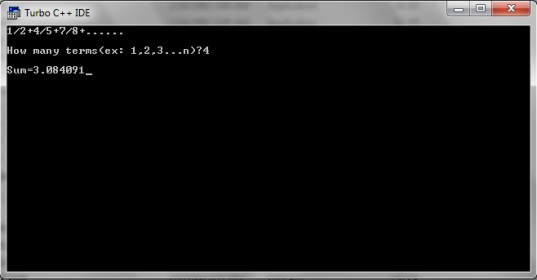
#include<stdio.h>
#include<conio.h>
void main()
{
int i,n;
clrscr();
float sum=0,x,a=1;
printf("1/2+4/5+7/8+......");
printf("
How many terms(ex: 1,2,3...n)?");
How many terms(ex: 1,2,3...n)?");
scanf("%d",&n);
for(i=0;i<n;++i)
{
x=a/(a+1);
sum+=x;
a+=3;
}
printf("
Sum=%f",sum);
Sum=%f",sum);
getch();
}
Monday, February 16, 2015
C Program to Print following series 1 4 7 10 40
#include<iostream.h>
#include<conio.h>
void main()
{
clrscr();
int i,a=-1,b;
for(i=1;i<=40;i+=3)
{
a*=-1;
b=i;
b*=a;
cout<<b<<" ";
}
getch();
}
Friday, February 13, 2015
switch statement in C Part 1
It is quite common that in day to day life we have to choose one option from several choices. Say if you have to choose only one desert out of the menu. Suppose if I give you a task to write a program for one menu. Probably you will use if-else ladder to make that. Well its good for now. But after reading this tutorial, I would suggest you to go with switch statements rather than anything else.
Syntax
switch(integer expression)
{
case constant 1: do this;
case constant 2: do this;
case constant 3: do this;
default: do this;
}
Explanation of this syntax
integer expression: It is used to check if programmer wants to execute the set of statements under switch or not. It works similar to conditions but we can only give integer expressions insider. It means an expression which is a integer or which evolves an integer.
case: It is the keyword to show multiple conditions inside switch statement. We can have any number of cases.
constant 1,2 and 3: As its name suggests these values should be either integer constant or character constant. Each value must be unique.
do this: We can use any legal C programming statement at that place.
default: It is another keyword which is used to execute some default statements if all conditions fails inside switch.
Now lets apply the above knowledge in some program.
Output
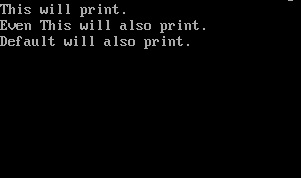
Explanation
Now an obvious question which should hit your mind.
Why is it so?
Well this is not the demerit of this program. In fact it’s the speciality of switch statements. It means if one condition turns true then all the subsequent conditions will also get executed inside switch statement. This is because it does not check any condition after getting a true value with one condition.
Switch statements are used very frequently in C programming. So I would recommend you to go through this tutorial at least once and make some programs by using switch keyword. In the next tutorial I will tell you about the method by which we can stop executing all the statements inside switch.
switch statement in C
This is the decision control instruction which allows the programmer to build a menu type program, so that the user can choose one options from multiple choices. It is also called switch-case-default instructions too because these are three keywords involved in making this instruction. Now lets head on to the syntax of switch statement.Syntax
switch(integer expression)
{
case constant 1: do this;
case constant 2: do this;
case constant 3: do this;
default: do this;
}
Explanation of this syntax
integer expression: It is used to check if programmer wants to execute the set of statements under switch or not. It works similar to conditions but we can only give integer expressions insider. It means an expression which is a integer or which evolves an integer.
case: It is the keyword to show multiple conditions inside switch statement. We can have any number of cases.
constant 1,2 and 3: As its name suggests these values should be either integer constant or character constant. Each value must be unique.
do this: We can use any legal C programming statement at that place.
default: It is another keyword which is used to execute some default statements if all conditions fails inside switch.
Now lets apply the above knowledge in some program.
#include<stdio.h>

void main ()
{
 int i=2;

 switch(i)
 {
  case 0: printf("No Message");
  case 1: printf("No Message");
  case 2: printf("This will print.
");
  case 3: printf("Even This will also print.
");
  default: printf("Default will also print.");
 }
}
Output
- The program starts with integer variable i with value 2 in it.
- After that I have written a switch keyword with one integer expression. i.e. switch(i). It means full switch statements will get executed if i=2 turns true.
- I think you should have an idea that case 2 will get executed.
- Now the turning point is after case 2, every statement get executed.
- Even the last expression under default is also get executed.
Now an obvious question which should hit your mind.
Why is it so?
Well this is not the demerit of this program. In fact it’s the speciality of switch statements. It means if one condition turns true then all the subsequent conditions will also get executed inside switch statement. This is because it does not check any condition after getting a true value with one condition.
Switch statements are used very frequently in C programming. So I would recommend you to go through this tutorial at least once and make some programs by using switch keyword. In the next tutorial I will tell you about the method by which we can stop executing all the statements inside switch.
Madcrosoft PC TuneUp Tools 2014 v8 1 002

PC TUNEUP TOOLS 2014 A brand New Version, with New tools to help keep your PC running Like NEW. 10+ superb tools that can help keep your PC running clean and error free.
REGISTRY CLEANER
The Windows registry stores all types of information and settings on your computer. With every installation, save, and edit, you add new data. Unfortunately, even moderate use can lead to the registry becoming overgrown and cluttered with old entries. These are often left behind from uninstallations, viruses, and system errors. When PC TuneUp Tools clears away these registry problems, your system can access the information it needs without being impeded by clutter and waste. As a result, your PC speeds up! Click the Start Program button to see how healthy your system registry is.
HARD DRIVE CLEANER
Hard Drive Cleaner is designed to search and eradicate zero byte files and empty folders that have been created by programs and have been left over after being uninstalled. After time these file and folders can clog up your PC. "INFORMATION:" Due to system stability issues and inherent risks, Hard Drive Cleaner DOES NOT delete system, read-only and hidden files and directories that are empty. Please take the time to review all scan results before cleaning.
PRIVACY CLEANER
YOUR COMPUTER KEEPS A RECORD OF ALL YOUR PC AND INTERNET ACTIVITY? Protect your online privacy and internet habits by cleaning all your internet tracks, temporary files, cookies and websites visited. NOW SUPPORTS CHROME, FIREFOX AND OPERA BROWSERS. This program may take a short time to load while collecting data.
STARTUP MANAGER
Startup Manager is a program that provides you with the possibility to manage the Windows® startup procedure. It offers you the possibility to control which programs automatically start up with Windows® and more.Take total control over your Windows® startup. Make your PC start up faster and work without using all the system memory. This program automatically creates a backup of your settings and can be restored anytime.
FILE SHREDDER
This product is an advanced deletion program that can eradicate a file beyond any form of retrieval the program overwrites each deleted file with random characters in accordance with the US department of Defence, Directive (DOD) 5220.22-M. File Shredder can eliminate personal and private files that you need to be removed from your personal PC. "PLEASE NOTE:" Large files can take several minutes to shred depending on the strength setting.
FILE ENCRYPTER
This product is our advanced encryption program that can scramble any file so it will be come unreadable and inoperable, thus giving you a piece of mind if you need to safeguard important documents on your PC. Password protects any file with an unbreakable encryption algorithm. KEEP PRIVATE DOCUMENTS SAFE FROM PRYING EYES.
DESKTOP LOCK
Desktop Lock is computer security program, which enables you to apply password protection to Windows® and restrict others from being able to use your PC while you are away. It hides your desktop at the same time and shows a blank screen to totally protect your privacy.
RESTORE POINT CLEANER
The Restore Points created by System Restore use a lot of space, a gigabyte or more in the case of large hard drives. One simple and safe way to claw back some of this space is to delete old redundant System Restore Points, with the exception of the current one. This program can instantly get back hard drive space making your PC run faster.
PREFETCH CLEANER
Just like the TEMP directory on your system, the Prefetch folder can fill up with lots of unused entries and take up needed space. The folder space isnt really what you are solely worried about, its all this preloaded in memory stuff that you are trying to avoid. Memory is priceless... its what makes your System seem fast. In reality, you load everything from your hard disk... the more memory your system has, the more the operating system will attempt to load and keep loaded in memory. You always... always want to keep this area as free and clear as possible because when it fills up - it immediately impacts the system.
PROCESS MANAGER
If youve ever tried tracking down a process in Windows Task Manager, you know its like looking for a needle in a haystack. Process Manager makes the job a lot easier. This utility displays running processes in an intuitive format that includes not only process names, but also other data, such as description, and processor time. It also can identify the process for a given application window or you can look up a process name in Google--a handy way to spot spyware.
UNISTALLER
Uninstaller helps you to uninstall software and remove unwanted programs installed on your computer easily! Even if you have problems uninstalling and cannot uninstall them from "Windows Programs and Features (Add or Remove Programs)" control panel applet. Uninstaller is a much faster and more powerful alternative to "Windows Programs and Features (Add or Remove Programs)" applet! It has very powerful features to uninstall and remove programs.
Home Page - http://www.madcrosoft.com/
System requirements:
anyone can use it........!
Screen Shots: Click on the image to view large screen
 |  |  |
I hope you like it......!
Thursday, February 12, 2015
C program to input number of weeks day 1 7 and translate to its equivalent name of the day of the week

#include<stdio.h>
#include<conio.h>
void main()
{
int ch;
clrscr(); //to clear the screen
printf("Enter number of weeks day(1-7):");
scanf("%d",&ch);
switch(ch)
{
case 1: printf("
Sunday");
break;
case 2: printf("
Monday");
break;
case 3: printf("
Tuesday");
break;
case 4: printf("
Wednesday");
break;
case 5: printf("
Thursday");
break;
case 6: printf("
Friday");
break;
case 7: printf("
Saturday");
break;
}
getch(); //to stop the screen
}
Subscribe to:
Posts (Atom)