Showing posts with label 4. Show all posts
Showing posts with label 4. Show all posts
Wednesday, February 18, 2015
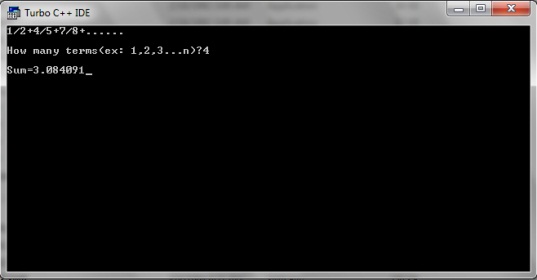
C program to find the sum of series 1 2 4 5 7 8
#include<stdio.h>
#include<conio.h>
void main()
{
int i,n;
clrscr();
float sum=0,x,a=1;
printf("1/2+4/5+7/8+......");
printf("
How many terms(ex: 1,2,3...n)?");
How many terms(ex: 1,2,3...n)?");
scanf("%d",&n);
for(i=0;i<n;++i)
{
x=a/(a+1);
sum+=x;
a+=3;
}
printf("
Sum=%f",sum);
Sum=%f",sum);
getch();
}

Monday, February 16, 2015
C Program to Print following series 1 4 7 10 40
#include<iostream.h>
#include<conio.h>
void main()
{
clrscr();
int i,a=-1,b;
for(i=1;i<=40;i+=3)
{
a*=-1;
b=i;
b*=a;
cout<<b<<" ";
}
getch();
}
Wow Slider 4 x full version with crack free download

Hello Users my name is HarryBest and today im telling you the way to remove watermark from wowslider very easily. You can also remove the watermark from wowslider by just follow these steps:
Step 1: Install your WowSlider 4.8 software from here: Download
Step 2: After installing WowSlider create you project and publish it
Step 3: Copy the crack and paste it into "engine1 folder" which is in your publish project folder.
Download Crack: Link 1 ; Link 2
Step 4: The Last one Step is Copy your real images and paste them into your
"your publish project folder/data1/images"
For example
"your publish project folder/data1/images"
For example
This is real image
.png)
This is your image in your publish project folder

Watch Video tutorial
Sunday, February 15, 2015
USING YOUR BLUETOOTH ENABLED PHONE AS A MODEM UBUNTU 10 4 LTS
 |
| Using your phone as a modem via Bluetooth |
Author: Kibui Kenneth Maina Wed Sep 1, 4:43PM
CLICK ON AN IMAGE TO VIEW THE FULL SIZE IF ITS TOO BURY
1. Go to http://ubuntu-tweak.com/ and install Ubuntu tweak. (It makes it easy for novices and experienced users to configure and manage Ubuntu).
2. After the installation completes go to Applications>System tools> Ubuntu tweak
 |
| Installed Ubuntu tweak |
4. Check Blueman if it is not already checked and click apply. (install to completion)
5. Turn on your phone and computers Bluetooth. (I am Using the Motorolla l6i for this demo).
 |
| Motorola L6i |
6. Go to System>Preferences>Bluetooth Manager
7. Click on the search button on the Bluetooth manager. All available Bluetooth devices will be detected and displayed.
 |
| Installed Bluetooth manager |
8. Click once on your phone on the Bluetooth manager to select it then go to setup on the top bar of the Bluetooth manager.
 |
| A Paring session |
9. Select custom passkey and key in the code of your choice or use mine 0000 then click forward.
 |
| Putting a passkey |
10. Your phone will ask you if you want to pair, select Yes, it will then ask you for a passkey, enter the passkey that you entered into the computer.
11. You will then be asked if you want to connect to dial up networking click forward, select the network that you are on and click on forward.
 |
| Setting up your broadband connection |
12. You will be informed that your device has been added and connected successfully click close.
 |
| Finalizing the set up process |
13.Your Blue tooth manager should appear as follows.
 |
| Your phone connected as a modem |
14. Your panel will appear as follows (no wireless or wired network, one lighting Bluetooth icon one normal Bluetooth icon.
 |
| Your panel before connecting to mobile broadband |
15. Click on your network icon. Go to Mobile broadband and select your network
 |
| Connecting to mobile broadband Internet on your computer |
16. Your connection will appear as shown, with phone network bars appearing where your network connection is supposed to be.
 |
| Your connected mobile broadband ready to go |
|
| A mobile broadband connection on your computer |
17. Open your browser and browse away.... (Make sure you have enough credit), for Safaricom users you can convert your airtime to bundles to save on credit by dialing;
- *100#
- select option 1
- select option 2
- select option 2
- Select the appropriate bundles
Functions in C Programming Part 4
In the last tutorial I told you about the passing values to the functions. I hope you had read that tutorial at least twice till now. So today I will tell you about some typical nuances of using functions in C language. I will also tell you about the scope rule of functions. So lets start with our first objective
1. The variables that are passed by main() function are called actual arguments or parameters and the variables in which the user defined function receives those values is called formal arguments or parameters.
2. We can pass any number of actual arguments. But it should be in the same number and order to the formal arguments.
3. We can also use the same variable name for both formal and actual arguments but the compiler will treat them different.
4. Compiler automatically passes the control to the calling function when it encounters the closing brace of user defined function. There is no need for some return statement for it.
5. However if you want to return some value to the calling function then you should use return statement for it.
6. You can use any number of return statements in your program. There is no restriction for that.
7. Some variations while using return statement
return(b);
return(4);
return(2.67);
return;
Last return statement will return any garbage value to the calling function. And we can drop the parenthesis in that case.
8. We can only return one value at a time. It’s a restriction in C. So below statements will not work.
return(x, y);
return(6,4);
9. IMPORTANT – When we change the value of formal arguments then those values will not change in actual arguments.
E.g. Suppose we pass two variables to some function. And in that function I received the values in that variables in some local variable. So when we change the values of those local variables the it will not affect to the values of actual variables.
The simple reason is that the default scope of variables inside some functions is local to it. It means the variables inside main() function can only be accessed in main() function. We cannot access them in any other function. So that is why we have to pass values to the user defined functions explicitly.
Rules for using functions in C
1. The variables that are passed by main() function are called actual arguments or parameters and the variables in which the user defined function receives those values is called formal arguments or parameters.2. We can pass any number of actual arguments. But it should be in the same number and order to the formal arguments.
3. We can also use the same variable name for both formal and actual arguments but the compiler will treat them different.
4. Compiler automatically passes the control to the calling function when it encounters the closing brace of user defined function. There is no need for some return statement for it.
5. However if you want to return some value to the calling function then you should use return statement for it.
6. You can use any number of return statements in your program. There is no restriction for that.
7. Some variations while using return statement
return(b);
return(4);
return(2.67);
return;
Last return statement will return any garbage value to the calling function. And we can drop the parenthesis in that case.
8. We can only return one value at a time. It’s a restriction in C. So below statements will not work.
return(x, y);
return(6,4);
9. IMPORTANT – When we change the value of formal arguments then those values will not change in actual arguments.
E.g. Suppose we pass two variables to some function. And in that function I received the values in that variables in some local variable. So when we change the values of those local variables the it will not affect to the values of actual variables.
Scope Rule of Functions
In this rule I will tell you about the reason behind point number 9 in above rules. Till now you must be asking that why we should pass the values to some function explicitly?The simple reason is that the default scope of variables inside some functions is local to it. It means the variables inside main() function can only be accessed in main() function. We cannot access them in any other function. So that is why we have to pass values to the user defined functions explicitly.
An Insight into Apple iMovie app and its New Version 10 0 4
Apple rolled out a new version update for iMovie – an innovative iOS app development for Mac. The new 10.0.4 version will help resolve crashing issues that caused iMovie app to quit unexpectedly.
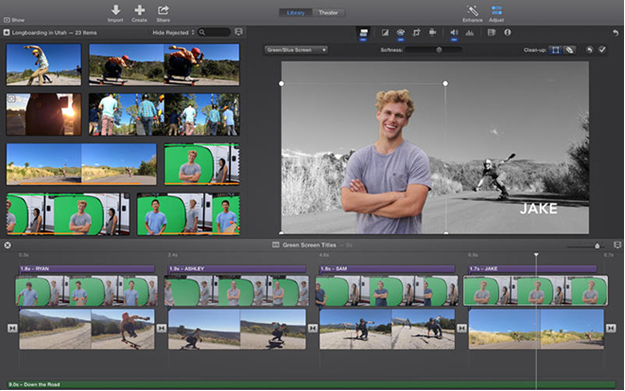
Before getting in depth into the new updated version of the iMovie application, lets have a detailed insight about this app and its previous version.
Introduction to iMovie and Its Features
If youve been yearning for a gratifying video recording experience for Mac, then iMovie is an app that you cant miss to have. It lets you put the entire focus on videos and enjoy watching them like never before. With this app you browse through video library, organize them all at one place, create high-definition movies and trailers, and even allow sharing your beautiful moments instantly. Its available for $4.99 in the iTunes store.

Also Read: iPhone 6 (Rumors) Vs Nexus 5
The best part about using the app is that all your work carried out on iMovies gets saved automatically at the same time as you work. So, you no longer have to fret about constantly saving your work. Whats more? The app helps to improvise the visual appeal as well sound of your video. Also, it helps in augmenting your video using the colour controls. Lets have a more detailed view on the features of this application.
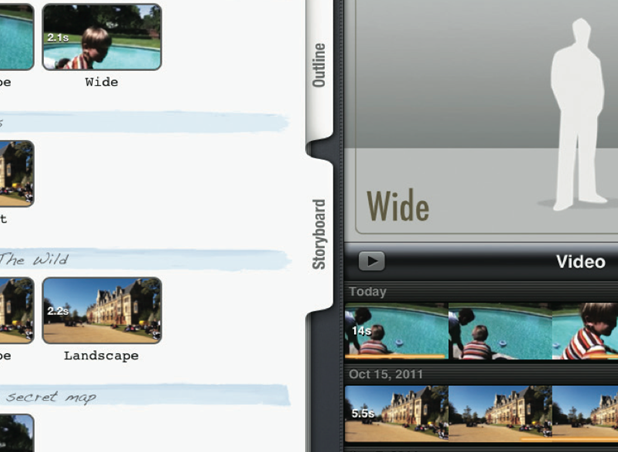
Hollywood-style trailers: With iMovie you get the flexibility to choose the most suitable template from 29 templates – for creating your movie trailer in Hollywood style. All the templates come enriched with high-end graphics and original scores of renowned film composers. So, whatre you waiting for? Pick the best videos and photos for constructing your video trailers and fulfil your urge to develop your own hollywood-styled trailers.
Beautiful HD movies: In the iMovie app you get 15 unique themes with various customization options, which include transitions, titles, ability to adjust motion effects (like speed up, slow down and fast-forward) and more. Thats not it! You can even build your own soundtrack using the songs from the Apples iTunes library and so on.
iMovie Theatre: Now you can show movies as well as trailers you’ve made with help of your own personal theatre. Your movies will serve as beautiful posters, which you can click to watch the clips in full-screen.
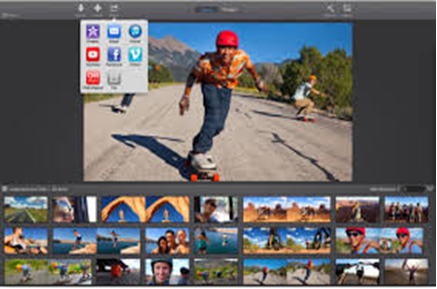
Sharing is Fun: iMovie app allows sharing your video clips with friends and family. It even let you post your clips to YouTube and Vimeo. You can even share the clips via emails.
Experienced video editors wont find any difficulty in working with the iMovie application. However, proficient iPhone App Developer for Hire can be availed, in case you find some technical issues. But even immature and neophyte video editors wont find it hard to create video clips and photos using the app in not more than 10 minutes, after doing a little practice and understanding the settings.
What has iMovie version 10.0.4 in Store for You?
As discussed earlier, iMovie version 10.0.4 is new update that has recently been released. The major purpose behind updating the existing version was to fix bug issues and bring stability improvements with the previous iMovie app version. Prior to this update, iMovie for Mac was updated to 10.0.3 version in April that introduced new sort features in the sidebar, tweaked user interface, and upgraded font options and color in new titles etc. But unfortunately, even the last version failed to fix the issues that led to force close iMovie.
With 10.0.4 version, Apples effort to eliminate bugs from the app has proved a success. Any existing iMovie app users can easily download the upgraded version of the application from the Mac App for free. However, new users will have to purchase it for $14.99.
Also Read: Swift: A New Programming Language Introduced by Apple For iOS and OS X Development
Lets Wrap Up!
If you have been craving to create simple yet stunning video clips that can make the eye-balls roll, then the latest iMovie 10.0.4 version for Mac OS X seems to be the perfect choice for you. Though, nothing much has been added to this update but its a very important one from all the previous upgrades made to the application, as it resolved the bug issues and stability problems that made the app to quit, without any prior warning. So, begin adding your pics and videos and build some really fascinating movies showing off your talent as a movie director – to your friends, family and acquaintances.
Author Bio:
Rick Brown is a veteran technical content writer associated with a reputed iPhone Application Development India firm – Mobiers Ltd. You can avail iPhone App Developer for Hire, in case you are looking forward for the same.
Website: http://www.mobiers.com
Facebook: https://www.facebook.com/Mobiers
Friday, February 13, 2015
4 Best Tips For iOS Application Development
There is no question of the popularity of iOS platform. In the Smartphone world, the iOS platform is the most admired mobile OS. However, it is ranked as the second best platform if their market shares are considered (as, Android possesses over 85% share whereas iOS exhibits around 12% market share). But, no one can deny the fact that the iOS apps generates much greater revenue than the Android applications. Thus, developing an iOS application will definitely benefit your business.

If you are interested in trying your hand in the iOS app development, there are a few tools and things that must be known beforehand to accomplish the task in an ideal way. There is no dearth of iOS applications in the Apple App Store, to make your app stand out of the crowd, its better to refer some expert guidance and assistance. Here are certain tips and tricks that can help you stay ahead of the curve.
Also Read: Wearable Tech - Wearable Application Development Technology
For efficiently promoting an application
Author Bio
Rick Brown is an app programmer for Mobiers Ltd – a leading iOS App Development Company. In case, you are willing to avail some related information and want to explore more about the technology, feel free to contact him.
If you are interested in trying your hand in the iOS app development, there are a few tools and things that must be known beforehand to accomplish the task in an ideal way. There is no dearth of iOS applications in the Apple App Store, to make your app stand out of the crowd, its better to refer some expert guidance and assistance. Here are certain tips and tricks that can help you stay ahead of the curve.
Also Read: Wearable Tech - Wearable Application Development Technology
Tips For iOS Application Development
1. Quite Basic but highly essential requirement: Mac and Xcode
To begin the iOS app development, a Mac device is a must and preferably it should be OS X 10.8 or a higher version, since, it can ensure a smooth and proficient development process. Another basic requirement is the Xcode, an Apple IDE (Integrated Development Environment) that offers an ideal app development framework. It is recommended to install the latest version of Xcode and develop your iOS application with greater precision with the included prolific tools.2. App Approval From The App Store Is Not The Ultimate Victory
Although, registering a developers account and getting your developed app approved from the Apple App Store is an imperative step, but it is just half the battle. By just getting the approval, your app will not get noticed and generate money. For that, you will need to promote your app with ideal marketing strategies.For efficiently promoting an application
- First of all, streamline your target audience by keeping the prime goal of your application in mind. This will help you make strives for surefire results.
- To ensure that your app gets some initial momentum upon its release in the App Store, it is essential to optimize your app for better marketing. The iTunes basically acts as a search engine, and thus can crawl the keyword-rich app content and index them with ease.
- Create an online presence of your application to efficiently promote it. Although, the App store facilitates a page to showcase the captivating attributes of your app, but you cant rely only on that . You either create a blog or website to support your application. There you can flaunt all the intriguing features and amazing capabilities of your application.
- You can even hire some experts to promote your app over different channels to attract potential customers.
- Analytics can help you determine your user behavior, so that you can make strives in the correct direction and improve your app.
- Consider your customer feedback. Whether its a positive feedback or negative, accept it. And, try to amend the best possible solution to further improve your app.
- Generate as much buzz as you can and gather the attention of journalists bloggers worldwide. This will encourage them to write about your app and thus, will help efficiently promote your app. And, this can definitely do wonders on the launch day of your app.
Also Read: IOS vs Android - Difference and Comparison [Infographic]
3. Stay Calm And Be Patient
Developing an iOS application is not a childs play. It could take a few days or a few months, depending upon how complex your application is. From the moment you get some innovative application idea in your head to the moment it gets approved could take a lot of time. In fact, once you submit your app for approval, it is not essential that it will immediately get published. The process could consume a substantial time, thus, it is better to stay patient and watch out the results.4. Other Essential Key Points For Your Consideration
- Plan well while equally balancing both the design and development strategies.
- Keep the targeted audience in mind while developing an application. This way you will be able to develop something useful that can best cater to the needs of your potential customers.
- Dont wait for application development to be completed, you can start promoting your application alongside the development process. This way you can create a good market base for your application.
- Most importantly, dont forget that you are targeting the touch-screen devices. Think of the app functions and features while keeping that in mind.
Final Thought
The aforementioned useful tips and facts can help you ensure a great iOS application development with an optimal approach. Go through these tips and prepare yourself for the forthcoming challenges that you might face during the development process. Create a remarkable application and promote it globally to enhance your business values and generate greater ROI.Author Bio
Rick Brown is an app programmer for Mobiers Ltd – a leading iOS App Development Company. In case, you are willing to avail some related information and want to explore more about the technology, feel free to contact him.
Subscribe to:
Posts (Atom)