Showing posts with label java. Show all posts
Showing posts with label java. Show all posts
Wednesday, February 18, 2015
Java program to check whether a number is prime or not

class prime
{
public static void main(String...s)
{
int n,i;
n=Integer.parseInt(s[0]);
for(i=2;i<n;++i)
{
if(n%i==0)
break;
}
if(i==n)
System.out.println("
Number is prime");
else
System.out.println("
Number is not prime");
}
}

Saturday, February 14, 2015
Java Program to Find Intersection of two Arrays
For example we have two sorted arrays a1[]={2,3,5,11} and a2[]={4,5,7,9,11} then intersection of a1 and a2 will be {5,11}. A Java program for finding intersection of two arrays is given below.
Also Read: Java Program to Find Union of two Arrays
class demo
{
public static void main(String...s)
{
int i,j,n1,n2;
Scanner sc=new Scanner(System.in); //used to read from keyboard
System.out.print("Enter number of elements of first array:");
n1=sc.nextInt();
System.out.print("Enter number of elements of second array:");
n2=sc.nextInt();
int a1[]=new int[n1];
int a2[]=new int[n2];
System.out.print("
Enter elements of first array in ascending order:");
for(i=0;i<n1;++i)
a1[i]=sc.nextInt();
System.out.print("
Enter elements of second array in ascending order:");
for(i=0;i<n2;++i)
a2[i]=sc.nextInt();
i=j=0;
System.out.print("
Intersection of Arrays: ");
while(i<n1&&j<n2)
{
if(a1[i]<a2[j])
i++;
else
if(a2[j]<a1[i])
j++;
else
{
System.out.print(a1[i]+" ");
i++;
j++;
}
}
}
}

Also Read: Java Program to Find Union of two Arrays
Java Program to Find Intersection of two Arrays
import java.util.Scanner; //import Scanner class in our programclass demo
{
public static void main(String...s)
{
int i,j,n1,n2;
Scanner sc=new Scanner(System.in); //used to read from keyboard
System.out.print("Enter number of elements of first array:");
n1=sc.nextInt();
System.out.print("Enter number of elements of second array:");
n2=sc.nextInt();
int a1[]=new int[n1];
int a2[]=new int[n2];
System.out.print("
Enter elements of first array in ascending order:");
for(i=0;i<n1;++i)
a1[i]=sc.nextInt();
System.out.print("
Enter elements of second array in ascending order:");
for(i=0;i<n2;++i)
a2[i]=sc.nextInt();
i=j=0;
System.out.print("
Intersection of Arrays: ");
while(i<n1&&j<n2)
{
if(a1[i]<a2[j])
i++;
else
if(a2[j]<a1[i])
j++;
else
{
System.out.print(a1[i]+" ");
i++;
j++;
}
}
}
}
Whatsapp for Java Phones How to Download and Install
Whatsapp for java phones is like a dream for java mobile users. I found a solution for this and in this article I am going to tell you how to download and install whatsapp for java phones.
WhatsApp is an app used to send free sms to your friend who is also using the app via internet. WhatsApp is available for various platforms like android, windows, symbian and some s40 phones. One who have a smartphone can esily use Whatsapp.
WhatsApp is an app used to send free sms to your friend who is also using the app via internet. WhatsApp is available for various platforms like android, windows, symbian and some s40 phones. One who have a smartphone can esily use Whatsapp.

Also Read: How to Install WhatsApp on PC
In this article I am going to tell you how to download and install whatsapp for java phones. Below, I am sharing a link to download WhatsApp for Java Phones which will run in almost all java mobile phones with big screen (having at least 240x320 screen size, can’t say anything about other screens). It is 100% working and tested by me on some nokia phones like Asha 200, C2-03, etc. So without wasting time just click on below link to download WhatsApp for java phone and comment below to let me know if it is working in your phone or not.
Steps to Download and Install Whatsapp for Java Phones
1. Download both the files (WhatsApp_Messenger.jar and WhatsApp_Messenger.jad) from the link given below in your PC (not in mobile)WhatsApp_Messenger.jar
WhatsApp_Messenger.jad
3. You have done! Now try to run whatsapp from your mobile and enjoy using it.
Note: Downloading must be done in computer. If you download files from mobile then the file format does not support.
Search Terms:
whatsapp for java phonewhatsapp para java
download whatsapp for java jar
download whatsapp for samsung java
whatsapp java download
whatsapp for java mobile phone
whatsapp java download
whatsapp for java mobile phone
Friday, February 13, 2015
Java Program to Take Screenshots
There might be a situation where you guys want to take screen shots programmatically. So I am sharing a program that help you to take screen capture of your screen and save it in PNG (Portable network graphic) picture format.
Also Read: Java Program to Find IP Address

The below program uses Java.awt.Robot class to capture the screen pixels and uses Imageio to save it as PNG image format. Just copy and paste the program in Notepad, save it and run the program to take screen shot.
Note: The Screen shot image will be stored at the location where your program is stored.
If you liked the article please do share!!
Source: http://viralpatel.net/blogs/how-to-take-screen-shots-in-java-taking-screenshots-java/
Also Read: Java Program to Find IP Address
The below program uses Java.awt.Robot class to capture the screen pixels and uses Imageio to save it as PNG image format. Just copy and paste the program in Notepad, save it and run the program to take screen shot.
Note: The Screen shot image will be stored at the location where your program is stored.
Java Program to Take Screenshots
import java.awt.Rectangle;
import java.awt.Robot;
import java.awt.Toolkit;
import java.awt.image.BufferedImage;
import java.io.*;
import javax.imageio.*;

class Snap
{
 public static void main(String args[]) throws Exception
 {
  Robot awt_robot = new Robot();
  BufferedImage Entire_Screen = awt_robot.createScreenCapture(new Rectangle(Toolkit.getDefaultToolkit().getScreenSize()));
  ImageIO.write(Entire_Screen, "PNG", new File("Entire_Screen.png"));
 }
}
If you liked the article please do share!!
Source: http://viralpatel.net/blogs/how-to-take-screen-shots-in-java-taking-screenshots-java/
Thursday, February 12, 2015
Best Java Books Top 5 Best Java Programming Books
What are the best java books? This is the first question that comes in our mind when we start learning java programming. So in this article I have made a list of top 5 best java programming books on the basis of their popularity. These books are written for easy learning and are highly recommended for beginners.
List of Top 5 Best Java Books
Java: A Beginners Guide

- Get this Book -
Table of Contents
Java Fundamentals
Introducing Data Types and Operators
Program Control Statements
Introducing Classes, Objects, and Methods
More Data Types and Operators
A Closer Look at Methods and Classes
Inheritance
Packages and Interfaces
Exception Handling
Using I/O
Multithreaded Programming
Enumerations, Autoboxing, Static Import, and Annotations
Generics
Applets, Events, and Miscellaneous Topics
Introducing Swing
Answers to Self Tests
Using Javas Documentation Comment
Index
Head First Java
- Get this Book -
Table Of Contents
Introduction
Breaking the Surface: a quick dip
A Trip to Objectville: yes there will be Object
Know Your Variables: primitives and references
How Objects Behave: object state affects method &Junior
Extra-Strength Methods: flow control operations, and more
Using the Java Library: so you dont have to write it all yourself
Better Living in Objectville: planning for the future
Serious Polymorphism: exploiting abstract Classes and interfaces
Life and Death of an Object: constructors and memory management
Numbers Matter: math, formatting, wrappers; and statics
Risky Behavior: exception handing
A Very Graphic Story: intro to GUI, event handling, and inner classes
Work on Your Swing: layout managers to subcomponents
Saving Object: serialization and I/0
Make a Connection: networking sockets and multi-threading
Data Structures: collections and genetics
Release Your Code: packaging and deployment
Distributed Computing: RMI with a dash of serialize, EJE, and Jini
Appendix A: Fatal code kitchen
Appendix B: To 7th Mugs that &diet make it into the rest of the book
Index
Effective Java

- Get this Book -
Table of Contents
Foreword
Preface
Acknowledgments
Introduction
Creating and Destroying Objects
Methods Common to All Objects
Classes and Interfaces
Generics
Enums and Annotations
Methods
General Programming
Exceptions
Concurrency
Serialization
Appendix: Items Corresponding to First Edition
References
Index
Java - The Complete Reference

- Get this Book -
Table of Contents
Part I: The Java Language
The History and Evolution of Java
An Overview of Java
Data Types, Variables and Arrays
Operators
Control Statements
Introducing Classes
A Closer Look at Methods and Classes
Inheritance
Packages and Interfaces
Exception Handling
Multithreaded Programming
Enumerations, Auto-boxing and Annotations (Meta-data)
I / O, Applets and Other Topics
Generics
Lambda Expressions
Part II: The Java Library
String Handling
Exploring java.lang
Java.util Part 1 - The Collections Framework
Java.util Part 2 - More Utility Classes
Input / Output - Exploring Java.io
Exploring NIO
Networking
The Applet Class
Event Handling
Introducing the AWT - Working with Windows, Graphics and Text
Using AWT Controls, Layout Managers and Menus
Images
The Co-currency Utilities
The Stream API
Regular Expressions and Other Packages
Part III: Introducing GUI Programming with Swing
Introducing Swing
Exploring Swing
Introducing Swing Menus
Part IV: Introducing GUI Programming with JavaFX
Introducing JavaFX GUI Programming
Exploring JavaFX Controls
Introducing JavaFX Menus
Part V: Applying Java
Java Beans
Introducing Servlets
Appendix: Using Java’s Documentation Comments
Index
Programming With Java

- Get this Book -
Table of Contents
Chapter 1: Fundamentals of Object-Oriented Programming
Chapter 2: Java Evolution
Chapter 3: Overview of Java Language
Chapter 4: Constants, Variable and Data types
Chapter 5: Operators and Expressions
Chapter 6: Decision Making and Branching
Chapter 7: Decision Making and Looping
Chapter 8: Classes, Objects and Methods
Chapter 9: Arrays, Strings and Vectors
Chapter 10: Interfaces: Multiple Inheritance
Chapter 11: Packages: Putting Classes Together
Chapter 12: Multithreading Programming
Chapter 13: Managing Error and Exceptions
Chapter 14: Applet Programming
Chapter 15: Graphics Programming
Chapter 16: Managing Inputs/Output Files in Java
Chapter 17: Java Collections
Appendices
Appendix A: Java Language Reference
Appendix B: Java Keywords
Appendix C: Difference between Java C/C++
Appendix D: Bit-level Programming
Appendix E: Java API Packages
Appendix F: Java Classes and their Packages
Appendix G: Assertion and Design by Contract
Appendix H: Java Version History
Appendix I: Deprecated Classes and Methods
Appendix J: Statistics of Java Packages
Appendix K: SCJP Exam Model Questions
Appendix L: Points to Remember
Appendix M: Common Coding Errors
Appendix N: Glossary of Java Terms
Appendix O: Projects
Bibliography
Index
Classes and Objects in Java
Class
- Class is the collection of similar type of objects which have some common properties.
- Class is a concept which is implemented by object.
- Class is a blueprint of java program from which we create object, then object is instance of class.
- We can also say that class is a collection of variables and methods.
Class
{
Methods: Represent Property
Variables: Represent Behavior
}
Object
- Any real world entity which have physical existence either living or non living is called an object.
- It is a runtime memory area. Object goes to heap.

How to Create an Object?
- In Java object of any class is created using new keyword.
- new keyword reserve the memory for an object in heap and generate an implicit reference id which is stored in a reference variable.
class Emp
{
String name;
int salary;
void get(String n1,int s1)
{
name=n1;
salary=s1;
}
void show()
{
System.out.println(name);
System.out.println(salary);
}
public static void main(String...s)
{
Emp e1=new Emp();
e1.get("aa",101);
e1.show();
new Emp().get("bb",102); //Anonymous Object
new Emp().show(); //Anonymous Object
}
}
Note: Reference variables and local variables goes to stack and methods goes to method area

Note: Reference variables and local variables goes to stack and methods goes to method area

- In above example total three objects are created. Firstly an object is created using new operator and its reference id is stored in reference variable e1. Then using e1 we call get() and show() methods. After that we are creating two anonymous objects. You can see that we are getting different outputs in three objects.
- Anonymous object is an object without name.
- We can store one reference id into more than one reference variable.
Example: Emp e1=new Emp();
Emp e2=e1;
If you find anything wrong or missing in above tutorial then please mention it in comment section.
Bar chart with Target lines in pentaho CDE making bars as lines using java script in pentaho CDE
Hi guys,
This post teach you how to make bars as lines in pentaho CDE.
Source for this post is : http://jsfiddle.net/duarteleao/7maGD/
and http://type-exit.org/adventures-with-open-source-bi/2011/06/creating-dashboards-with-cde/
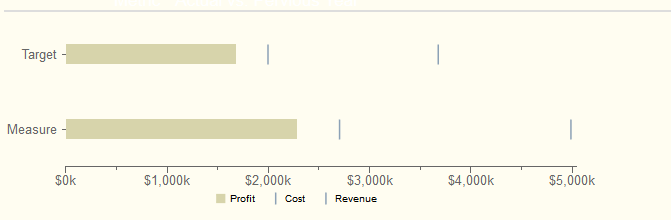
Scenario : Some end users wants visualization of grouped bars as lines where one of the bar is as bar and remaining bars as targeted lines on the same bar.
Properties have to give:
Plot2 : True
Find the remaining properties in below image: version of CDE is : 13.06 but will work in higher versions also.
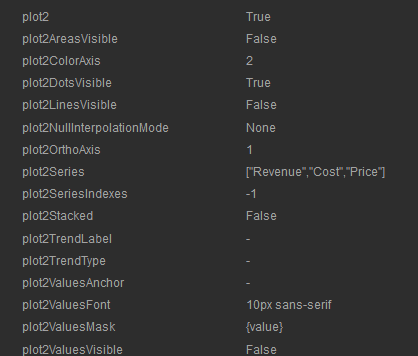
NOTE: Find the image for how to give the above code as properties in Extension points of chart component.
Sample output of the chart on dashboard after giving the above properties.
Sadakar
BI developer
("Learning never exhausts the mind")
This post teach you how to make bars as lines in pentaho CDE.
Source for this post is : http://jsfiddle.net/duarteleao/7maGD/
and http://type-exit.org/adventures-with-open-source-bi/2011/06/creating-dashboards-with-cde/
Scenario : Some end users wants visualization of grouped bars as lines where one of the bar is as bar and remaining bars as targeted lines on the same bar.
Properties have to give:
Plot2 : True
Find the remaining properties in below image: version of CDE is : 13.06 but will work in higher versions also.
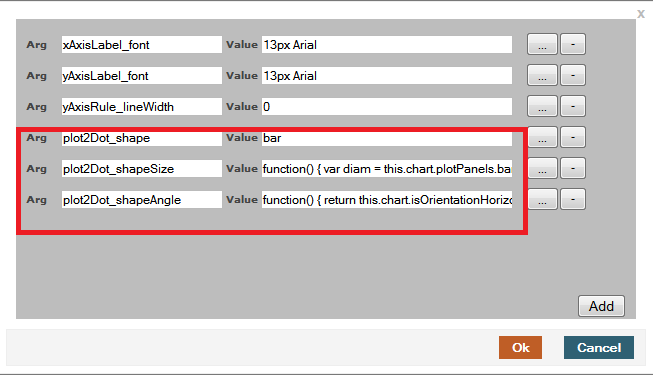
In "Extension points" for the chart component you need to give 3 properties from the first link.
They are
extensionPoints: {
plot2Dot_shape: bar,
plot2Dot_shapeSize: function() {
var diam = this.chart.plotPanels.bar.barWidth ||
this.chart.options.barSizeMax;
return this.finished(diam);
},
plot2Dot_shapeAngle: function() {
return this.chart.isOrientationHorizontal() ? 0 : -Math.PI/2;
}
plot2Dot_shape: bar,
plot2Dot_shapeSize: function() {
var diam = this.chart.plotPanels.bar.barWidth ||
this.chart.options.barSizeMax;
return this.finished(diam);
},
plot2Dot_shapeAngle: function() {
return this.chart.isOrientationHorizontal() ? 0 : -Math.PI/2;
}
NOTE: Find the image for how to give the above code as properties in Extension points of chart component.
Sample output of the chart on dashboard after giving the above properties.
Sadakar
BI developer
("Learning never exhausts the mind")
Wednesday, February 11, 2015
Features of Java Language
Simple
- Java derives its syntax from C and object oriented features from C++.
- If you are good in C and C++ programming then you can learn Java easily. Hence Java is Simple.
Secure
- Java provides its own execution environment and hence do not allow any malicious program to access other parts of computer.
- Java Virtual Machine (JVM) verifies the code before execution (sandbox security).


Portable
- Java is platform independent i.e. Write Once and Run Anywhere (WORA).
- When java program is compiled a .class file (bytecode) is created. This .class file can run on any platform (linux, windows, mac). You just need JVM of that platform.

Robust
Java is called as robust because of following two features:- Automatic Memory Management
- Automatic Exception Handling
Object-Oriented
- Java is object oriented programming language same as C++.
- It means focus on the data and methods that manipulate that data instead of taking care of procedures.
Multithreaded
- Java supports multithreaded programming.
- It allows you to write programs that do many things simultaneously.
Architecture-Neutral
- Java is machine independent.
- It was made with goal “write once; run anywhere, anytime, forever”.
Interpreted
- Java enables the creation of cross-platform program i.e. bytecode.
- This code can be executed on any platform that has JVM.
High Performance
- Java bytecode can be easily executed on any machine for very high performance by using a just-in-time (JIT) compiler.
Dynamic
- Java programs carry with them substantial amounts of run-time type information that is used to verify and resolve accesses to objects at run time.
Distributed
- Java enables the creation of distributed applications which can be accessed on the internet.
Image Source: http://www.javatpoint.com/features-of-java
How to Execute Your Java Program Without main Method
Have you ever thought about executing your java programwithout main() method? If you write a program without main() and compile it then it will compile successfully. But as you execute the program it will show an error that Main method not found in the class. JVM verify the code before its execution. JVM checks for main() method and if not found it will show error.
+Method.jpg "How to Execute Your Java Program Without main() Method?")
There is a way to execute your java program without using main(). This can be done using static block. JVM has four phases as I have discussed in one of my article about Java Virtual Machine Architecture and Structure.
- Load Code
- Verify Code
- Execute Code
- Provide Runtime Environment
Static block executed at the loading of code. In below example we get output and then error is shown because the code is executed at loading of code and after that JVM verifies the code and show error.
class demo
{
static
{
System.out.println("Static Block");
}
}
Note: This method will work till Java 6. Java 7 and newer versions doesn’t allow this because JVM checks presence of main method before initializing the class.
If you have any other such trick then you can share it by commenting below.
Tuesday, February 10, 2015
Prime Number Checking in java
public class PrimeTest {
public static void main(String[] args) {
// TODO Auto-generated method stub
for(int number = 2; number<=20; number++){
//print prime numbers only
boolean r=false;
for(int i=2; i<number; i++){
if(number%i == 0){
r=true;
System.out.println(number+" is not prime");
break;
}
else
{
r=false;
}
}
if(r==false){
System.out.println(number+" is prime");
}
}
}

public static void main(String[] args) {
// TODO Auto-generated method stub
for(int number = 2; number<=20; number++){
//print prime numbers only
boolean r=false;
for(int i=2; i<number; i++){
if(number%i == 0){
r=true;
System.out.println(number+" is not prime");
break;
}
else
{
r=false;
}
}
if(r==false){
System.out.println(number+" is prime");
}
}
}
---------------------------------------------------------------------------
Output:
----------------------------------------------------------------------------
Wednesday, February 4, 2015
How to find the Greatest common divisor of an integer array in java
In this post Im going to illustrate very simple algorithm to find the Greatest Common Divisor (GCD) of set of integers (an array) using java.
See the following implementation of the algorithm.
Here is the output for 15, 18, 42 and 108

Here is the output for 3,7 and 12

Read more »
- In this algorithm we first find the smallest integer in the int array.
- Then we get the modulus for each element in the numbers of the array by dividing smallest integer and add all those modulus together.
- After processing each element in the array we check if the total of modulus is equals to 0. If it is equal to 0 then the GCD is current smallest value if that total is not equals 0 we deduct 1 from the previous smallest value and do the same computation.
- The algorithm will continue with the same operations until total of modulus becomes 0 or until smallest integer is 2.
- If there is any GCD, algorithm will return it or otherwise it will return -1.
See the following implementation of the algorithm.
public class GCD {

    public static int findGcd(int... numbers) {

        //Find the smallest integer in the number list

        int smallest = numbers[0];

        for (int i = 1; i < numbers.length; i++) {
            if (numbers[i] < smallest) {
                smallest = numbers[i];
            }
        }

        //Find the GCD
        while (smallest > 1) {

            int counter = 0;
            int modTot = 0;

            while (counter < numbers.length) {

                modTot += numbers[counter] % smallest;
                counter++;

            }

            if (modTot == 0) {
                //Return the gcd if any
                return smallest;
            }

            //System.out.print(" "+ smallest);
            smallest--;

        }
        //return -1 if there is no gcd
        return -1;
    }

    public static void main(String[] x) {
        System.out.println("The GCD of 15 18 42 108 : "+GCD.findGcd(new int[]{15, 18, 42,108}));
    }
}
Here is the output for 15, 18, 42 and 108
Here is the output for 3,7 and 12
Subscribe to:
Posts (Atom)